web
You’re offline. This is a read only version of the page.
close
Skip to main content

Notifications

Announcements

No record found.

Community site session details

Community site session details

Session Id :
Microsoft Dynamics CRM (Archived)

CRM 4.0 Rollup 07 installtion issue

(0) ShareShare
ReportReport
Posted on by

Hi Guys,

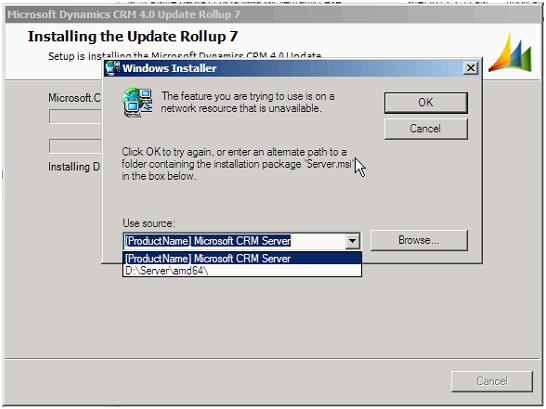
I need help we tried to install CRM 4.0 Rollup 07, we stuck after start installation “Installing DB” & window pop up Windows Installer “The feature you are trying to use is on a network recourse that is unavailable. Click ok to try again, or enter an alternate path to a folder containing the installation “Server.msi” in the box below -  Use source: [ProductName] Microsoft CRM Server or d:\Server\amd\64”. There is no drive D: in environment only c: & P:. Please suggest how fix this issue. This screen came when I tried to install any CRM 4.0 rollup 9,10 & also tried uninstall rollup6.
*This post is locked for comments

I have the same question (0)
  • Suggested answer
    Thomas Unzeitig Profile Picture
    364 on at

    Download the file. Extract is using the extract option (i dont know exactly use .... .exe /? to get a list of possibilities). And then browse to the extraction path.

  • Robinson Moses Profile Picture
    on at

    Hello,

    I have seen this issue before when the installation file was saved in a network location and that network location is now not available. But I have seen this issue while uninstalling and not while installing any Update Roll up.

    The error message has an option to browse, please browse to the location of the CRM Server Extraction point and select the server.msi and then try the installation.

    Please let me know.

    Thanks,

    Rob Moses

  • Robinson Moses Profile Picture
    on at

    Hello,

    Where you able to get past the error message, please let us know.

    Rob Moses

Under review

Thank you for your reply! To ensure a great experience for everyone, your content is awaiting approval by our Community Managers. Please check back later.

Helpful resources

Quick Links

Responsible AI policies

As AI tools become more common, we’re introducing a Responsible AI Use…

Neeraj Kumar – Community Spotlight

We are honored to recognize Neeraj Kumar as our Community Spotlight honoree for…

Leaderboard > 🔒一 Microsoft Dynamics CRM (Archived)

#1
SA-08121319-0 Profile Picture

SA-08121319-0 4

#1
Calum MacFarlane Profile Picture

Calum MacFarlane 4

#3
Alex Fun Wei Jie Profile Picture

Alex Fun Wei Jie 2

Last 30 days Overall leaderboard

Featured topics

Product updates

Dynamics 365 release plans



