web
You’re offline. This is a read only version of the page.
close
Skip to main content

Announcements

News and Announcements icon
Community site session details

Community site session details

Session Id :
Small and medium business | Business Central, N...
Answered

Link customer A to HO account customer B

(0) ShareShare
ReportReport
Posted on by 60

Hi all,

Question is we have  many customers who have branches throughout the country. These branches are setup individually in BC. When goods are sent the Branch gets a copy of the invoice etc BUT the  charge goes back to the Head office account.

In old NAV we used to be able to do this so in the General setup it was all the branch info and in the Invoicing tab it was charged to the Head office.

Like a CHILD ACCOUNT
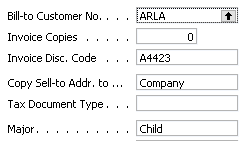
pastedimage1658965606482v1.png

I cant see where or how I can do this in BC

Any ides would be appreciated.

Thank you

I have the same question (0)
  • Suggested answer
    IB-29041624-0 Profile Picture
    1,191 Moderator on at

    The screenshot you are showing seems to be customized and not a standard NAV page. So could you have had any customization around this in NAV ? If it is a NAV page you are showing?

    In BC you have the sell to and bill to customers like you have in NAV as standard.

    You can also define several recipients of invoices f.ex if they are sent by email.

  • TMAC54 Profile Picture
    60 on at

    Thank you Inge, another answer right in my face

  • Suggested answer
    YUN ZHU Profile Picture
    102,927 Super User 2026 Season 2 on at

    Hi, just adding some info.

    This sounds a lot like a new feature in the next version, but unfortunately, it seems to be only for Vendor.

    https://docs.microsoft.com/en-us/dynamics365-release-plan/2022wave2/smb/dynamics365-business-central/use-multiple-remit-to-addresses-vendors

    Hope this helps.

    Thanks.

    ZHU

  • TMAC54 Profile Picture
    60 on at

    Thank you all,

    I did see the BILL TO on the customer card no ides how I missed that. Thinking in regard to multiple email addresses, could we just no add another contact?

  • Suggested answer
    IB-29041624-0 Profile Picture
    1,191 Moderator on at

     Hi TMAC54 

    I am not certain that just adding another contact will be enough.

    I use the docment layout page that you find on the customer card that yo find under related, customer ribbon.

    There you can define all the recipients and what reports and layouts they will get.

    You can retrieve the e-mail addresses from an action on that page.

    It is a very good functionality.

    pastedimage1659006799747v1.png

Under review

Thank you for your reply! To ensure a great experience for everyone, your content is awaiting approval by our Community Managers. Please check back later.

Helpful resources

Quick Links

Season of Sharing Community Challenge Winners!

Congratulations to our community stars!

Women in Power Builds Momentum

Expanding mentorship, skilling, and AI innovation

Congratulations to the July Top 10 Community Leaders

These are the community rock stars!

Leaderboard > Small and medium business | Business Central, NAV, RMS

#1
OussamaSabbouh Profile Picture

OussamaSabbouh 566 Super User 2026 Season 2

#2
YUN ZHU Profile Picture

YUN ZHU 347 Super User 2026 Season 2

#3
Grigorios Mavrogeorgis Profile Picture

Grigorios Mavrogeorgis 327 Super User 2026 Season 2

Last 30 days Overall leaderboard

Featured topics

Microsoft Training Manuals

Product updates

Dynamics 365 release plans
