web
You’re offline. This is a read only version of the page.
close
Skip to main content

Announcements

No record found.

News and Announcements icon
Community site session details

Community site session details

Session Id :
Finance | Project Operations, Human Resources, ...
Suggested Answer

How to change Security Role Name

(0) ShareShare
ReportReport
Posted on by

Hi all,

While creating security Role, I've made some changes with the label, for example at first the wording use camel case, then right now change to all small case.

As mentioned, I'm using label for the naming.

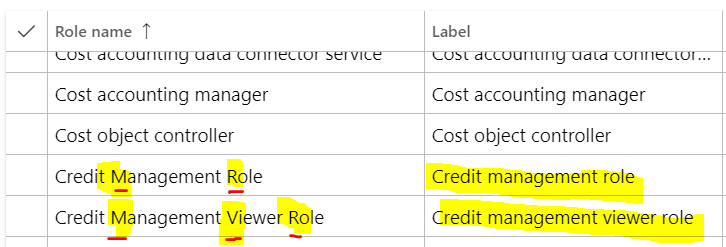
However after Build, I noticed the Role name doesn't change in the Security Role lookup, like below :
pastedimage1599559204166v2.png

How to refresh the lookup ? the column label on its right is correct, but the name is still with the old 'type' of writing.

FYI, this lookup I'm getting is from System Admin > Users, when we want to assign Role.

If from Sys Admin > Security Configuration,, the Role listed is correct, picking the last value from my Label file (which is the one the no camel case).

Thanks,

I have the same question (0)
  • Suggested answer
    Sergei Minozhenko Profile Picture
    23,097 on at

    Hi WWwong,

    Try to restart IIS in devbox.

  • Community Member Profile Picture
    on at

    Hi Sergei,

    sadly still no.

    I just did full Build as well, then restart IIS again. still with the old value (only in the Role name in the lookup)

    Thanks

  • Suggested answer
    Sergei Minozhenko Profile Picture
    23,097 on at

    Hi WWwong,

    In this case, try to DB Sync and IIS restart.

  • Community Member Profile Picture
    on at

    Hi Sergei,

    Yes, that's what I did, during Full Build, check Synchronize and then IISRESET from command prompt.

    Thanks

  • Sergei Minozhenko Profile Picture
    23,097 on at

    Hi WWwong,

    That's weird, just tried to reproduce the issue and can't do it. After build, sync and iisrestart (from VS menu) I see the updated label. Try to name it completely differently like "Test Test" and check if the label and name is updated.

  • André Arnaud de Calavon Profile Picture
    305,150 Super User 2026 Season 1 on at

    Hi WWwong,

    Where do you have this lookup in the application? When I check the lookup on e.g. the External roles form, I only have one column.

    Initially, I would also suggest a model build and sync. In the AOT a role has a Name, Description and Label. The name is a technical one without spaces. How do you manage to have both a name and label in the lookup with spaces?

  • Suggested answer
    vinitgoyal2005 Profile Picture
    6,332 on at

    HI,

    Try doing Synchronize all in security configuration.

    pastedimage1599576814628v1.png

  • AnithaEswaran Profile Picture
    2,032 on at

    Check the table SysSecurityRole (not sure about the table name).  

  • Suggested answer
    Sukrut Parab Profile Picture
    71,741 Moderator on at

    The label field you are referring is data method on SysSecUserAddRoles form which gets value from label property of the role you created in application explorer. So as long as you have your label defined properly  and objects are build properly , those should be visible.

Under review

Thank you for your reply! To ensure a great experience for everyone, your content is awaiting approval by our Community Managers. Please check back later.

Helpful resources

Quick Links

Introducing the 2026 Season 1 community Super Users

Congratulations to our 2026 Super Stars!

Meet the Microsoft Dynamics 365 Contact Center Champions

We are thrilled to have these Champions in our Community!

Congratulations to the April Top 10 Community Leaders

These are the community rock stars!

Leaderboard > Finance | Project Operations, Human Resources, AX, GP, SL

#1
Giorgio Bonacorsi Profile Picture

Giorgio Bonacorsi 804

#2
André Arnaud de Calavon Profile Picture

André Arnaud de Cal... 639 Super User 2026 Season 1

#3
Subra Profile Picture

Subra 528

Last 30 days Overall leaderboard

Product updates

Dynamics 365 release plans
