web
You’re offline. This is a read only version of the page.
close
Skip to main content

Notifications

Announcements

No record found.

Community site session details

Community site session details

Session Id :
Microsoft Dynamics CRM (Archived)

Dynamics CRM 2015 Outlook Client - Tracking Emails

(0) ShareShare
ReportReport
Posted on by

I am using CRM 2015 online with CRM 2015 outlook client in order to track my emails. When I was using CRM 2013 all tracked emails recipients in To: and CC: will be displayed as hyperlinks in the outlook client. But this is not happening in CRM 2015 outlook client. Also, I noticed some options are disabled in the the CRM outlook client section.
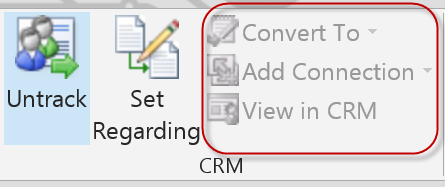
Has anyone noticed this?

*This post is locked for comments

I have the same question (0)
  • Rajkumar Rajaraman Profile Picture
    on at

    Hi Dinesh,

    Take a look to the following link:

    www.microsoft.com/.../overview-of-tracking-records-in-crm-for-outlook.aspx

    "What can you do after you track a record?" section provides detailed explanation

    Hope this helps.

    Regards,

    R.Rajkumar

    "Please mark my answer as verified if you found it helpful"

  • mscrmba Profile Picture
    on at

    Is this just a timing / synchronisation issue (check back 15 minutes later to confirm)?  

    Or are you seeing it for specific records/users?

  • Andre Margono Profile Picture
    2,602 on at

    Hi Dinesh, are you using server side sync? It seems to be a known issue that supposed to be fixed on CRM 2013 SP1 ur 2: "When using Server Side sync and setting the option to track all email within personal options, received emails do not change the Track button, this causes the View in CRM buttons to not get enabled within the command bar."

    support.microsoft.com/.../2963850

    It is the behaviour when the Server side sync creates the record in CRM not in synchronous manner, therefore the client doesn't know whether the record has been created in CRM database or not.

    Somehow the fix might haven't been pushed for CRM 2015 build. Hopefully Update 1 on CRM 2015 Online fix this issue.

    Alternatively, you could set the synchronisation method to Outlook Client to have the "real-time" tracking experience back.

  • Dinesh Nanayakkara Profile Picture
    on at

    Thanks for your time guys. The problem I have is this. When I had CRM 2013 outlook client, i had following screen where I can click on contacts so I can record them in CRM as new.

    But I can't see those contacts as hyperlinks after I installed 2015 outlook client.

    Do you have any idea why this is behaving like this?

    TIA

  • Rajkumar Rajaraman Profile Picture
    on at

    Hi Dinesh,

    Is this what you are looking for?:

    Refer the following link. It explains deeply.

    https://www.microsoft.com/en-us/dynamics/crm-customer-center/overview-of-tracking-records-in-crm-for-outlook.aspx#AfterTracking

    Hope this helps.

    Regards,

    R.Rajkumar

    " Please mark my answer as verified if you found it helpful"

  • Rajkumar Rajaraman Profile Picture
    on at

    You can open the regarding record, parent record for a contact, or related records directly from the tracking pane. The tracking pane also includes an Options button that provides quick access to personal tracking options.

    If you track an email message without first expanding a distribution list, the tracking pane displays the name of the distribution list. To track the individual email addresses, expand the distribution list before you track the message.

  • Andre Margono Profile Picture
    2,602 on at

    What is the email settings on your system settings, if the appointment, contact and task sync set to server side sync this behaviour occurs.

    In case it is version specific only problem (Only happened on Outlook client 2015), I reckon you could log a support ticket as bug. As it seems Microsoft are aware with this behaviour (referring to the UR release to CRM 2013 SP1).

  • Community Member Profile Picture
    on at

    I agree with Andre Margono - if you are using Server Side Synch then your email is *flagged* to be tracked, but is not tracked immediately (this is why it says "this email *will be tracked*..." - future tense). So CRM will not have copied the email and matched up the email addresses yet. Once it is synched, you should see those same old links you are used to. Can you see them on emails you tracked earlier?

    If you need the "instant" tracking, then use Outlook as your synch mechanism, rather than SSS.

  • Dinesh Nanayakkara Profile Picture
    on at

    Thank you for your replies guys. I double checked the sync settings and it is been set as what Andre is pointing to. Not sure the cause. I will do more troubleshooting to see what caused it. Also, I will submit a bug to MS if I can't resolve by the end of this week. Thanks for your time guys.

  • Andre Margono Profile Picture
    2,602 on at

    Try to see your personal mailbox settings, because the system settings only become effective for new users.

Under review

Thank you for your reply! To ensure a great experience for everyone, your content is awaiting approval by our Community Managers. Please check back later.

Helpful resources

Quick Links

Responsible AI policies

As AI tools become more common, we’re introducing a Responsible AI Use…

Neeraj Kumar – Community Spotlight

We are honored to recognize Neeraj Kumar as our Community Spotlight honoree for…

Leaderboard > 🔒一 Microsoft Dynamics CRM (Archived)

#1
SA-08121319-0 Profile Picture

SA-08121319-0 4

#1
Calum MacFarlane Profile Picture

Calum MacFarlane 4

#3
Alex Fun Wei Jie Profile Picture

Alex Fun Wei Jie 2

Last 30 days Overall leaderboard

Featured topics

Product updates

Dynamics 365 release plans



