web
You’re offline. This is a read only version of the page.
close
Skip to main content

Announcements

No record found.

News and Announcements icon
Community site session details

Community site session details

Session Id :
Microsoft Dynamics AX (Archived)

Customer lookup form customization AX7

(0) ShareShare
ReportReport
Posted on by 80

Hi there,

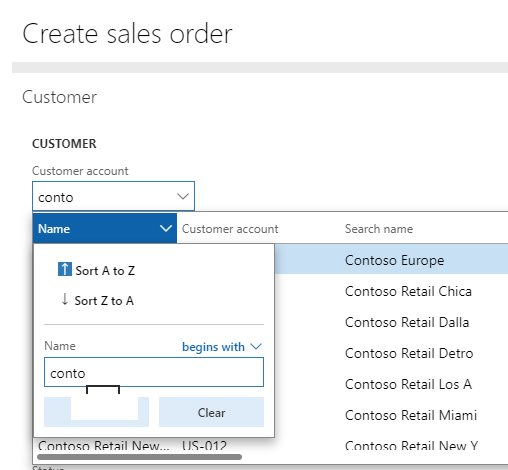
in AX7 we could use CustomerDataInteractorFactory to search records based on customer name instead of customer account.

However it only allows searching based on "Begins with". How could we customize it to search based on "Contain"? 

Which object(s) should we customize? Thanks.
8244.CUST.png

*This post is locked for comments

I have the same question (0)
  • Verified answer
    Mea_ Profile Picture
    60,286 on at

    Hi TomC. ,

    You need to look at AmbiguousReferenceResolver class PKReferenceQuery and AlternativeReferenceQuery methods. There you will find next line

    filterValue = SysQueryRangeUtil::literalFilterValue(_userEnteredValue) + "*";

    As you can see "begins with" is hard coded there, so you need to extend this method to add new behavior.

  • TomC. Profile Picture
    80 on at

    Thanks Ievgen!

    But in my environment AmbiguousReferenceResolver is under package Application Platform and customization is not allowed. Is there any workaround for that? Thanks a lot.

  • Mea_ Profile Picture
    60,286 on at

    Customization? We don't do them anymore. I was talking about extension. You may create your own class derived from ambigiousreferensresolver with your own black jack and filtering and extend customerdatainteractor to use it instead of standard.

  • TomC. Profile Picture
    80 on at

    We have extended ambigiousreferensresolver class and the corresponding methods (both pkreference & alternative) like below:

    filterValue = "*" + SysQueryRangeUtil::literalFilterValue(_userEnteredValue) + "*";

    Tried to run debugger and system did generate query below while searching by keyword Euro.

    rootQBDS {SELECT AccountNum, ContactPersonId FROM CustTable(CustTable_1) ORDER BY DirPartyTable.Name ASC OUTER JOIN * FROM DirPartyTable(DirPartyTable_1) ON CustTable.Party = DirPartyTable.RecId WHERE ((DirPartyTable(DirPartyTable_1).Name LIKE N'*Euro*'))} Dynamics.AX.Application.QueryBuildDataSource

    But it shows nothing on screen. Is there anywhere else we need to further change? Thanks again.

    CUSTSEARCH.png

  • Suggested answer
    Mea_ Profile Picture
    60,286 on at

    So there are 2 parts: lookup and resolve. I told you how to change reolving, so if you type a value and hit "enter" it should pick up customer using *value* patern.  Try and let us know if this work.

    To change how lookup works, look at SysTableLookup class, applyUpdateFilterToLookup method, you will find similar thing that adds * to filter expression.

Under review

Thank you for your reply! To ensure a great experience for everyone, your content is awaiting approval by our Community Managers. Please check back later.

Helpful resources

Quick Links

Introducing the 2026 Season 1 community Super Users

Congratulations to our 2026 Super Stars!

Meet the Microsoft Dynamics 365 Contact Center Champions

We are thrilled to have these Champions in our Community!

Congratulations to the March Top 10 Community Leaders

These are the community rock stars!

Leaderboard > 🔒一 Microsoft Dynamics AX (Archived)

#1
CP04-islander Profile Picture

CP04-islander 39

#2
Michel ROY Profile Picture

Michel ROY 14

#3
imran ul haq Profile Picture

imran ul haq 8

Last 30 days Overall leaderboard

Featured topics

Product updates

Dynamics 365 release plans
