You have correctly surmised the BOM Cost field in the Bill of Materials Entry/View Windows is a calculated field and not a value in a table. This is illustrated best when you click the "Recalculate BOM Cost" button to the right of the BOM Cost field in the BOM Entry window.
When you click this button, The Standard Cost Maintenance Window is opened. The window will show the detail buckets of the Current Standard Cost, Pending Costs and allows for Standard Cost Overrides.
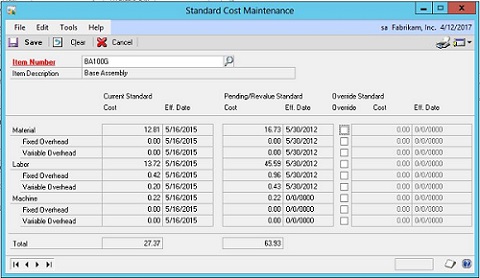
When there is a Current Standard Cost, the Total in this column will be the value you see in the BOM Cost. If the Current Standard Cost is Zero, it does not matter if there is a Pending Standard Cost, the BOM Cost will still be $0.00
So where do you get the data, and which data should you use, when putting together a SmartList? The easiest thing to do is link the Inventory Master or IV00101 table on the ITEMNMBR (I would suggest a Left Join), and return the STNDCOST field from this table. You can also link the IC_IV_STANDARD or ICIV0323 table also on ITEMNMBR (again, a left join), and return the TOTALCOSTI_1 field.
Here is a query to help you get started. I would suggest opening the BOM Entry or View Window, and scroll through the records and compare them to results of the query below to determine which field will work best for you.
-------------------------
select
'Manufacturing' 'Cost_Source',
SCM.ITEMNMBR 'Item_ID',
cast(SCM.TOTALCOSTI_1 as money) Current_Cost
from ICIV0323 SCM
Left join IV00101 IVI on IVI.ITEMNMBR = SCM.ITEMNMBR
Union All
select
'Inventory' 'Cost_Source',
SCID.ITEMNMBR 'Item_ID',
cast(IVC.STNDCOST as Money) Current_Cost
from CT00003 SCID
Left Join IV00101 IVC
on SCID.ITEMNMBR = IVC.ITEMNMBR
order by Item_ID,Cost_Source
------------------


