web
You’re offline. This is a read only version of the page.
close
Skip to main content

Announcements

No record found.

News and Announcements icon
Community site session details

Community site session details

Session Id :
Microsoft Dynamics AX (Archived)

error during posting customer invoice

(0) ShareShare
ReportReport
Posted on by 95

Hi all

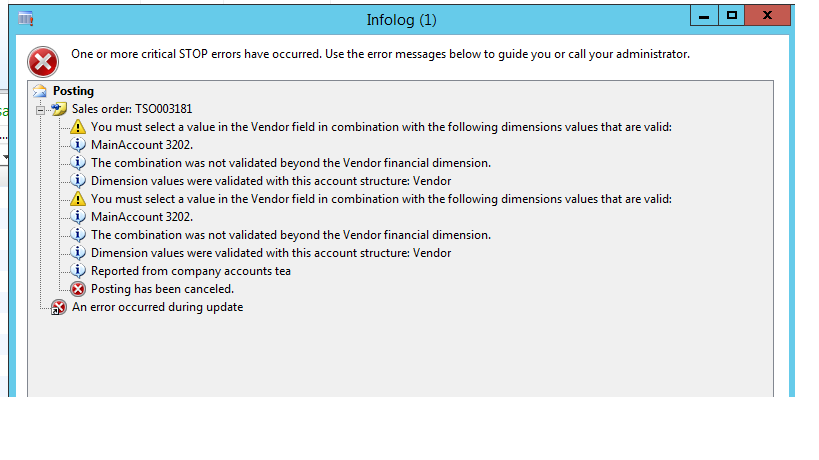
one of our users is trying to post invoice for a sale order, but there is an unexpected error as attached photo, it says that:

"you must select a value in the vendor field in combination with the following dimensions values that are valid.

Main account 3202.

The combination was not validated beyond the vendor financial dimension.

, cause this person is customer and i don't know for which reason there should be error for 3202 main account that is for vendors ; would you please  tell me the reason and solution?47527.error.png
*This post is locked for comments

I have the same question (0)
  • Suggested answer
    Mahmoud Hakim Profile Picture
    17,887 on at

    you need to check the structure and advanced rules for this account

  • Suggested answer
    Khaled Alloud Profile Picture
    3,658 on at

    Dear,

    You have an account structure named 'Vendor', and in this structure there should be an account 3202, it seems that this account requires to have the dimension Vendor filled.

    If you dont need this dimension to be filled always, you can edit the Acc Str and set the dimension Vendor as 'Allow all values'

    Thank you,

  • Ludwig Reinhard Profile Picture
    Microsoft Employee on at

    Hello Hero,

    Have you been able to get this resolved?

    If so, please be so kind and verify the solution to let the community know what helped you.

    Many thanks and best regards

    Ludwig

  • Khaled Alloud Profile Picture
    3,658 on at

    Dear,

    Another thing, the account 3202 should be related to the Customer group for which this particular customer is linked to. The system would get the main account defined in the customer group posting.

    Thank you,

  • herodabaghi Profile Picture
    95 on at

    Hi Ludwig,

    I am working on it, for sure i will give feedback to community.

    Tnx all!

  • herodabaghi Profile Picture
    95 on at

    No Crispin, it is not intercompany SO.

    Thanks for response!

  • Suggested answer
    Nour Desoki Profile Picture
    555 on at

    Hello Hero ,

    you should check account structure Vendor which requires to enter Vendor value in financial dimension..

  • Suggested answer
    Ahmad ghubj  Profile Picture
    227 on at

    I have encountered similar error before it is related to Account structure where account 3020 is in layer where vendor must be felled, you can check either allow blank value in that layer in account structure or fell the value in transaction.

    if you need more help please share some screen shoots for you account structure.

  • herodabaghi Profile Picture
    95 on at

    Hi Ahmad

    Thanks for response, how I can allow blank value for vendor financial dimension?

Under review

Thank you for your reply! To ensure a great experience for everyone, your content is awaiting approval by our Community Managers. Please check back later.

Helpful resources

Quick Links

Introducing the 2026 Season 1 community Super Users

Congratulations to our 2026 Super Stars!

Meet the Microsoft Dynamics 365 Contact Center Champions

We are thrilled to have these Champions in our Community!

Congratulations to the March Top 10 Community Leaders

These are the community rock stars!

Leaderboard > 🔒一 Microsoft Dynamics AX (Archived)

#1
Joris dG Profile Picture

Joris dG 5

#2
Andrew Jones a1x Profile Picture

Andrew Jones a1x 2

#3
GL-01081504-0 Profile Picture

GL-01081504-0 1

Last 30 days Overall leaderboard

Featured topics

Product updates

Dynamics 365 release plans
