web
You’re offline. This is a read only version of the page.
close
Skip to main content

Notifications

Announcements

No record found.

Community site session details

Community site session details

Session Id :
Microsoft Dynamics CRM (Archived)

Activities missing from Activities Feed on Company Form

(0) ShareShare
ReportReport
Posted on by 760

Hello,

For an unknown reason, the Activities feed on some forms have stopped showing all Activities related to the record. This occurs so far on the Company, Contact & Case Form but no on every record. I'm trying to isolate what might be unique about the ones that do not display information in order to try and develop a pattern.

If you have any suggestions, I would greatly appreciate it!

Pictures:

The first picture below highlights the area that is blank where we would normally have our Activities displayed (emails, appointments, notes, etc.) but it is blank. The second picture shows the related activities to the Company, via the Activities view. It's proof that the Activities still exist and are related back to the correct Company, however, for some reason they are not being displayed properly.
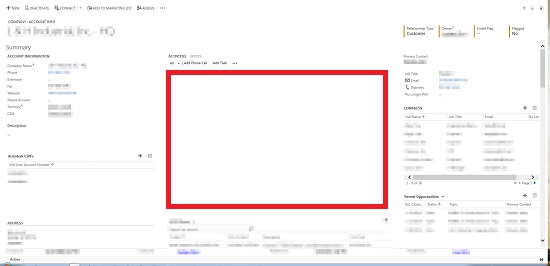
*This post is locked for comments

I have the same question (0)
  • mscrmba Profile Picture
    on at

    Are these 3 forms your most complex?

    There was an issue in earlier versions of CRM about the number of grids that would automatically be populated on load - but they have a message that displays that ask you to manually refresh the grid.

    I'm not aware of a similar limitation in 2013/2015 - but someone else may be?

  • CRMTreky Profile Picture
    760 on at

    Thank you for your reply. We did implement a new form recently that did add several new  sub-grids. To test your theory though, I activated the old form and opened up the Company in question with no success. The Activities feed was still blank.

    Any other thoughts?

  • Verified answer
    mscrmba Profile Picture
    on at

    There was a mention of the Notes pane not displaying properly when upgrading from CRM 2011 to 2013.

    To fix the problem you needed to:

    Activate the Post Configuration for the required entity (make sure wall enabled is yes)

    Settings > Post Configurations > Select Entiity > Activate > Publish the entity

    Is there any chance someone has been playing around with these settings?

    Mark had a blog on the topic back in 2013:  community.dynamics.com/.../crm-2013-posts-activities-amp-notes-control.aspx

  • CRMTreky Profile Picture
    760 on at

    Hello,

    My apologies for the late response. The issue resolved itself over time so I'm not sure what was the root issue. Thank you for suggesting answers though!

Under review

Thank you for your reply! To ensure a great experience for everyone, your content is awaiting approval by our Community Managers. Please check back later.

Helpful resources

Quick Links

Responsible AI policies

As AI tools become more common, we’re introducing a Responsible AI Use…

Neeraj Kumar – Community Spotlight

We are honored to recognize Neeraj Kumar as our Community Spotlight honoree for…

Leaderboard > 🔒一 Microsoft Dynamics CRM (Archived)

#1
SA-08121319-0 Profile Picture

SA-08121319-0 4

#1
Calum MacFarlane Profile Picture

Calum MacFarlane 4

#3
Alex Fun Wei Jie Profile Picture

Alex Fun Wei Jie 2

Last 30 days Overall leaderboard

Featured topics

Product updates

Dynamics 365 release plans



