web
You’re offline. This is a read only version of the page.
close
Skip to main content

Notifications

Announcements

No record found.

Community site session details

Community site session details

Session Id :
Supply chain | Supply Chain Management, Commerce
Suggested Answer

Work Creation Process = Adjustment out, posts counting journal automatically in D365 F&O when processed from Warehouse Mobile App.

(0) ShareShare
ReportReport
Posted on by 87

Hi,

Have configured a warehouse mobile device menu items to perform "Adjustment Out" and set Inventory Adjustment type = "Adjust Out".
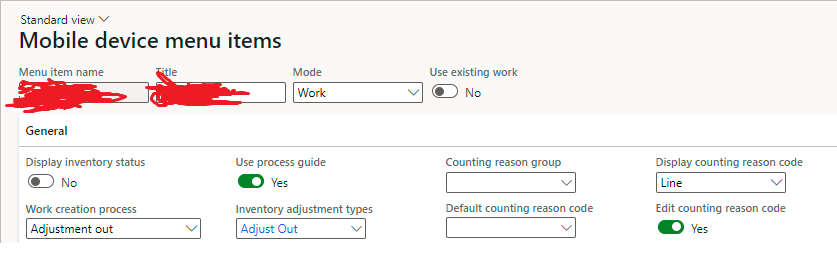
pastedimage1658151563866v1.png

Through the warehouse mobile app, able to perform the adjustment out and counting journal is posted automatically in D365 F&O.

But I would like only the system to create a counting journal and would like to be posted manually. Is there any possibility to do through Standard ?

Have also tried  to setup workflow for the respective counting journal, but this is basically throwing error to complete even the warehouse mobile app process saying the journal is not approved.

I have the same question (0)
  • Suggested answer
    Charlotte X Profile Picture
    on at

    Hi Sathish Kumar V,

    You can refer to the following article:

    Define inventory counting processes - Supply Chain Management | Dynamics 365 | Microsoft Docs

    Counting journal is a manual process, the system can not help you create counting journal automatically. I don't think this is very possible to achieve this requirement through standards, which requires custom development.

    Best Regards,

    Charlotte

  • Sathish Kumar V Profile Picture
    87 on at

    Hi Charlottexu

    Thanks for you reply.

    So currently, when I perform the "Adjustment out" through Warehouse mobile device, the counting journal is created and posted automatically in D365 F&O.

    But I would like the system to only create the counting journal and not post it ?

    Is it not possible through standard ?

    Thanks,

    Sathish.

  • Suggested answer
    Charlotte X Profile Picture
    on at

    Hi Sathish,

    You can try this method:  Add the "Maintain Counting Journal" in the privileges. You also need to add the privileges of "Process item journals", "Process journals from batch" and "Process on-hand journals". This method enables the user to create the counting journal but not be able to post it.

Under review

Thank you for your reply! To ensure a great experience for everyone, your content is awaiting approval by our Community Managers. Please check back later.

Helpful resources

Quick Links

Responsible AI policies

As AI tools become more common, we’re introducing a Responsible AI Use…

Neeraj Kumar – Community Spotlight

We are honored to recognize Neeraj Kumar as our Community Spotlight honoree for…

Leaderboard > Supply chain | Supply Chain Management, Commerce

#1
Laurens vd Tang Profile Picture

Laurens vd Tang 302 Super User 2025 Season 2

#2
Siv Sagar Profile Picture

Siv Sagar 183 Super User 2025 Season 2

#3
André Arnaud de Calavon Profile Picture

André Arnaud de Cal... 120 Super User 2025 Season 2

Last 30 days Overall leaderboard

Product updates

Dynamics 365 release plans



