web
You’re offline. This is a read only version of the page.
close
Skip to main content

Notifications

Announcements

No record found.

Community site session details

Community site session details

Session Id :
Small and medium business | Business Central, N...
Suggested Answer

Sales Invoice UpdatePropagation not set

(0) ShareShare
ReportReport
Posted on by

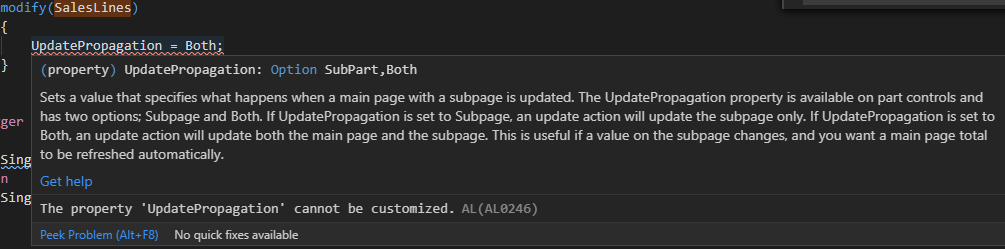
We have 2 FlowFields on the Sales Header table that calculate a sum from all the Sales Line on the document. When specific fields on the Sales Line are validated, we are calling a CurrPage.Update to refresh the FlowFields. Doing this works on Sales Quotes and Sales Order. However, it does not work on Sales Invoice. After reviewing, I found that the SalesLines part on the Sales Invoice page does not have the UpdatePropagation property set. When I attempt to add the property to my page extension I get an error that the property cannot be customized. Any thoughts on why the property is not set for Sales Invoices? Anyone know how I could get this to work?

SalesLine part from Sales Invoice page

 pastedimage1606346156314v1.png+

Attempting to add it to my page extension
pastedimage1606346213932v2.png

Thanks in advance

I have the same question (0)
  • Suggested answer
    Bilal Haider Profile Picture
    414 on at

    Hi,

    AL0246 is the error that comes when you try to update a property that cannot be customized. This restriction might be put to preserve the state of object as multiple extensions might be using this object.

    The scenario that you have shared is very interesting. You are right, the "Update Propagation" is set to "Subpart" in Sales Invoice page for Sales Line part. I have tried to find a way but can't.

    One lay man approach is that after putting values in sales line user clicks refresh action at top then it will update the flow fields in header.  

  • Suggested answer
    Bilal Haider Profile Picture
    414 on at

    Suggestion for solution:

    As you are saying that the sum of flow fields on header are calculated from line table values. So add these flow fields to line table. And then add in the salesline subform using extension. As Salesline is already added on Sales Invoice so your fields will appear there and also updated.

    You can get inspiration from Standard Sales Invoice page where the totals of all the lines are also kept in the same table and are shown on the sales line sub form. In image below the flow fields that calculate sums are from sales line table and shown on subform.

    Totals-sI.PNG

Under review

Thank you for your reply! To ensure a great experience for everyone, your content is awaiting approval by our Community Managers. Please check back later.

Helpful resources

Quick Links

Responsible AI policies

As AI tools become more common, we’re introducing a Responsible AI Use…

Neeraj Kumar – Community Spotlight

We are honored to recognize Neeraj Kumar as our Community Spotlight honoree for…

Leaderboard > Small and medium business | Business Central, NAV, RMS

#1
OussamaSabbouh Profile Picture

OussamaSabbouh 2,135

#2
YUN ZHU Profile Picture

YUN ZHU 733 Super User 2025 Season 2

#3
Sumit Singh Profile Picture

Sumit Singh 612

Last 30 days Overall leaderboard

Featured topics

Product updates

Dynamics 365 release plans



