web
You’re offline. This is a read only version of the page.
close
Skip to main content

Notifications

Announcements

No record found.

Community site session details

Community site session details

Session Id :
Microsoft Dynamics AX (Archived)

'Invalid character' in data export to Excel

(0) ShareShare
ReportReport
Posted on by 54

Hi,

when i export data to excel error came. 

An error occurred consider contacting your system administrator about this problem

Hexadecimal value 0x15, is an invalid character.
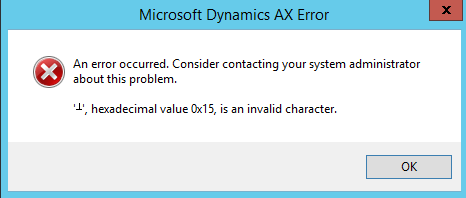
2017_2D00_04_2D00_23_5F00_15_2D00_06_2D00_42.png

Please help me.

Regards,

Tarak

*This post is locked for comments

I have the same question (0)
  • Ludwig Reinhard Profile Picture
    Microsoft Employee on at

    Hi Tarak,

    Did you simply exporting some AX data by selecting CTRL+T or did you make use of the AIF and an Excel template?

    What data did you try to export?

    Best regards,

    Ludwig

  • Taraka rama prasad peram Profile Picture
    54 on at

    Hi Ludwig,

    i am exporting AX data like release products, counting journal line and select by CTRL+T.

    Regards,

    Tarak

  • Verified answer
    Martin Dráb Profile Picture
    237,801 Most Valuable Professional on at

    I would expect that it's a problem in your data, so you could identify the problematic record and remove the character in question.

  • Taraka rama prasad peram Profile Picture
    54 on at

    Hi Martin,

    Data is correct but in product name and product search name fields length modified 60 characters to 90 characters. when i hide those columns in AX form and export(CTRL+T) its working fine. i need to export product name also.

    Regards,

    Tarak

  • Verified answer
    Martin Dráb Profile Picture
    237,801 Most Valuable Professional on at

    You claim that the data is correct, but the rest of your reply suggests that you have a problem with data in either product name and product search field (or both).

  • Suggested answer
    Zain Bokhari Profile Picture
    3,208 Moderator on at

    Hi Taraka,

    If you don't get the error by hiding those two columns. It suggests that the character causing this error is in one of these two columns in some record. Like Martin suggested you need to find that record with this character and correct  it before you can export data.

  • Taraka rama prasad peram Profile Picture
    54 on at

    Hi,

    Issue was resolved. user enters special characters in Product name.

    Thanks for valuable suggestions.

    Regards,

    Tarak

  • Martin Dráb Profile Picture
    237,801 Most Valuable Professional on at

    Great! The only remaining thing is marking this thread as answered. Notice "Did this answer your question?" beside each reply, which are used to indicate which replies answer the question.

Under review

Thank you for your reply! To ensure a great experience for everyone, your content is awaiting approval by our Community Managers. Please check back later.

Helpful resources

Quick Links

Responsible AI policies

As AI tools become more common, we’re introducing a Responsible AI Use…

Neeraj Kumar – Community Spotlight

We are honored to recognize Neeraj Kumar as our Community Spotlight honoree for…

Leaderboard > 🔒一 Microsoft Dynamics AX (Archived)

#1
Martin Dráb Profile Picture

Martin Dráb 4 Most Valuable Professional

#1
Priya_K Profile Picture

Priya_K 4

#3
MyDynamicsNAV Profile Picture

MyDynamicsNAV 2

Last 30 days Overall leaderboard

Featured topics

Product updates

Dynamics 365 release plans
