web
You’re offline. This is a read only version of the page.
close
Skip to main content

Notifications

Announcements

No record found.

Community site session details

Community site session details

Session Id :
Microsoft Dynamics AX (Archived)

Getting error while exporting model file from AX 2012 Feature Pack

(0) ShareShare
ReportReport
Posted on by 30

HI All,

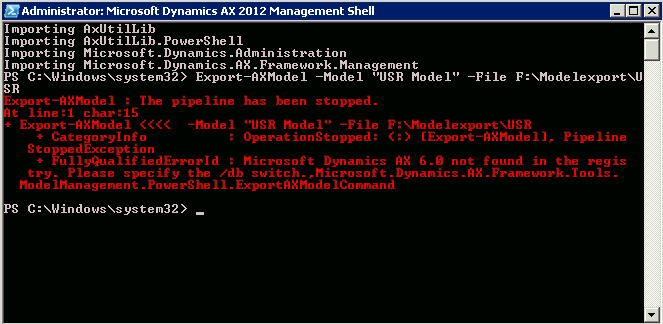
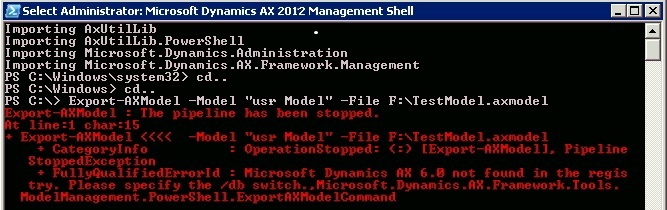
I am getting the below error while exporting model file from AX 2012 Feature Pack.

Build version (6.0.947.280)
5734.2.png

7181.stopped.jpg

PipeLine has been stopped...

Kindly give me the solution.

Please give me more shed on this.

Thanks!

*This post is locked for comments

I have the same question (0)
  • André Arnaud de Calavon Profile Picture
    301,130 Super User 2025 Season 2 on at

    Hi Arpan,

    Have you checked all naming and if the directory actually exists? If you have multiple environments on this machine, then also use the parameter to specify the environment (-Config)

  • @rp@n Profile Picture
    30 on at

    Thanks Andre

    You mean 1AOS pointed to multiple environment ( Instance ).

    Is it correct?

  • Suggested answer
    nmaenpaa Profile Picture
    101,162 Moderator on at

    Ther error clearly says "please use the /db switch". The registry on this machine doesn't contain information about which database model export should use as a source.

    The documentation ([View:https://docs.microsoft.com/en-us/dynamicsax-2012/developer/how-to-export-and-import-a-model#export-an-axmodel-file-windows-powershell:750:50]) says: "You can use the –Server, –Config, or –Database parameters to specify the environment to export from.

    So you should try to add more parameters to your export command (replace "myDatabaseServerName" with the name or IP address of your AX database server, and "myModelDatabaseName" with the name of your AX model database):

    Export-AXModel -Model "USR Model" -File F:\ModelExport\USR.axmodel -Server "myDatabaseServerName" -Database "myModelDatabaseName"


  • @rp@n Profile Picture
    30 on at

    Thanks Nikoloas,

    They using MS Dynamics AX 2012 Feature Pack. Build version (6.0.947.280)
    I think they having no separete Model DB.

    Export-AXModel -Model "USR Model" -File F:\ModelExport\USR.axmodel -Server "myDatabaseServerName" -Database "myModelDatabaseName"

    Export-AXModel -Model "USR Model" -File F:\ModelExport\USR.axmodel -Server "myDatabaseServerName" -Database "< ??? >"

    Please suggest me.

    Please give me more shed on this.

  • Suggested answer
    nmaenpaa Profile Picture
    101,162 Moderator on at

    What do you think? What database could it be then? How about the only database for that AX instance (which includes models as well as business data)?

    You really can't break anything by exporting models so I encourage you to try out things by yourself. It's great for learning.

  • @rp@n Profile Picture
    30 on at

    Kindly suggest me .

  • nmaenpaa Profile Picture
    101,162 Moderator on at

    I think I already did suggest something.

    If you still can't make it you are beyond my help. I don't have the skills to make you understand. I'm sorry about that.

    I really hope you have a colleague who can support you through this.

  • @rp@n Profile Picture
    30 on at

    Based in your suggestion I am asking because in that moment I am not getting. Still I connected the customer system to do the same...

    Export-AXModel -Model "USR Model" -File F:\ModelExport\USR.axmodel -Server "myDatabaseServerName" -Database "myModelDatabaseName"

    Export-AXModel -Model "USR Model" -File F:\ModelExport\USR.axmodel -Server "myDatabaseServerName" -Database "< ??? >"

  • @rp@n Profile Picture
    30 on at

    Any one please help me on this...

  • Sukrut Parab Profile Picture
    71,710 Moderator on at

    If you have access to customer environment cant you see the database server name and model database name  and use that in command ?

Under review

Thank you for your reply! To ensure a great experience for everyone, your content is awaiting approval by our Community Managers. Please check back later.

Helpful resources

Quick Links

Responsible AI policies

As AI tools become more common, we’re introducing a Responsible AI Use…

Neeraj Kumar – Community Spotlight

We are honored to recognize Neeraj Kumar as our Community Spotlight honoree for…

Leaderboard > 🔒一 Microsoft Dynamics AX (Archived)

#1
Martin Dráb Profile Picture

Martin Dráb 4 Most Valuable Professional

#1
Priya_K Profile Picture

Priya_K 4

#3
MyDynamicsNAV Profile Picture

MyDynamicsNAV 2

Last 30 days Overall leaderboard

Featured topics

Product updates

Dynamics 365 release plans
