web
You’re offline. This is a read only version of the page.
close
Skip to main content

Notifications

Announcements

No record found.

Community site session details

Community site session details

Session Id :
Microsoft Dynamics CRM (Archived)

Product information -Unit Group locked

(0) ShareShare
ReportReport
Posted on by

Hello Everyone:

I need to change a record in a field (Unit Group) for the Product information and I can not because it has a lock next to it.
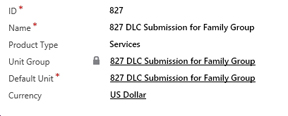
product-form.jpg

is there away to open the field so I can make a change. I have already open the field properties  and there is no check-mark on the locking properties
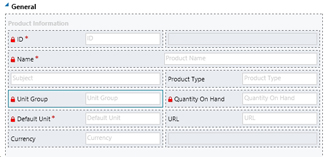
Any help would be great

Thanks

_damon


*This post is locked for comments

I have the same question (0)
  • Suggested answer
    Alexandre Vidal Profile Picture
    195 on at

    Hi,

    Please check this article on the subject:

    crmentropy.blogspot.fr/.../changing-product-unit-groups.html

    Hope it helps,

    Alexandre Vidal

  • Verified answer
    Aileen Gusni Profile Picture
    44,524 on at

    Hi Damon,

    I think CRM has a javascript function to block it.

    Yes, you can use the Bulk Import feature, but I'd recommend you to create a overridden script or even a Business Rule.

    Just put a condition that will trigger, for example if ID contains data or any field that can trigger the Business Rule on change, but you need to change the field value to unlock the Business Rule.

    For example I use ID as the trigger point

    To trigger, you need to delete a letter from field: ID (don't forget the original value), then it will unlocked the Unit Group field:

    You can use another field as well, maybe you create a field, Two Options yes/no: Unlock Unit Group, if yes, then Unlock the Unit group, and if No then do nothing or lock the Unit Group.

    I think it is easier than you create a script just for this.

    But, remember to change the Default Unit accordingly, adjusted to its each Unit Group relationship.

    Hope this helps!
    Thanks.

  • yleclerc Profile Picture
    1,549 on at

    Hi Aileen,

    Your solution worked for me... But those products were already used in Opportunities/Quotes. And as soon as I changed the Unit Group/Default Unit (Product Level) and the Price List Item Unit (Price List Item Level), I was unable to open the related Opportunity/Quote Products. I had a generic "an error occured" message.

    Even worse, we could not even open the Opportunity or Quote. Same Generic error. Bit of a shock for our users!

    We ended up reverting the changes, and create new products instead. Then we deactivated the older products.

    So... Be careful before applying this kind of change. Test everything with one product before you go ahead and update everything :).

Under review

Thank you for your reply! To ensure a great experience for everyone, your content is awaiting approval by our Community Managers. Please check back later.

Helpful resources

Quick Links

Responsible AI policies

As AI tools become more common, we’re introducing a Responsible AI Use…

Neeraj Kumar – Community Spotlight

We are honored to recognize Neeraj Kumar as our Community Spotlight honoree for…

Leaderboard > 🔒一 Microsoft Dynamics CRM (Archived)

#1
SA-08121319-0 Profile Picture

SA-08121319-0 4

#1
Calum MacFarlane Profile Picture

Calum MacFarlane 4

#3
Alex Fun Wei Jie Profile Picture

Alex Fun Wei Jie 2

Last 30 days Overall leaderboard

Featured topics

Product updates

Dynamics 365 release plans



