web
You’re offline. This is a read only version of the page.
close
Skip to main content

Notifications

Announcements

No record found.

Community site session details

Community site session details

Session Id :
Small and medium business | Business Central, N...
Answered

Sales Order Issue - Sales Prepmt Incl Tax Field

(0) ShareShare
ReportReport
Posted on by

Hello, 

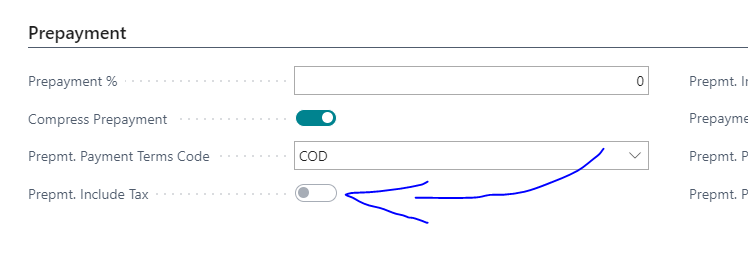
We are looking to use this fields functionality but when the field was added to our field is was greyed out. Can't find any security reason for it and normal prepayments function just fine. Any idea's on how to make this field editable?

Env Details:

App Version: 17.2.19367.19525

Platform Version: 17.2

Region: US East
pastedimage1609941838505v1.png

I have the same question (0)
  • Verified answer
    Community Member Profile Picture
    on at

    Brendand,

    I checked with my programmer and the field is being decommissioned in the April 2021 release. With that said, the Sales Tax topic will not be addressed in Prepayments for the US version. The only solution I can think of, given the upcoming change, is to add the G/L row, for the Sales Tax. This will allow the Prepayment Invoice to reflect Sales Tax. However, to finalize, you will need to reverse this so the standard Sales Tax process balances when you Post - Invoice the SO. I know this sounds clunky, but this is the easiest solution without a customization.

    Thanks,

    Steve

  • Community Member Profile Picture
    on at

    Hi Steve,

    Thank you for the information. We found a workaround to cover this. Appreciate the response.

  • Annie2021 Profile Picture
    5 on at

    Hi Steve, we are having the same issue... Do you mind sharing your workaround for this? :)

    Thank you!

  • Suggested answer
    Community Member Profile Picture
    on at

    Brendand,

    Can you update this with your workaround as Annie was looking for it.

    Steve

  • Community Member Profile Picture
    on at

    Hi Annie,

    I apologize for the delay, this thread got buried in the wrong email folder. This work around was fine for a customer of ours who only collects tax in a few states. We ended up setting up item charges with tax routings to each appropriate GL account (each state). It doesn't allow the calculation to occur automatically but it allows the pre-payment invoice to be posted with a line (non-inventory) so that the customer could process the pre-payment using PayPal with the tax included. Each item charge is by state and when you do this you have to unflag the tax liable check box on the sales order each time. Not fun by any means but it gave some resolve. Hoping Microsoft will devise a better way to handle such a simple concept for pre-payments.

Under review

Thank you for your reply! To ensure a great experience for everyone, your content is awaiting approval by our Community Managers. Please check back later.

Helpful resources

Quick Links

Responsible AI policies

As AI tools become more common, we’re introducing a Responsible AI Use…

Neeraj Kumar – Community Spotlight

We are honored to recognize Neeraj Kumar as our Community Spotlight honoree for…

Leaderboard > Small and medium business | Business Central, NAV, RMS

#1
OussamaSabbouh Profile Picture

OussamaSabbouh 3,010

#2
Jainam M. Kothari Profile Picture

Jainam M. Kothari 1,270 Super User 2025 Season 2

#3
YUN ZHU Profile Picture

YUN ZHU 1,085 Super User 2025 Season 2

Last 30 days Overall leaderboard

Featured topics

Product updates

Dynamics 365 release plans



