web
You’re offline. This is a read only version of the page.
close
Skip to main content

Notifications

Announcements

No record found.

Community site session details

Community site session details

Session Id :
Finance | Project Operations, Human Resources, ...
Answered

Revenue recognition module - Revenue Schedule - how to

(0) ShareShare
ReportReport
Posted on by 1,261

Hello folks 

I'm trying to test this new module of Revenue recognition in 10.0.5 and it seems very easy but yet I don't find it very user friendly as it seems to lack some UI buttons like <new> etc...

- I can't find any documentation on the mandatory functions

- There is no set up in Contoso - USMF

- the video below has the walk through of the process but it would be nice to find some basic steps somewhere

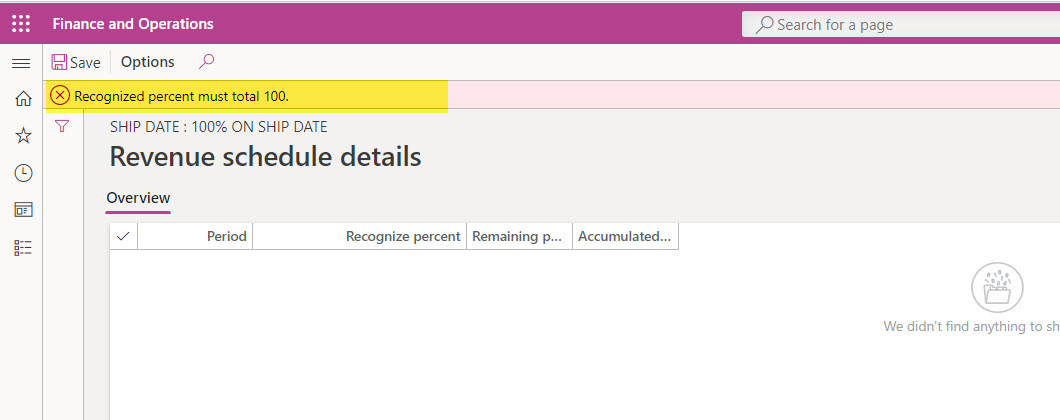
For example: this schedule set up which is basic is not so user friendly

When creating a rule, a schedule must be created in the second step.

Once you access the second menu, there is no <new> button. And then you can't close the menu as it entered in infinity loop...

64285.jpg 

4604.jpg

It could mean that this is simply a display menu, but then where is the actual setup done?

Any one has some hint on this set up?

I have the same question (0)
  • Verified answer
    Ludwig Reinhard Profile Picture
    Microsoft Employee on at

    Hello Veronika,

    Okeksiy published a video on youtube about this topic just the other day.

    www.youtube.com/watch

    Have you checked it out?

    Best regards,

    Ludwig

  • Veronika Filonenko Profile Picture
    1,261 on at

    Yes,

    Exactly what i needed.

    Many thanks

Under review

Thank you for your reply! To ensure a great experience for everyone, your content is awaiting approval by our Community Managers. Please check back later.

Helpful resources

Quick Links

Responsible AI policies

As AI tools become more common, we’re introducing a Responsible AI Use…

Neeraj Kumar – Community Spotlight

We are honored to recognize Neeraj Kumar as our Community Spotlight honoree for…

Leaderboard > Finance | Project Operations, Human Resources, AX, GP, SL

#1
Martin Dráb Profile Picture

Martin Dráb 646 Most Valuable Professional

#2
André Arnaud de Calavon Profile Picture

André Arnaud de Cal... 529 Super User 2025 Season 2

#3
Sohaib Cheema Profile Picture

Sohaib Cheema 285 User Group Leader

Last 30 days Overall leaderboard

Product updates

Dynamics 365 release plans
