web
You’re offline. This is a read only version of the page.
close
Skip to main content

Notifications

Announcements

No record found.

Community site session details

Community site session details

Session Id :
Finance | Project Operations, Human Resources, ...
Suggested Answer

Urgent: Error when posting Sales tax payment - Cannot edit a record in Sales tax period setup (TaxReportPeriod).

(0) ShareShare
ReportReport
Posted on by 12

Hi all,

I have an urgent question (AX 2012 R3):

we try to post the sales tax payment (GL->Periodic->sales tax payment ->sales tax payment  ) and either the system doesn't react or we get en error(if we run the function on server side):

Cannot edit a record in Sales tax period setup (TaxReportPeriod). Update conflict occured due to another user process deleting the record or changing one or more fields in the record)
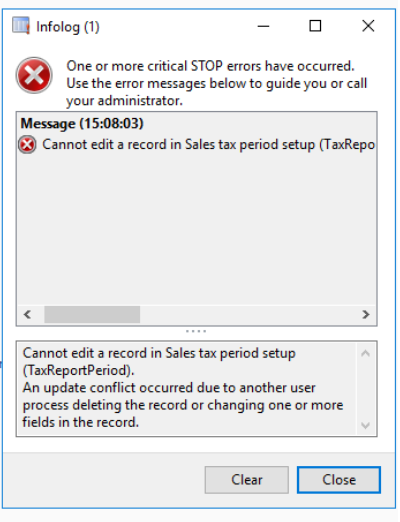
3404.error.png

We didn't have this error before. The key user told me, he had changed earlier this day the status of period in ledger calendar to "on hold" and then again to "open"(I don't know for what reason..).

And now he gets this error when trying to post the sales tax payment.

I have checked the setup: the period in ledger calender is "open"; the sales tax settlement period is set up correctly as 01.10.2020-31.10.2020.

Is there some other sales tax period setup, which is mentioned in the error?

What should we check else?

Thank you a lot!

Best regards.

I have the same question (0)
  • Suggested answer
    Ramit Paul Profile Picture
    22,797 Most Valuable Professional on at

    Hi,

    I did not see this before, however this seems a sales tax period changes issue.

    Can you may be delete the period if not run and re create again?

    I am talking about sales tax settlement period.

  • Suggested answer
    Ludwig Reinhard Profile Picture
    Microsoft Employee on at

    Good morning JuleWergne,

    I would recommend asking a developer for some help to debug this issue.

    Especially if things worked fine in the past and somebody made a change to status fields and possibly something else.

    Before making things worse, I would recommend having a chat with a developer.

    Best regards,

    Ludwig

  • Suggested answer
    JuleWergne Profile Picture
    12 on at

    Hi all,

    I don't know, what was the reason, but today I checked Sales tax payment and it worked, without debugging or changing something.

    Strange, isn't it?;)

    Thank you for  your input!

Under review

Thank you for your reply! To ensure a great experience for everyone, your content is awaiting approval by our Community Managers. Please check back later.

Helpful resources

Quick Links

Responsible AI policies

As AI tools become more common, we’re introducing a Responsible AI Use…

Neeraj Kumar – Community Spotlight

We are honored to recognize Neeraj Kumar as our Community Spotlight honoree for…

Leaderboard > Finance | Project Operations, Human Resources, AX, GP, SL

#1
André Arnaud de Calavon Profile Picture

André Arnaud de Cal... 456 Super User 2025 Season 2

#2
Martin Dráb Profile Picture

Martin Dráb 429 Most Valuable Professional

#3
BillurSamdancioglu Profile Picture

BillurSamdancioglu 239 Most Valuable Professional

Last 30 days Overall leaderboard

Product updates

Dynamics 365 release plans
