web
You’re offline. This is a read only version of the page.
close
Skip to main content

Announcements

No record found.

News and Announcements icon
Community site session details

Community site session details

Session Id :
Finance | Project Operations, Human Resources, ...
Answered

No appers the Electronic document parameters D365 F&O

(0) ShareShare
ReportReport
Posted on by 24

Hi Team.

I am configuring the "response types" for electronic invoicing for a client in Mexico, but the "Electronic document parameters option" does not appears.
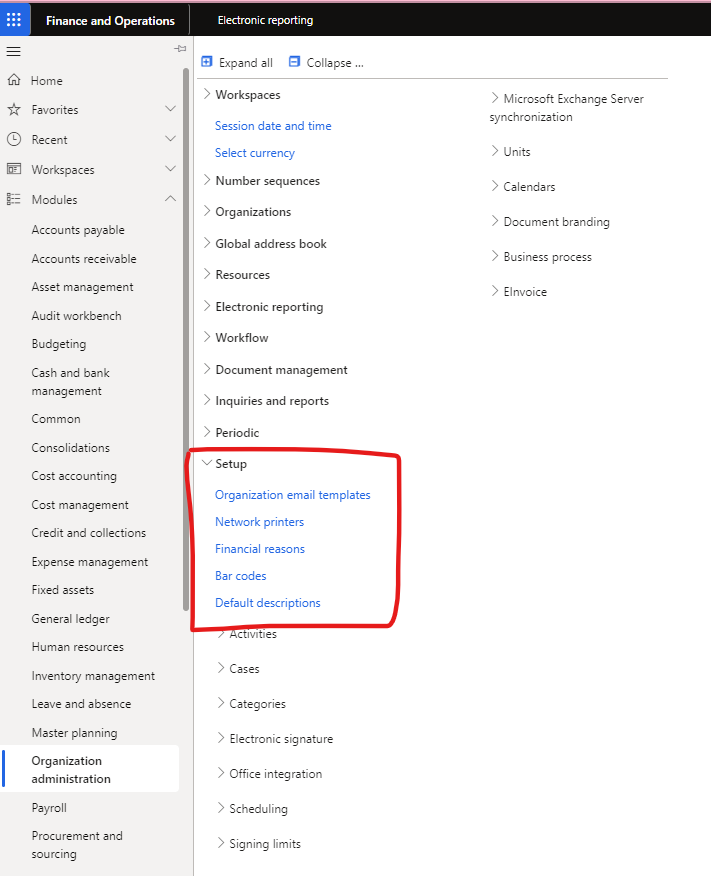
pastedimage1685903433579v2.png

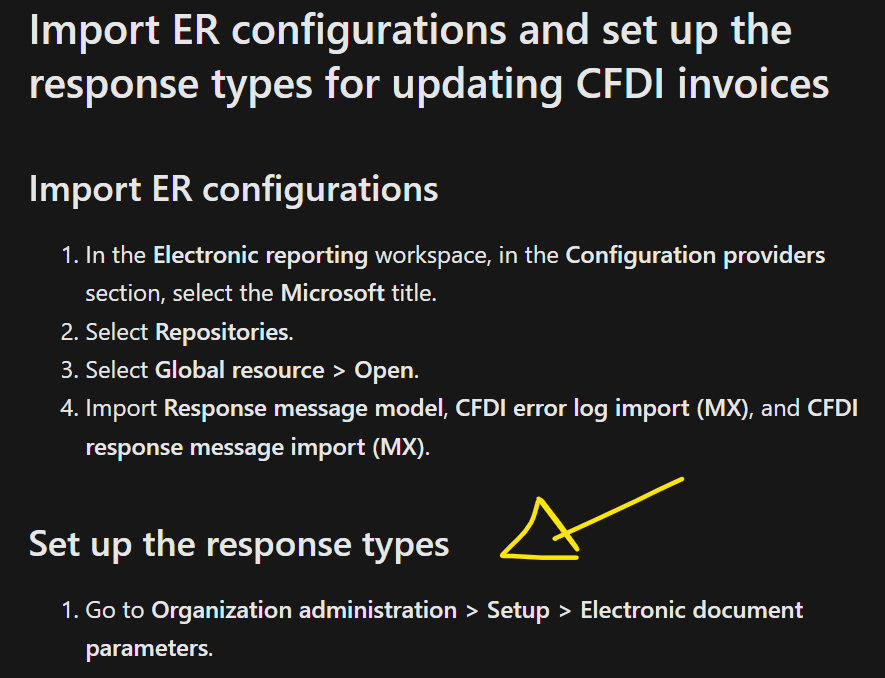
On the Microsoft Learning Portal I can see:

Set up the response types
Go to Organization administration > Setup > Electronic document parameters.
Has anyone had a similar problem?

I have the same question (0)
  • Suggested answer
    Magno Pereira Profile Picture
    2,437 Moderator on at

    Hello Tonatiuh,
    To access the Electronic Reporting parameters, you can navigate to the ER workspace and find it under the "Related Links" section.
    I have not located this menu item under the Organization administration > Setup section too.

  • Verified answer
    Hana Xue Profile Picture
    Microsoft Employee on at

    Hi Tonatiuh,

    You first need to enable the Electronic Invoicing integration feature in the feature management workspace, and then you will find the corresponding electronic document parameters in Organization Management > Settings, as shown in the screenshot below:

    pastedimage1685946076870v2.pngpastedimage1685946086150v3.png

    Best Regards,

    Hana

    This post is my own opinion and does not necessarily reflect the opinion or view of my company.

    Please mark as verified if the answer is helpful. Welcome to join hot discussions in Dynamics 365 Forums.

  • Suggested answer
    Tonatiuh Tlalpachicatl Profile Picture
    24 on at

    Hi Hana,

    Thank you for your suggestion.

    We had to enable the following feature "Electronic Invoicing Integration" and then we were able to see the electronic document parameters.

  • Tonatiuh Tlalpachicatl Profile Picture
    24 on at

    Hi Magno,

    Thank you for your time.

    We had to enable the following feature "Electronic Invoicing Integration" and then we were able to see the electronic document parameters.

    Regards,

  • Hana Xue Profile Picture
    Microsoft Employee on at

    Hi Tonatiuh,

    I'm glad that your problem is solved and if the suggestion is useful, please mark it as verified so that it can help others. Thanks a lot!

    Best Regards,

    Hana

    This post is my own opinion and does not necessarily reflect the opinion or view of my company.

    Please mark as verified if the answer is helpful. Welcome to join hot discussions in Dynamics 365 Forums.

Under review

Thank you for your reply! To ensure a great experience for everyone, your content is awaiting approval by our Community Managers. Please check back later.

Helpful resources

Quick Links

Introducing the 2026 Season 1 community Super Users

Congratulations to our 2026 Super Stars!

Congratulations to our 2025 Community Spotlights

Thanks to all of our 2025 Community Spotlight stars!

Leaderboard > Finance | Project Operations, Human Resources, AX, GP, SL

#1
André Arnaud de Calavon Profile Picture

André Arnaud de Cal... 512 Super User 2026 Season 1

#2
Giorgio Bonacorsi Profile Picture

Giorgio Bonacorsi 386

#3
Adis Profile Picture

Adis 259 Super User 2026 Season 1

Last 30 days Overall leaderboard

Product updates

Dynamics 365 release plans
