web
You’re offline. This is a read only version of the page.
close
Skip to main content

Announcements

No record found.

News and Announcements icon
Community site session details

Community site session details

Session Id :
Microsoft Dynamics AX (Archived)

Automatically close out back-order quantities in 2012 R3 WMS

(0) ShareShare
ReportReport
Posted on by

Our company ships what we have and doesn't produce or fill back-orders. We are looking for a way to automatically close out lines during the pick, pack and ship process, preventing the back order from being created. My understanding is to close out back-order quantities you must go into a partially picked order and in the General Tab > Line quantity > choose your lien with a back order quantity, click Update Line > Delivery Remainder then choose 'Cancel quantity'. This will cancel out that line.

I am asking if there is a way to automate this for every partially shipped line, either out of the box or through customization.
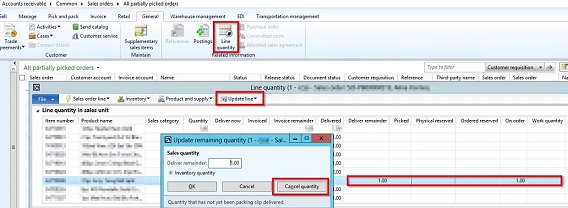
AX_5F00_Backorder.jpg

*This post is locked for comments

I have the same question (0)
  • Guy Terry Profile Picture
    28,965 Moderator on at

    On the Packing slip posting form, on the 'Lines' tab, you can click the 'Close' tick box to get AX to cancel any un-delivered quantities for lines on the delivery note.

    This should help with lines that are part-delivered. But where the line was not delivered at all, it won't be on the delivery note, so it won't get cancelled by this functionality. The only way I know in standard is to use 'Deliver remainder -> Cancel quantity' as you say.

    Of course, with a customisation you can do anything, but I suggest any modification you make attempts to do the same as 'Cancel quantity'.

  • Community Member Profile Picture
    on at

    Thanks Guy!

    It sounds like you are correct, that automating the cancel quantity is the way to go. 

    Has anyone automated this process before? Any suggestions on how to approach this? 

  • Suggested answer
    Guy Terry Profile Picture
    28,965 Moderator on at

    I read your original post again. You say you want to cancel the remainder on partially picked lines. This is exactly what 'Close' on the packing slip posting form will do for you.

    If you decide you do need something that will automatically cancel undelivered quantities (e.g. because you have lines to cancel which have not been picked at all), you'll probably want to write a Periodic Job to do it - something that you can schedule to run in batch if you decide to.

    I've seen it done. I think it is harder than you'll expect it to be. You'll want to call standard 'Deliver remainder -> Cancel quantity' functionality, but there are scenarios where even this standard functionality cannot work. In addition:

    You'll want to consider how to distinguish between orders that haven't been picked yet, and back orders (use requested ship date of the order line?)

    You'll want to reduce the number of order lines it has to look at (Line status is less than Delivered?)

    You'll only want to look at Sales line belonging to Sales orders of type 'Sales order'.

    You might have to do something to handle lines which have a 'Picked' quantity, because Deliver remainder -> Cancel quantity will, by default, attempt to cancel Picked quantities.

    And I suggest you test it a lot, to find scenarios that it can't handle.

Under review

Thank you for your reply! To ensure a great experience for everyone, your content is awaiting approval by our Community Managers. Please check back later.

Helpful resources

Quick Links

Introducing the 2026 Season 1 community Super Users

Congratulations to our 2026 Super Stars!

Congratulations to our 2025 Community Spotlights

Thanks to all of our 2025 Community Spotlight stars!

Leaderboard > 🔒一 Microsoft Dynamics AX (Archived)

#1
Joris dG Profile Picture

Joris dG 5

#2
Alexey Lekanov Profile Picture

Alexey Lekanov 2

#2
Henrik Nordlöf Profile Picture

Henrik Nordlöf 2 User Group Leader

Last 30 days Overall leaderboard

Featured topics

Product updates

Dynamics 365 release plans
