web
You’re offline. This is a read only version of the page.
close
Skip to main content

Notifications

Announcements

No record found.

Community site session details

Community site session details

Session Id :
Microsoft Dynamics 365 | Integration, Dataverse...
Suggested Answer

Date/Time building SSRS Report

(0) ShareShare
ReportReport
Posted on by 56

I'm wondering if anyone is able to help me with a date/time issue when building SSRS reports.

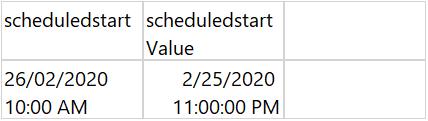
From my data set I need to pull through a scheduled start date - which i only want to show as the Day (ie Wednesday) instead of the whole date and time field. the problem i have is that the Scheduled start is the correct date, Scheduled start Value isn't the correct date, all the formatting and expressions that i try i can only do against the scheduled start value cell, if i try and use Scheduled start i get an error
pastedimage1582761059224v1.png

I have the same question (0)
  • Suggested answer
    Mayank Pujara Profile Picture
    830 on at

    I guess you just need to apply Expression on this field to display week day as shown below..

    =WeekdayName(DatePart("w", Today))

    see below for more information

    www.sqlservercentral.com/.../ssrs-expressions-tips-and-tricks

  • Mbentick Profile Picture
    56 on at

    Thanks for your input, an expression on the cell ScheduledStart comes up with an error,which i am guessing is because it isn't a value??

    The expression does work for the cell ScheduledStartValue, however as this date is coming through incorrectly its showing the incorrect Day??

    I'm not sure if it is converting my dates and times to a different timezone??

  • Mbentick Profile Picture
    56 on at

    i have worked out a work around for this issue.

    i have used the following expression to add 11 hours to the Scheduled Start time, and edited the text box properties for number to dddd to show the Day of the week

    =DateAdd(DateInterval.Hour,11,Fields!scheduledstartValue.Value)

Under review

Thank you for your reply! To ensure a great experience for everyone, your content is awaiting approval by our Community Managers. Please check back later.

Helpful resources

Quick Links

Responsible AI policies

As AI tools become more common, we’re introducing a Responsible AI Use…

Neeraj Kumar – Community Spotlight

We are honored to recognize Neeraj Kumar as our Community Spotlight honoree for…

Leaderboard > Microsoft Dynamics 365 | Integration, Dataverse, and general topics

#1
Martin Dráb Profile Picture

Martin Dráb 45 Most Valuable Professional

#2
iampranjal Profile Picture

iampranjal 36

#3
Satyam Prakash Profile Picture

Satyam Prakash 31

Last 30 days Overall leaderboard

Product updates

Dynamics 365 release plans



