web
You’re offline. This is a read only version of the page.
close
Skip to main content

Notifications

Announcements

Community site session details

Community site session details

Session Id :
Microsoft Dynamics GP (Archived)

GP crashes for several users in the Terminal Server

(0) ShareShare
ReportReport
Posted on by 1,005

Users who login to GP form Terminal server are experiencing GP crashes when trying to open. We tried from the GP shortcut as well as the Start> All program menu. Users with GP locally installed are OK, it is just happening to users on terminal server.

GP crashes when opening, we can't even login with our name. Their GP version is 11.00.1752 SP2
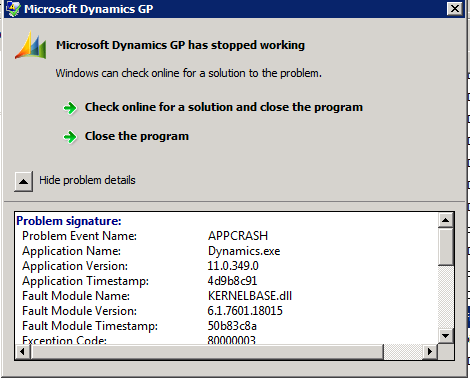
The entire error is below:

Problem signature:
  Problem Event Name:                        APPCRASH
  Application Name:                             Dynamics.exe
  Application Version:                           11.0.349.0
  Application Timestamp:                    4d9b8c91
  Fault Module Name:                          KERNELBASE.dll
  Fault Module Version:                        6.1.7601.18015
  Fault Module Timestamp:                 50b83c8a
  Exception Code:                                  80000003
  Exception Offset:                                00013219
  OS Version:                                          6.1.7601.2.1.0.16.7
  Locale ID:                                             1033
  Additional Information 1:                  0a9e
  Additional Information 2:                  0a9e372d3b4ad19135b953a78882e789
  Additional Information 3:                  0a9e
  Additional Information 4:                  0a9e372d3b4ad19135b953a78882e789
 

*This post is locked for comments

I have the same question (0)
  • steveendow Profile Picture
    2,281 on at

    Good call, Jonathan.  I forgot about standard file permissions.

  • Verified answer
    AndreaIES Profile Picture
    1,005 on at

    This was the problem. The Dynamic.set file had some path that the user could not access. Thanks all for your recommendations.

  • Community Member Profile Picture
    on at

    I'd also like to add to Steve's comment.. Make sure the users have sufficient rights to the Dynamics GP program folder.  See if the users are able to open the folder path from Windows Explorer.  If they can't that will produce errors as pictured above.

  • steveendow Profile Picture
    2,281 on at

    Hi,

    I wrote a post about AddIn DLLs and the Windows File Block security feature causing GP APPCRASH crashes at startup.

    http://dynamicsgpland.blogspot.com/2014/06/dynamics-gp-crashes-after-installing.html

    Have you copied any new files to the GP client directory, such as a new AddIn DLL?  If so, check the file Properties and see if you have the option to Unblock it.

  • soma Profile Picture
    24,410 on at

    Did you applied any updates or hotfix or service packs? If so, then try to recreate the REPORTS.dic and FORMS.dic files.

    Hope this helps!!!

Under review

Thank you for your reply! To ensure a great experience for everyone, your content is awaiting approval by our Community Managers. Please check back later.

Helpful resources

News and Announcements

Season of Giving Solutions is Here!

Quick Links

Responsible AI policies

As AI tools become more common, we’re introducing a Responsible AI Use…

Neeraj Kumar – Community Spotlight

We are honored to recognize Neeraj Kumar as our Community Spotlight honoree for…

Leaderboard > 🔒一 Microsoft Dynamics GP (Archived)

Last 30 days Overall leaderboard

Featured topics

Product updates

Dynamics 365 release plans



