web
You’re offline. This is a read only version of the page.
close
Skip to main content

Announcements

No record found.

News and Announcements icon
Community site session details

Community site session details

Session Id :
Microsoft Dynamics AX (Archived)

Account Payable - Processing Charges ( Landed Cost )

(0) ShareShare
ReportReport
Posted on by 14,855

Dear 

why is it that in the Charges , i have the ability to choose Vendor but in the drop down list i still see the ledger accounts and not the Vendor List ?
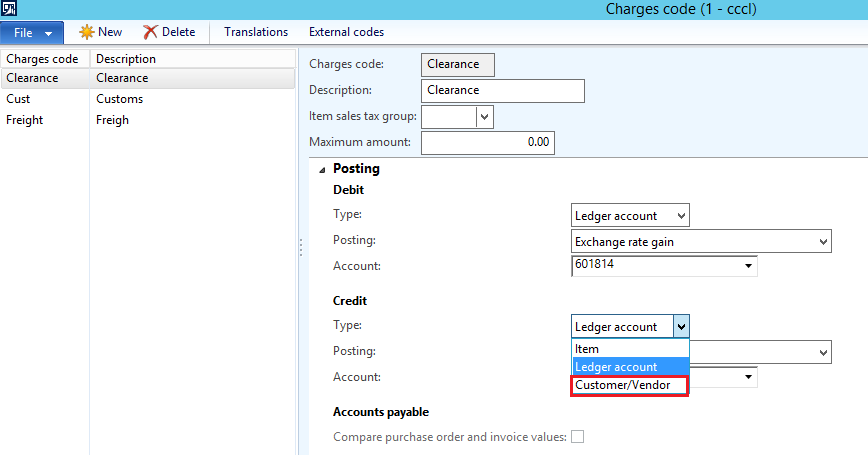
Charges1.png

should i be able to choose the vendor ID from here so that when we post a charges it will affect the Vendor Statement ?

in case i am mistaken

what is the normal AX method of processing these Charges?

is it :

1. Add Charges on top of PO  (Debit: Expense ) (Credit Transitory account )

2. Invoice expense (Debit Transitory account ) (Credit Account Payable)

is it like this ? or do we invoice the charges from inside the PO as well ?

*This post is locked for comments

I have the same question (0)
  • Suggested answer
    Ludwig Reinhard Profile Picture
    Microsoft Employee on at

    Hello Patrick,

    I think the reason why AX still shows you the ledger accounts even though you selected "Customer/Vendor" is a shortcoming / design error that does however not influence your ledger postings as the customer/vendor account will be used for posting the charge.

    In regards to your processing question:

    How you post charges depends on the accounting rules in your country and how your accountants want to have it recorded. What you show above records all charges on an expense account. Many countries require to add those costs on top of your item costs and record it in the company's balance sheet. You can certainly do the posting above but then you need to clarify with your accountants how to include those charges into the correct section of your financial reporting package.

    Hope it helps,

    Ludwig

  • Abdo Khoury Profile Picture
    14,855 on at

    Dear Ludwig

    thank you for your prompt reply, i most certainly need to add the charges on top of the item cost , how do I do that ?

    should I select Item in the drop down list ?

    your explanation is appreciated

  • Suggested answer
    Prashant Singh Profile Picture
    8,802 on at

    Dear  Patrick,

    You have two option here

    1. Put charges on PO if you are paying the charges to the same supplier

    i. Dr. Inventory Cr. AP

    ii. Dr. AP Cr. Bank

    2. In case of paying charges to another supplier

    i.Dr. Inventory and Cr. Order freight (Transitory account)

    ii. Dr. Order freight (Transitory account) Cr. AP

    iii. Dr. Vendor Cr. Bank

    if you select the Customer.Vendor it means the current customer vendor selected in current order and if you select item means item selected in current order. 

  • Suggested answer
    Ludwig Reinhard Profile Picture
    Microsoft Employee on at

    Hello Patrick,

    You are right, simply select "item" in the drop down list to get them posted on top of your item costs.

    Irrespective of that you might need to consider an additional issue that many companies face; that is, summary invoices that you receive from freight forwarders. According to most accounting regulations you also need to add those costs on top of your item costs but you often miss the relationship to the individual items and purchase orders to do that. Here you need to think how you can "allocate" them and need to discuss this concept with your accountants and Auditors.

    Hope it helps,

    Ludwig

Under review

Thank you for your reply! To ensure a great experience for everyone, your content is awaiting approval by our Community Managers. Please check back later.

Helpful resources

Quick Links

Introducing the 2026 Season 1 community Super Users

Congratulations to our 2026 Super Stars!

Meet the Microsoft Dynamics 365 Contact Center Champions

We are thrilled to have these Champions in our Community!

Congratulations to the April Top 10 Community Leaders

These are the community rock stars!

Leaderboard > 🔒一 Microsoft Dynamics AX (Archived)

#1
CP04-islander Profile Picture

CP04-islander 24

#2
Michel ROY Profile Picture

Michel ROY 14

#3
Jagadabi Profile Picture

Jagadabi 6

Last 30 days Overall leaderboard

Featured topics

Product updates

Dynamics 365 release plans
