web
You’re offline. This is a read only version of the page.
close
Skip to main content

Notifications

Announcements

No record found.

Community site session details

Community site session details

Session Id :
Microsoft Dynamics CRM (Archived)

SSRS using Microsoft Dynamics 365 Fetch as DataSource

(0) ShareShare
ReportReport
Posted on by 121

Hi, i just want to create SSRS project using Dynamics 365 Fetch as SataSource. I have installed:

- Visual Studio 2013

- BIDS for Visual Studio 2013

Microsoft Dynamics 365 Report Authoring Extension


And this what i have tried:

1. Create a connection string: 

https://mito.crm5.dynamics.com; my org unique name
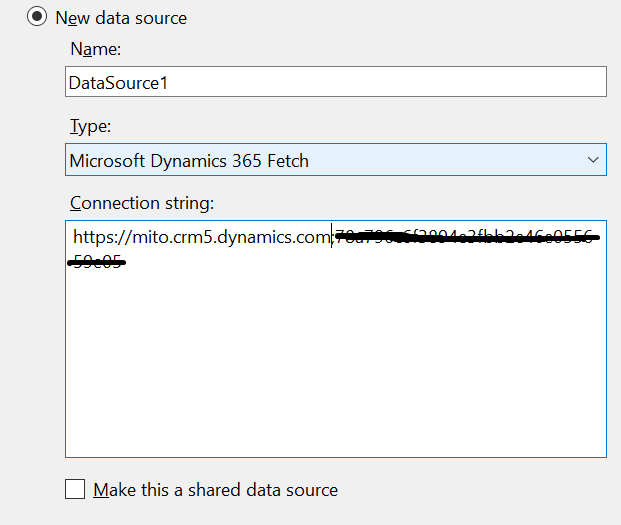
458102.1.png

2. Specified Credentials

830418.2.png


The result tell me that my credentials was wrong. But when i tried to login into CRM Online using those credentials, everything was fine. 

51804.3.png


What was wrong with my step above ?

*This post is locked for comments

I have the same question (0)
  • Suggested answer
    Alex Fun Wei Jie Profile Picture
    33,628 on at

    Hi,

    did you install the latest reporting extension? If no, Please install it.

    www.microsoft.com/.../details.aspx

  • Suggested answer
    Kokulan Profile Picture
    18,054 on at

    Hi

    As suggested above make sure you use the latest version of Report Authoring Extension.

    In your connection string I assume the shaded part is your org unique name? If not please try using the org unique name in your connection string as shown in the link below

    [View:https://community.dynamics.com/crm/b/crmtipsfromadeveloper/archive/2017/01/23/ms-crm-online-ssrstip1-fetch-data-source-and-connection-string]

    If above does not resolve the issue try uninstalling and reinstalling the extension.

    Hope this helps

  • Suggested answer
    Flydancer Profile Picture
    1,332 on at

    Hi Fikri,

    like stated before you have to use the organization name, not the organization id

  • FikriHailal Profile Picture
    121 on at

    Hi Fun Wei Jie, i have installed the latest reporting extension. It's the same version from the above link you mentioned to me.

  • FikriHailal Profile Picture
    121 on at

    Hi, i was used the org unique name. In my crm organization. The org unique name showed as a number like org unique id but without "-".

    I.E : if org unique id is : 708ac-0812bc-8181  then my org unique name is: 708ac0812bc8181.

  • Suggested answer
    Alex Fun Wei Jie Profile Picture
    33,628 on at

    Hi,

    can you go to Setting > Customization > Developer Resources? Get your organization name like below picture.

    6746.35.PNG

  • FikriHailal Profile Picture
    121 on at

    50578.3.png

  • FikriHailal Profile Picture
    121 on at

    Any idea ? anyone

  • Suggested answer
    Jharana Baliyar Singh Profile Picture
    2,667 on at

    Hello,

    Please have a look in to below url :

    community.dynamics.com/.../244891

    social.msdn.microsoft.com/.../crm-2011-online-bids-unable-to-connect-to-data-source-crm-onlinethe-connection-to-server

    And also check with the latest reporting extension, visual studio version .

    Thanks,

    Jharana

  • Suggested answer
    Alex Fun Wei Jie Profile Picture
    33,628 on at

    Hi,

    https://mito.crm5.dynamics.com; my org unique name <--- changed into https://mito.crm5.dynamics.com/ my org unique name

    I just tested in my environment, everything is working as expected.

    I also recommend you try to install visual studio 2015 and give a try.

    If in the end , nothing is working, contact Microsoft support would be the best idea.

    73014.2.PNG

Under review

Thank you for your reply! To ensure a great experience for everyone, your content is awaiting approval by our Community Managers. Please check back later.

Helpful resources

Quick Links

Responsible AI policies

As AI tools become more common, we’re introducing a Responsible AI Use…

Neeraj Kumar – Community Spotlight

We are honored to recognize Neeraj Kumar as our Community Spotlight honoree for…

Leaderboard > 🔒一 Microsoft Dynamics CRM (Archived)

#1
SA-08121319-0 Profile Picture

SA-08121319-0 4

#1
Calum MacFarlane Profile Picture

Calum MacFarlane 4

#3
Alex Fun Wei Jie Profile Picture

Alex Fun Wei Jie 2

Last 30 days Overall leaderboard

Featured topics

Product updates

Dynamics 365 release plans
