web
You’re offline. This is a read only version of the page.
close
Skip to main content

Notifications

Announcements

No record found.

Community site session details

Community site session details

Session Id :
Microsoft Dynamics GP (Archived)

Employee State Tax Summary is blank

(0) ShareShare
ReportReport
Posted on by 18,306
Hello,
Employee who is in Florida her State Tax information is not showing into W2. I found in Employee State Tax MaintenanceàSummary it didn’t show any data. Only this employee having problem other employee is same Florida State did show data in W2 as well as in Employee State Tax screen.
Below is screen shot for same :
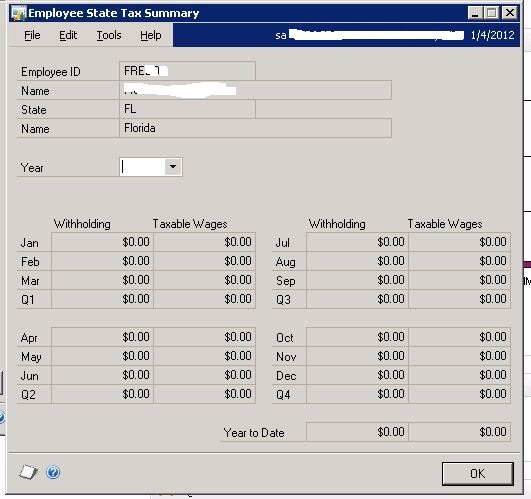
Any Update on above issue will be highly appreciable.
Thanks
Sandip

*This post is locked for comments

I have the same question (0)
  • Suggested answer
    Community Member Profile Picture
    on at

    Is the employee setup showing active for Florida state tax for this employee?

    Did they earn enough per payperiod to pay tax?

    The year is blank on this screen, you have to select a year.

    Have you checked other inquiry options for this employee to make sure they have state tax?  In PR Check history you can drill down for more information and it will show state tax.  Smartlists are another good place to look.

  • sandipdjadhav Profile Picture
    18,306 on at

    Jan,

    Thanks much for your reply.

    Is the employee setup showing active for Florida state tax for this employee?

    Yes it shows. To give you more information. Before it was Texas then after processing Payroll in 2011 for 1 month we changed to Florida.

    2) The year is blank on this screen, you have to select a year.

    Year is not available to select.

    3) Have you checked other inquiry options for this employee to make sure they have state tax?  

    I have check report "State Wage Report" it did not show any data.

    Any further help will be highly appreciable.

    Thanks

    Sandip

  • Community Member Profile Picture
    on at

    You did not answer if they earned enough per payperiod.  It appears that no state tax was taken for this employee, therefore none would be on the W-2.

    We had a similar issue with an employee, but discovered it during the year and changed the tax setup to correct.  

    I would reenter the tax setup and verify it is working correctly on next PR run.  Unfortunately there is no way to fix for last year, the employee will be responsible for filing and paying any tax due.

  • sandipdjadhav Profile Picture
    18,306 on at

    Jan,

    We have created new Employee ID and map all Tax properly, did payroll for 1st week and still it didn't show any data in State Wage Report as well as Employee State Tax Summary.

    May I know What is Taxable Salaried Income for Florida? Can you give me your email id so I will email you Income Details to you.

    Thanks

    Sandip

  • sandipdjadhav Profile Picture
    18,306 on at

    Jan,

    I found difference in Employee Pay Code Maintenance "Subject To Taxes" for "STate" and "Local" was not marked.

    Now my question is How we will rectify Payroll which already process for this year?

    Your earliest reply is appreciable.

    Thanks

    Sandip

  • Community Member Profile Picture
    on at

    Sorry I am in Nebraska & do not deal with other states.  You should be able to look this up.

    Are you talking about 2012 first payroll?  Has it been given to the employees yet?  If not you can void the check and reissue to correct.

    You cannot correct 2011 payroll as I stated before.

  • sandipdjadhav Profile Picture
    18,306 on at

    Jan,

    Appreciate your help. It's too late client inform me after sending ACH file to bank. Is there way to correct Tax.

    I think - On Next Payroll we need to pass manual Transaction for State Tax but I don't know to create ACH file?

    Do you have any other workaround?

    Thanks

    Sandip

  • Community Member Profile Picture
    on at

    What we have done to correct an error after it is paid is to have the employee pay us back, void the PR DD and reissue corrected check.

    Hope this helps.

  • sandipdjadhav Profile Picture
    18,306 on at

    Jan,

    THanks much for your quick reply; I don't think its possible because we are in Texas and employee is Florida. Already salary amount is withdraw from Bank.

    Let me open other support request and let us see what other bloggers says.

    Thanks much for your all help. Really appreciate.

    Thansk

    Sandip

Under review

Thank you for your reply! To ensure a great experience for everyone, your content is awaiting approval by our Community Managers. Please check back later.

Helpful resources

Quick Links

Responsible AI policies

As AI tools become more common, we’re introducing a Responsible AI Use…

Neeraj Kumar – Community Spotlight

We are honored to recognize Neeraj Kumar as our Community Spotlight honoree for…

Leaderboard > 🔒一 Microsoft Dynamics GP (Archived)

#1
mtabor Profile Picture

mtabor 1

Last 30 days Overall leaderboard

Featured topics

Product updates

Dynamics 365 release plans



