web
You’re offline. This is a read only version of the page.
close
Skip to main content

Announcements

No record found.

News and Announcements icon
Community site session details

Community site session details

Session Id :
Customer Insights - Journeys forum

Insights display incorrect data in interactions tab

(0) ShareShare
ReportReport
Posted on by 5
We have various customer journeys setup in Marketing App which are running continuously, but when i looked into insight - > Interactions, Email Opened for same customer displayed multiple time even though its opened once.
I have the same question (0)
  • LeoAlt Profile Picture
    16,331 Moderator on at

    Hi Sandeep,

    Could you share what your Marketing App version is? 

    Mine is 9.1.0000.8031.

    Your contact might had opened his/her marketing email for several times in a minute.
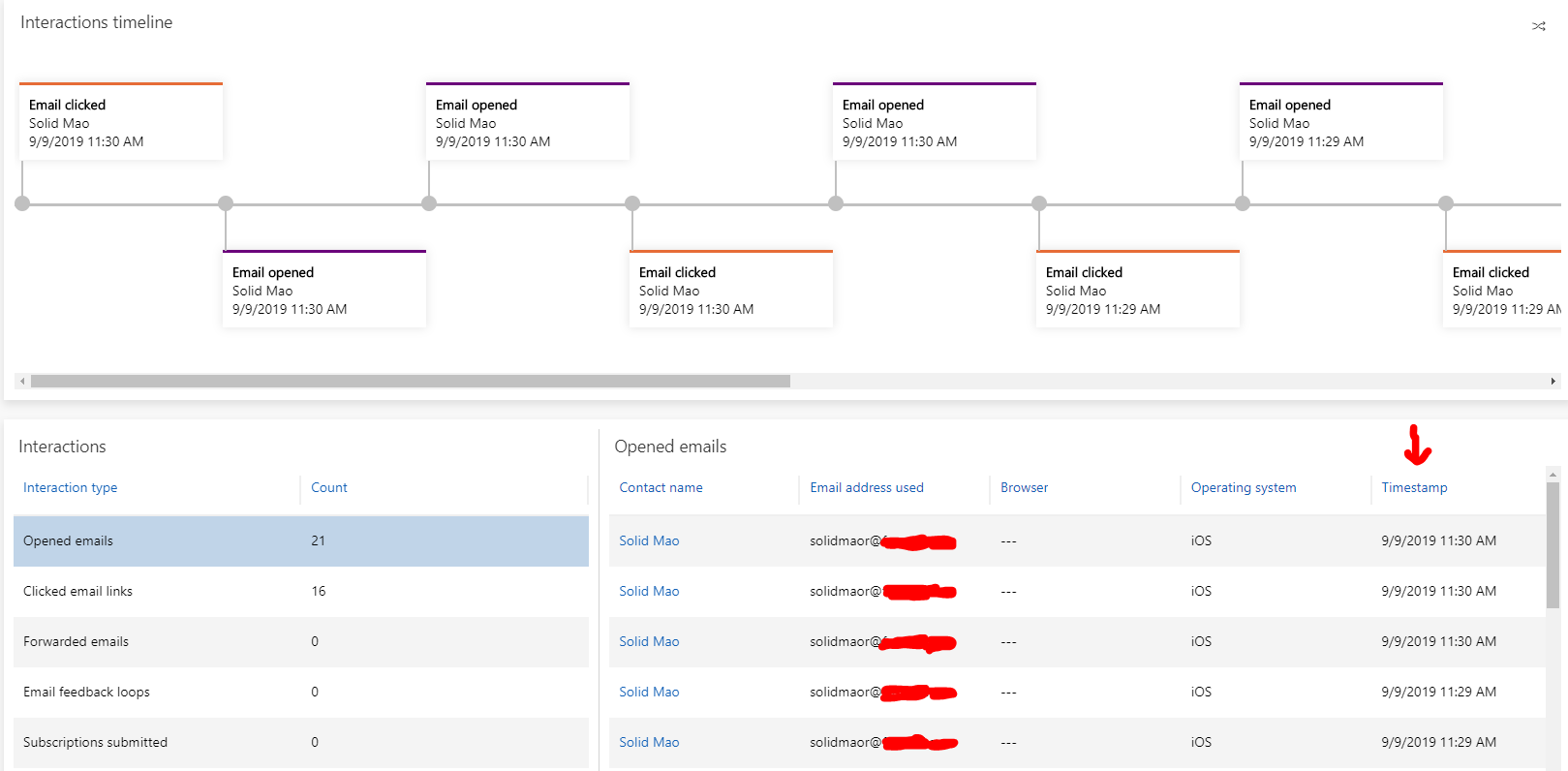
    991.png

    And there is a interface in Marketing developer guide which could give us details of each click for specific contact, you will see Timestamp are actually different for every retrieved records.

    https://docs.microsoft.com/en-us/dynamics365/customer-engagement/marketing/developer/retrieve-interactions-contact


    Below is my retrieving code:


    var url = "https://org.crm.dynamics.com/api/data/v9.0/msdyncrm_LoadInteractionsPublic";


    var data = {

      "InteractionType": "EmailOpened",

      "ContactId": "ec595a43-a3d2-e911-a825-000d3a3b10ec"

    };


    var req = new XMLHttpRequest();

    req.open("POST", url, false);

    req.setRequestHeader("Accept", "application/json");

    req.setRequestHeader("Content-Type", "application/json; charset=utf-8");

    req.setRequestHeader("OData-MaxVersion", "4.0");

    req.setRequestHeader("OData-Version", "4.0");

    req.setRequestHeader("Prefer", "odata.include-annotations=*");

    req.send(JSON.stringify(data));

    if (req.readyState === 4) {

      if (req.status === 200) {

        var results = JSON.parse(req.response)["Data"];

      } else {

        console.log("err");

      }


    Result for all Timestamps in each interaction for specific contact: 

    (It seems that the Timezone for retrieving action is different from system time zone or customer journey time zone, but you could try open Email once for test, and there shall be just one record generated.)
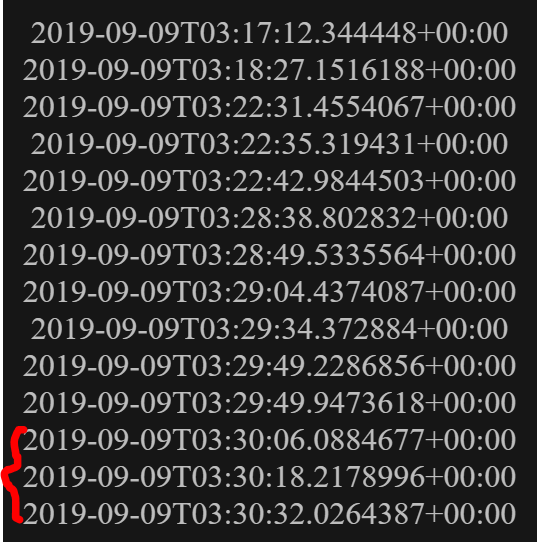
    992.png

    Hope it helps.

    Best Regards,

    Leo

  • Suggested answer
    ShaileshJain Profile Picture
    Microsoft Employee on at

    Besides Leo's suggestion to identify precise timestamp of email opens to confirm that they are indeed distinct,

    - you may also check if your are having some glitches on the recipient side that is yielding multiple opens?

    - one easy way to check this is to review the insights for the email being used - if #opens is substantially higher than #unique opens

    pastedimage1568178460884v1.png

Under review

Thank you for your reply! To ensure a great experience for everyone, your content is awaiting approval by our Community Managers. Please check back later.

Helpful resources

Quick Links

November Spotlight Star - Khushbu Rajvi

Congratulations to a top community star!

Forum Structure Changes Coming on 11/8!

In our never-ending quest to help the Dynamics 365 Community members get answers faster …

Dynamics 365 Community Platform update – Oct 28

Welcome to the next edition of the Community Platform Update. This is a status …

Leaderboard > Customer Insights - Journeys

Last 30 days Overall leaderboard

Featured topics

Product updates

Dynamics 365 release plans
