web
You’re offline. This is a read only version of the page.
close
Skip to main content

Announcements

No record found.

News and Announcements icon
Community site session details

Community site session details

Session Id :
Finance | Project Operations, Human Resources, ...
Suggested Answer

Free text invoice workflow - invoice total condition

(0) ShareShare
ReportReport
Posted on by 5

Hi,

In the workflow editor for free text invoice workflows, when I create a condition step and select "Customer free text invoice.Invoice total" on the condition, it doesn't give the option to select a currency next to the value. This means that the workflow doesn't first convert the amount into the required currency before validating the condition. 

E.g. if the requirement is to send anything over 500GBP for approval, if the invoice is 501DKK it will validate as TRUE. Whereas we need it to convert to GBP and then use that amount.

On other fields the value field has a currency option, but invoice total for free text invoices doesn't. 

Does anyone know a way around this? Or know why the invoice total option doesn't specify currency when other amount fields do?

See screenshot below showing invoice total (no currency option) vs invoice line amount (currency option).
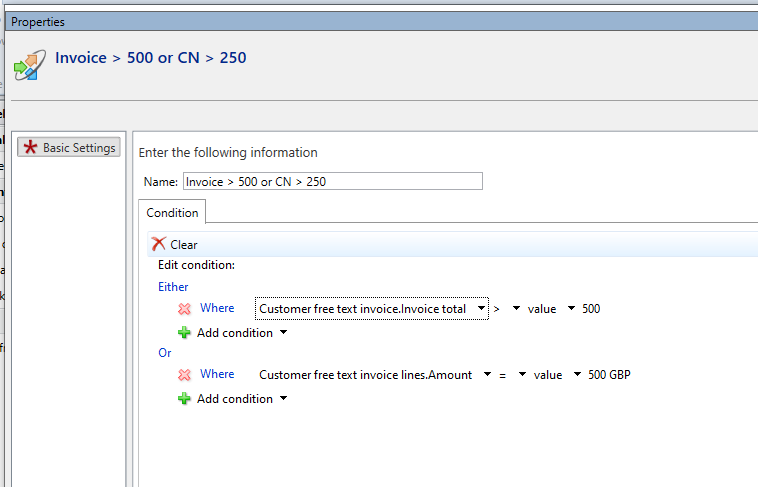
pastedimage1637336274209v1.png

Thanks,

Tom

I have the same question (0)
  • Suggested answer
    Ludwig Reinhard Profile Picture
    Microsoft Employee on at

    Hi Tom,

    I had the same question some months ago and got the feedback to create a second condition where you specify the currency.

    So your first line says invoice total = 500

    Create a second condition that says currency = GBP

    Best regards,

    Ludwig

  • Tom.jordan Profile Picture
    5 on at

    Hi Ludwig,

    Thanks for the quick reply.

    I've added the second condition for currency = GBP, but unfortunately this means if it is a non-GBP currency then the condition results in FALSE regardless of the amount.

    Also, it wouldn't work if we had a set of conditions for each currency as this would need to assume a constant exchange rate.

    Do you have any other suggestions?

    Thanks,

    Tom

  • Suggested answer
    Ludwig Reinhard Profile Picture
    Microsoft Employee on at

    Hi Tom,

    You could set up multiple conditions for multiple currencies but this makes the setup lengthy and does not guarantee that all currencies that are used in the future are covered.

    My other suggestion is trying to get a hold on MS. Add an idea on the ideas portal and share it here and in social media to let people vote for it.

    You will certainly get my vote ;-)

    Best regards,

    Ludwig

Under review

Thank you for your reply! To ensure a great experience for everyone, your content is awaiting approval by our Community Managers. Please check back later.

Helpful resources

Quick Links

Introducing the 2026 Season 1 community Super Users

Congratulations to our 2026 Super Stars!

Meet the Microsoft Dynamics 365 Contact Center Champions

We are thrilled to have these Champions in our Community!

Congratulations to the April Top 10 Community Leaders

These are the community rock stars!

Leaderboard > Finance | Project Operations, Human Resources, AX, GP, SL

#1
Giorgio Bonacorsi Profile Picture

Giorgio Bonacorsi 608

#2
André Arnaud de Calavon Profile Picture

André Arnaud de Cal... 591 Super User 2026 Season 1

#3
CP04-islander Profile Picture

CP04-islander 430

Last 30 days Overall leaderboard

Product updates

Dynamics 365 release plans
