web
You’re offline. This is a read only version of the page.
close
Skip to main content

Notifications

Announcements

No record found.

Community site session details

Community site session details

Session Id :
Microsoft Dynamics AX (Archived)

Posting Pending Invoice with multiple PO

(0) ShareShare
ReportReport
Posted on by

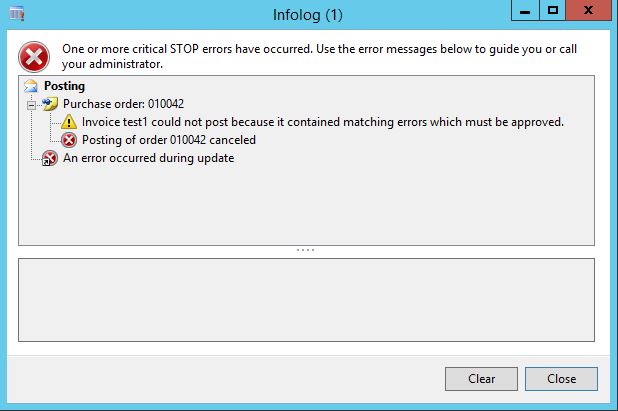
When posting invoice with discrepancy you need to approve the invoice before it can be posted, but even the invoice was approved there's always an error occurring if the invoice has multiple PO.

I tried to use single PO when posting the invoice with matching discrepancy and approve it for posting to disregard the mismatch variance and it worked, is there any Hotfix for this error?

This is the error that's popping up:
1588.Capture.JPG

TIA!

*This post is locked for comments

I have the same question (0)
  • Suggested answer
    Community Member Profile Picture
    on at

    Hi Melly,

    Do you check your PO ? Maybe it should be APPROVED first.

    Regards,

    WH

  • Community Member Profile Picture
    on at

    Hi Sci,

    It's already been approved because before creating pending invoice it's a must that the PO should have product receipt. I Approved the invoice(Multiple PO) before posting and still getting the error.

    Thanks,

    Melly

  • Verified answer
    Community Member Profile Picture
    on at

    Hi Melly,

    Okay .Sorry . Its already on the post.

    Try refer to this link.

    docs.microsoft.com/.../resolve-invoice-totals-invoice-matching-discrepancies

    technet.microsoft.com/.../hh292599.aspx

    Regards,

    QS

  • Community Member Profile Picture
    on at

    Hi QS,

    Thank you for the reference. :) I already read the links but unfortunately it didn't work thanks anyway.

    Regards,

    Melly

  • Verified answer
    Ludwig Reinhard Profile Picture
    Microsoft Employee on at

    Hello Melly,

    Please open the matching details form and review the variances.

    In the matching details form there is a specific approval checkbox that you must select in order to get the required approval that allows you posting the invoice.

    Best regards,

    Ludwig

  • Community Member Profile Picture
    on at

    Hi Dr. Ludwig,

    I already ticked "Approve posting with matching discrepancy" if this tick box was checked even with discrepancy it can be posted; But the problem upon posting the error "Invoice XXXXXXXX could not post because it contains matching errors which must be approve". This error will only occur if you have an invoice with Multiple PO with discrepancy.

    Regards,

    Melly

  • Verified answer
    Mahmoud Hakim Profile Picture
    17,887 on at

    As Ludwig mentioned you , you need to check matching details

    You can find more details about matching details here

    technet.microsoft.com/.../hh209713.aspx;MSPPError=-2147217396

Under review

Thank you for your reply! To ensure a great experience for everyone, your content is awaiting approval by our Community Managers. Please check back later.

Helpful resources

Quick Links

Responsible AI policies

As AI tools become more common, we’re introducing a Responsible AI Use…

Neeraj Kumar – Community Spotlight

We are honored to recognize Neeraj Kumar as our Community Spotlight honoree for…

Leaderboard > 🔒一 Microsoft Dynamics AX (Archived)

#1
Priya_K Profile Picture

Priya_K 4

#1
Martin Dráb Profile Picture

Martin Dráb 4 Most Valuable Professional

#3
Ali Zaidi Profile Picture

Ali Zaidi 2

Last 30 days Overall leaderboard

Featured topics

Product updates

Dynamics 365 release plans
