web
You’re offline. This is a read only version of the page.
close
Skip to main content

Notifications

Announcements

No record found.

Community site session details

Community site session details

Session Id :
Microsoft Dynamics AX (Archived)

Posting type and validation to restrict choice of ledger account

(0) ShareShare
ReportReport
Posted on by 20

Hi guys,


In a ledger account you have the optional field Posting type and different options for “posting type validation”.

In AX 2009, if you use posting type with a validation rule you can prevent other ledger accounts being chosen for that particular transaction.

In my example I have set up the Ledger accounts 140120 and 140220 as follows:

-          Posting type = “Purchase, receipt”

-          Validate posting = “To be filled in”
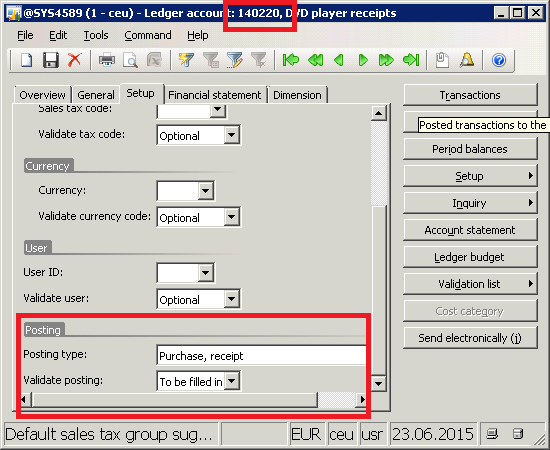
question_2D00_account.png

Thus, only those two accounts are available when I choose the ledger account for Purchase receipts in Item group/Posting. Makes sense!
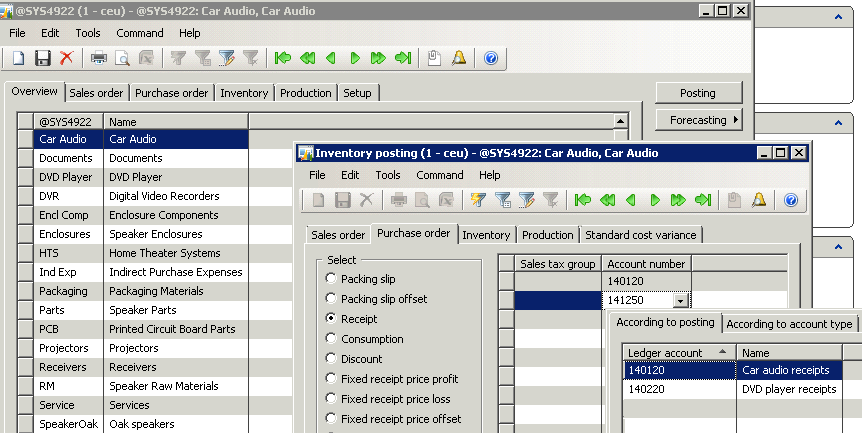
question_2D00_posting.png

I have not managed to make it work in AX 2012 R3 (Contoso). Is this a discontinued feature, or am I maybe missing a parameter somewhere?

I did find another forum post by googling. It’s basically the same question, restricting the choice of ledger accounts for a bank account. I didn’t find a definitive answer.

*This post is locked for comments

I have the same question (0)
  • RamK Profile Picture
    2,580 on at

    Go to General Ledger -> Common -> Main Accounts, Select the account, Edit, expand Setup fast tab -> Posting-> Select the Posting type

  • Prashant Singh Profile Picture
    8,802 on at

    Hi Sami Stranius,

    Posting definitions are an alternative to posting profiles. You can use both posting definitions and posting profiles to create subledger journal lines for originating transactions that meet selected criteria. However, posting definitions and posting profiles are not interchangeable. You might have to use both to meet your organization’s needs.

    Its working now in AX 2012 r3 You can find this in GL main account >> Edit >> Setup >> Posting >> Validate Posting. 

    Screen-Shot-2015_2D00_06_2D00_25-at-12.23.25-AM.png

  • Faisal Fareed Profile Picture
    10,796 User Group Leader on at

    You can have a look on my suggested answer on this thread community.dynamics.com/.../164188

Under review

Thank you for your reply! To ensure a great experience for everyone, your content is awaiting approval by our Community Managers. Please check back later.

Helpful resources

Quick Links

Responsible AI policies

As AI tools become more common, we’re introducing a Responsible AI Use…

Neeraj Kumar – Community Spotlight

We are honored to recognize Neeraj Kumar as our Community Spotlight honoree for…

Leaderboard > 🔒一 Microsoft Dynamics AX (Archived)

#1
Martin Dráb Profile Picture

Martin Dráb 4 Most Valuable Professional

#1
Priya_K Profile Picture

Priya_K 4

#3
MyDynamicsNAV Profile Picture

MyDynamicsNAV 2

Last 30 days Overall leaderboard

Featured topics

Product updates

Dynamics 365 release plans
