web
You’re offline. This is a read only version of the page.
close
Skip to main content

Announcements

No record found.

News and Announcements icon
Community site session details

Community site session details

Session Id :
Business Central forum

How to get Item Available Quantity by Lot (Item Tracking Lines) with AL + how to check if a Lot No./Serial No. is valid

(0) ShareShare
ReportReport
Posted on by

Hi,

please,

1) How to calculate the item available Quantity by Lot No. or by Serial No. with AL.

2) how to check if a Lot No./Serial No. is valid (already exists) with AL. (ex: how to check if LT10 is a valid Lot No. related to an item and a Location).

----------------

Thanks in advance,

I have the same question (0)
  • Verified answer
    Community Member Profile Picture
    on at

    Hi all,

    Because I didn't get an answer and because the answer could interest someone else :

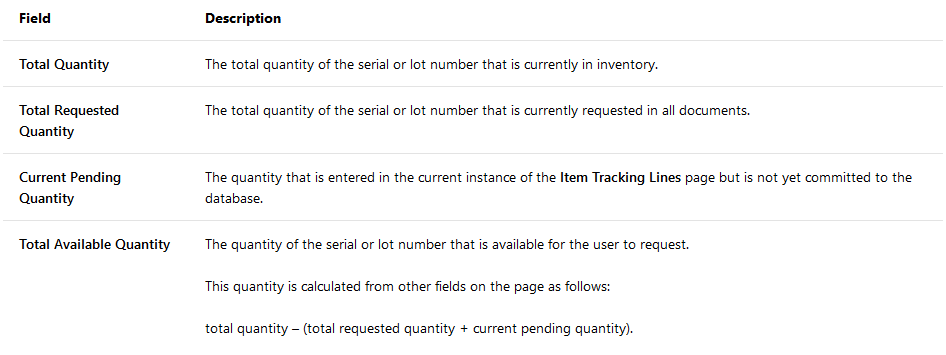
    1) the formula to calculate the item available Quantity is as follow :   

                  Total Available Quantity = Total Quantity - Current Reserved Quantity.

                                                         = Total Quantity - (total requested quantity + current pending quantity).

                                                         = Quantity in inventory – (all demands + quantity not yet committed to the database).

       where
       2018_2D00_12_2D00_12-16_5F00_34_5F00_03_2D00_Window.png

    The Total Quantity could be calculated based on the "Remaining Qty." from the Item Ledger Entry table (SUM with filter on fields Open = True and Positive = True).

    The Total Requested Quantity is the quantity reserved on other outbound documents which is not posted yet and could be calculated based on the Reservation Entry table

    The Current pending quantity, if you are assigning lots on by code where you group Quantity by Lot No. or Serial No., you don't need to use it, because if fact it means the quantity on the current document not committed yet (not committed to Reservation Entry table) and this could be used when you have a page with temporary table.

    2) To check a Lot No./Serial No. is valid (already exists) you can filter on the Lot No./Serial No. on the Item Ledger Entry (with filter on fields Open = True and Positive = True if you want Lot No. Serial No. with positive available Quantity).

    --

    If someone reads this and needs more info, just write me back and I hep you.

    -----

    Best Regards,

  • Jun Wang Profile Picture
    8,208 Moderator on at

    Hi, about the Current pending quantity, could you provide an example? 

    I did a test as following. 

    1/ create item A with qty of 10 with serial no.

    2/ create a SO requesting 5, specifying the serial no. 

    3/ create another SO requesting 3, specifying the serial no. 

    when I check the item tracking select entries page, the Current pending qty all shows zero. But I would expect it show 1 for the eight line whose tracking no. has been specified. 

    pastedimage1684510152563v1.png

    any thoughts? 

  • Suggested answer
    NAV_with_Narang Profile Picture
    2,320 Moderator on at

    Thankyou for assisting the community with the answer

Under review

Thank you for your reply! To ensure a great experience for everyone, your content is awaiting approval by our Community Managers. Please check back later.

Helpful resources

Quick Links

November Spotlight Star - Khushbu Rajvi

Congratulations to a top community star!

Forum Structure Changes Coming on 11/8!

In our never-ending quest to help the Dynamics 365 Community members get answers faster …

Dynamics 365 Community Platform update – Oct 28

Welcome to the next edition of the Community Platform Update. This is a status …

Leaderboard > Business Central

Last 30 days Overall leaderboard

Featured topics

Product updates

Dynamics 365 release plans
