web
You’re offline. This is a read only version of the page.
close
Skip to main content

Notifications

Announcements

No record found.

Community site session details

Community site session details

Session Id :
Small and medium business | Business Central, N...
Suggested Answer

Post in Batch not working as expected for Purchase Invoice and Sales Invoice

(0) ShareShare
ReportReport
Posted on by 195

One of my client need to post a 200 to 400 Purchase/Sales invoice every month. We tried posting all the transactions in Purchase Invoice Listing by selecting all, it only posted few, but not all the transactions selected. We tried using the "Post Batch" feature, but it does not work out too. We thought there might be error in the transactions which causing system not to post, but after check the transactions from Test Report and Preview Posting, all transactions are fine without error. Is there some posting setup we are missing out? Or system bug?

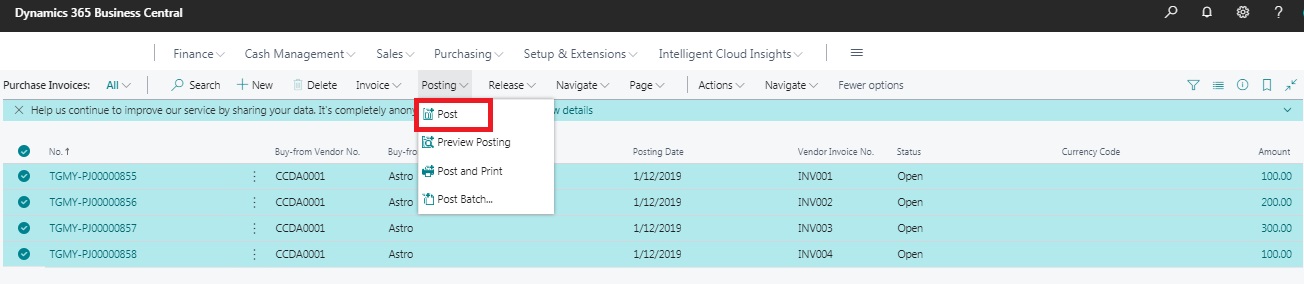
Refer screenshots below are the 4 Purchase Invoices I prepare in dummy company to test the batch posting feature.

1. We try select all the 4 invoices and post at once.
   Batch-Posting-1.jpg

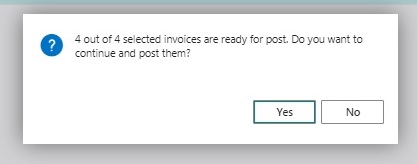
2. The message shows all 4 invoices are selected and ready for post.
   Batch-Posting-2.jpg

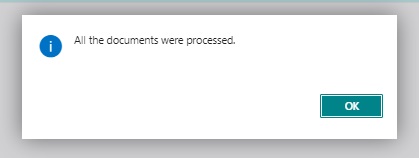
3. Weird thing is, a message shows all 4 transactions are processed instead posted.
   Batch-Posting-3.jpg

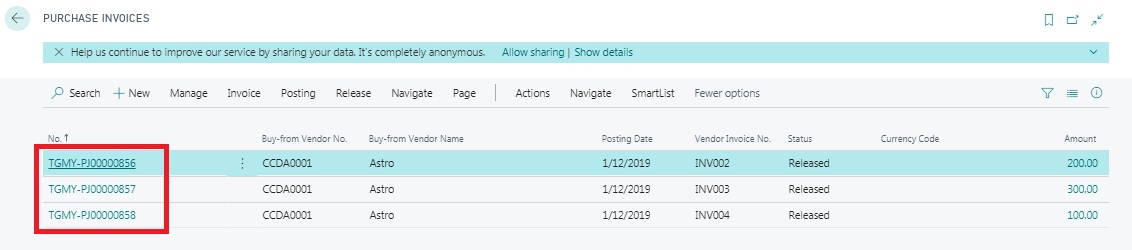
4. Back to the Invoice listing, only 1 transaction was posted instead of all 4.
Batch-Posting-4.jpg

I have the same question (0)
  • Dirk Profile Picture
    on at

    Please create a service request.

  • Suggested answer
    divyeshchitte Profile Picture
    968 on at

    Can you try posting this Invoices one by one and check if you are getting any error.

  • Community Member Profile Picture
    on at

    Have you tried posting every invoice one by one?

    Does it show an error in doing so?

    It there is an error in posting single invoice also, then it must have a broader picture as well?

  • Kelvin Hew Profile Picture
    195 on at

    Yes. We had raised a case with Microsoft. Still waiting their feedback after few question asked from them. It has been the 4th day now since I raised the case.

  • Kelvin Hew Profile Picture
    195 on at

    Yes I did, but no error found and all are posted by posting one by one manually.

  • Kelvin Hew Profile Picture
    195 on at

    Yes I did, but no error found and all are posted by posting one by one manually.

  • Lars Pelgrim Profile Picture
    15 on at

    Hi Kelvin,

    Did you receive an answer or do you know if this is fixed and in which CU?

    KR,

    Lars

  • Kelvin Hew Profile Picture
    195 on at

    Hi Lars,

    Yes, they had identified it as bug, they had solved it in version update.

  • Lars Pelgrim Profile Picture
    15 on at

    Hi Kelvin,

    Thank you for your quick reply, do you happen to know in which update, or do you know it is fixed in BC15 CU04 for sure?

    Thank you in advance.

  • Kelvin Hew Profile Picture
    195 on at

    Hi Lars,

    I can’t remember what is the version number, but I remember they have include the fix of this issue in version BC15 which rolled out in Feb-20.

Under review

Thank you for your reply! To ensure a great experience for everyone, your content is awaiting approval by our Community Managers. Please check back later.

Helpful resources

Quick Links

Responsible AI policies

As AI tools become more common, we’re introducing a Responsible AI Use…

Neeraj Kumar – Community Spotlight

We are honored to recognize Neeraj Kumar as our Community Spotlight honoree for…

Leaderboard > Small and medium business | Business Central, NAV, RMS

#1
OussamaSabbouh Profile Picture

OussamaSabbouh 2,135

#2
YUN ZHU Profile Picture

YUN ZHU 733 Super User 2025 Season 2

#3
Sumit Singh Profile Picture

Sumit Singh 612

Last 30 days Overall leaderboard

Featured topics

Product updates

Dynamics 365 release plans
