web
You’re offline. This is a read only version of the page.
close
Skip to main content

Announcements

No record found.

News and Announcements icon
Community site session details

Community site session details

Session Id :
Finance | Project Operations, Human Resources, ...
Answered

Display field that will be showing the sum of the amounts on the product receipt lines

(0) ShareShare
ReportReport
Posted on by 72

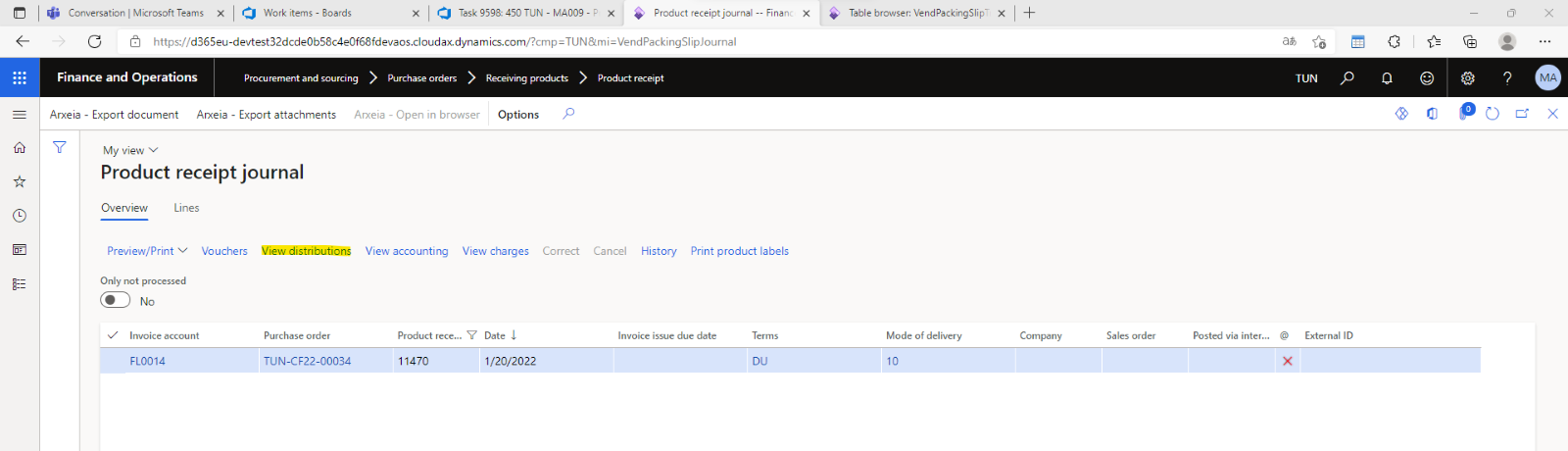
Hello evryone i have a task where i need to add a field that will be showing the sum of the amounts on the product receipt lines and the Currency in the product receipt journal.
pastedimage1668784842514v1.png

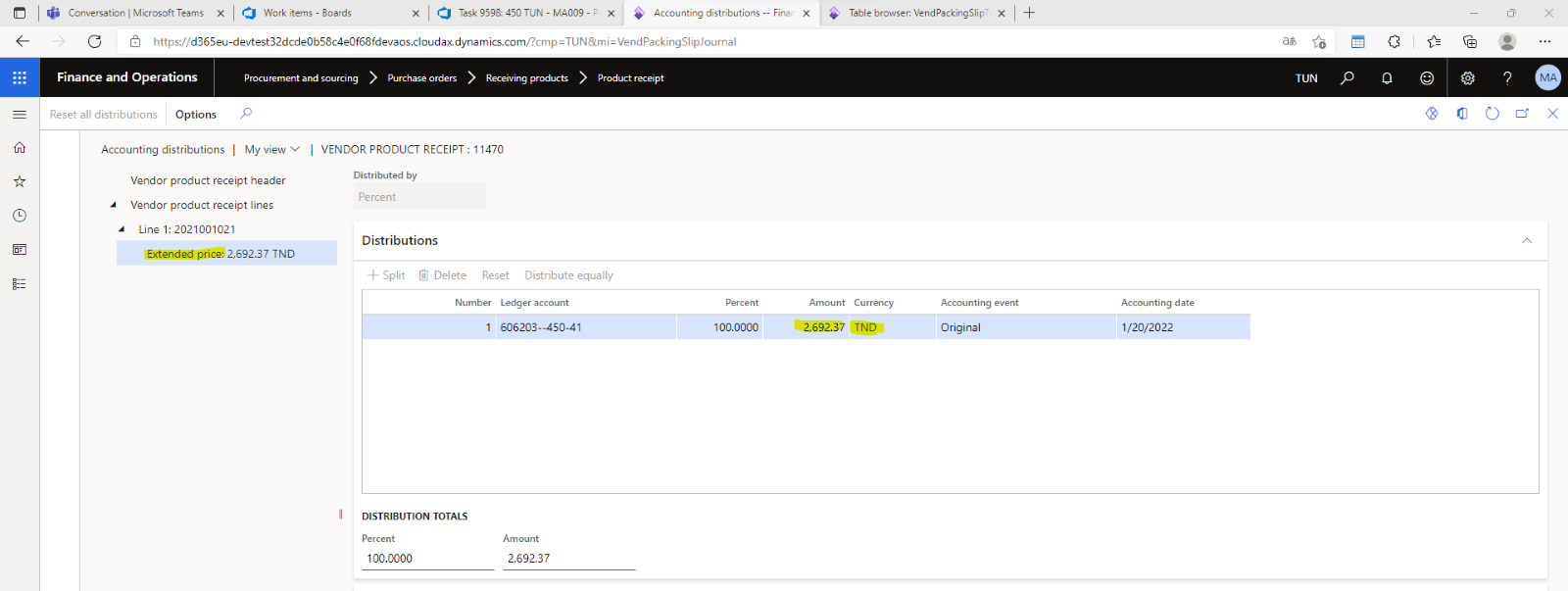
The distributions view in yallow is where I can locate the lines with their amounts and currencies as demonstrated in the image below
pastedimage1668785075715v2.png

When I checked, the field was getting data by an edit method. I want to know how to sum the multiple lines of the selected record also their value and how to acquire the relationship between the two forms/datasources.

thank you.

I have the same question (0)
  • Suggested answer
    GirishS Profile Picture
    27,843 Moderator on at

    Hi wassim,

    If you want to get the total amount you can directly get it from product receipt line. No need to go for view distribution. I guess view distribution will show all monetary amounts.

    On the product receipt form there is a lines tab next to overview tab. I guess that tab will have all the lines.

    So you can add a display method to get the total line amount from the tables used in the Lines tab against product receipt.

    Thanks,

    Girish S.

  • wassim.77 Profile Picture
    72 on at

    Hey Girish S.

    I want to thank you for your response first.

    I used your reasoning, and while it did work, it wasn't how I had intended.

    [ExtensionOf(tableStr(VendPackingSlipJour))]
    public final class VendPackingSlipJour_Extension
    {
        public display AmountMST SumProductReceipt()
        {
            VendPackingSlipJour vendPackingSlipJour;
            VendPackingSlipTrans vendPackingSlipTrans;
    
            select sum(ValueMST) from vendPackingSlipTrans
                where vendPackingSlipTrans.OrigPurchid == this.PurchId; 
    
                return vendPackingSlipTrans.ValueMST;
        }
    
    }

    In my situation, I want to obtain the product receipt total and the currency used without converting to US dollars, but the valueMST field returns the amount in monetary standard (national currency).

    productreceipt.png

    As demonstrated in the screenshot below, because the currency is CAD I'm getting 171.23 as a total but it should be 175.00 .

  • Verified answer
    GirishS Profile Picture
    27,843 Moderator on at

    I got your point. You can make use of "AccountingDistribution" table and "VendPackingSlipJour" table. Relation will be "SourceDocumentHeader".

    Try the below code and check whether it works for your scenario.

    [ExtensionOf(tableStr(VendPackingSlipJour))]
    public final class VendPackingSlipJour_Extension
    {
        public display AmountMST SumProductReceipt()
        {
            VendPackingSlipJour vendPackingSlipJour;
            VendPackingSlipTrans vendPackingSlipTrans;
            AccoutingDistribution   distribution;
            
            select sum(TransactionAmount) from distribution
                join vendPackingSlipJour
                where vendPackingSlipJour.SourceDocumentHeader == distribution.SourceDocumentHeader
                && vendPackingSlipJour.Purchid == this.PurchId
                && distribution.TransactionCurrency == "CAD"; 
    
            return distribution.TransactionAmount;
        }
    
    }

    Thanks,

    Girish S.

  • wassim.77 Profile Picture
    72 on at

    thank you Girish S

    So i did some modification and it worked here is the code for both the amount and currency for anyone how may need it


    [ExtensionOf(tableStr(VendPackingSlipJour))]
    public final class VendPackingSlipJour_Extension
    {
        public display AmountMST SumProductReceipt()
        { 
                VendPackingSlipJour vendPackingSlipJour;
                VendPackingSlipTrans vendPackingSlipTrans;
                AccountingDistribution   distribution;
            
            select sum(TransactionCurrencyAmount) from distribution
                join vendPackingSlipJour
                where vendPackingSlipJour.SourceDocumentHeader == distribution.SourceDocumentHeader
                && vendPackingSlipJour.Purchid == this.PurchId;
              
    
                return distribution.TransactionCurrencyAmount;
        }
    
        public display CurrencyCode SumProductReceiptCurrency()
        {
            VendPackingSlipJour vendPackingSlipJour;
            VendPackingSlipTrans vendPackingSlipTrans;
            AccountingDistribution accountingDistribution;
    
            select TransactionCurrency from accountingDistribution
                join vendPackingSlipJour
                where vendPackingSlipJour.SourceDocumentHeader == accountingDistribution.SourceDocumentHeader
                && vendPackingSlipJour.PurchId == this.PurchId;
    
            return accountingDistribution.TransactionCurrency;
        }
    
    }

Under review

Thank you for your reply! To ensure a great experience for everyone, your content is awaiting approval by our Community Managers. Please check back later.

Helpful resources

Quick Links

Introducing the 2026 Season 1 community Super Users

Congratulations to our 2026 Super Stars!

Meet the Microsoft Dynamics 365 Contact Center Champions

We are thrilled to have these Champions in our Community!

Congratulations to the April Top 10 Community Leaders

These are the community rock stars!

Leaderboard > Finance | Project Operations, Human Resources, AX, GP, SL

#1
Giorgio Bonacorsi Profile Picture

Giorgio Bonacorsi 608

#2
André Arnaud de Calavon Profile Picture

André Arnaud de Cal... 591 Super User 2026 Season 1

#3
CP04-islander Profile Picture

CP04-islander 430

Last 30 days Overall leaderboard

Product updates

Dynamics 365 release plans
