web
You’re offline. This is a read only version of the page.
close
Skip to main content

Notifications

Announcements

No record found.

Community site session details

Community site session details

Session Id :
Microsoft Dynamics CRM (Archived)

How to change "Decimal Number" into Time (mm:ss)

(0) ShareShare
ReportReport
Posted on by

Hi,

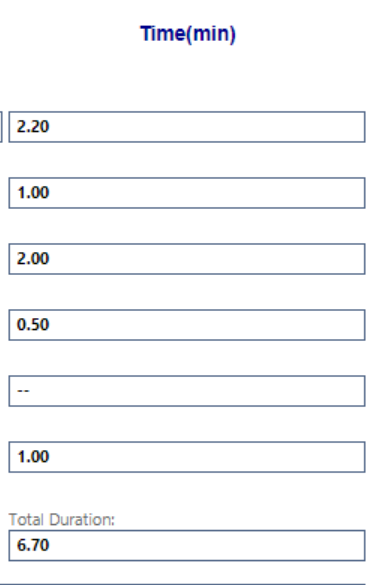
I am using decimal number field to enter the time in minutes:seconds. At the end we need to calculate total Duration. Below is the screenshot.

How to change the Total Duration to Time( ex: If it is 6.70 change it to 7.10(7minutes 10 seconds) )
2017_2D00_08_2D00_16_5F00_105558.png

*This post is locked for comments

I have the same question (0)
  • Suggested answer
    Henry J. Profile Picture
    5,237 on at

    I suggest you recreate your fields. Change your attribute type to "Whole Number" and type "Duration".

    That way CRM interprets them like you desire, and you can also use Calculated Fields to to the math.

    These kinds of fields store a number of seconds  n the database but they display something user friendly (1 hour, etc.)

  • Suggested answer
    Aric Levin - MVP Profile Picture
    30,190 Moderator on at

    If you can't convert the field to duration (per Henry's suggestion), you can use the following logic to get the number format:

    sciencing.com/convert-decimal-hours-minutes-6178981.html

    Not sure if there is a JavaScript function to do this, but, you can create a function that does the following:

    1. Split the number that you have on the period, which will give you number1 = 6, number2 = 70

    2. Check if values number2 is greater than 60. If yes Add 1 to number 1, and subtract 60 from number2 to get number 3. You can use mod function here (%)

    3. There you have it: Number1 has 7, Number3 has 10. Combine them and get the result.

    If you need to get that into time variable you can use the JavaScript Date function, but not sure if that is what you are looking for.

    Not the most elegant way, but might be useful. Possibly there are JS functions, but not aware of this scenario.

  • Suggested answer
    ashlega Profile Picture
    34,477 on at

    It's not even correct to convert the total:

    1.50 + 1.50 + 1.50 will render 4:50. You can't make it 5:30 no matter how you try (but that's what it is when you add minutes:seconds rather than decimals)

    You'll likely need some javascript to do the calculations, and, then, to convert the resutls (or change the fields as Henry suggested).First, might convert every decimal to seconds (minutes * 60 + seconds), then add up all of them, then convert the result to "decimal time":

    result = floor(result / 60) + (result - floor(result / 60)*60)/100;

  • ram r Profile Picture
    on at

    I would prefer a duration field(whole number) and if that's not an option, then with the current design,

    1. Add a javascript validation so that the decimals never exceed .59

    2. Convert each and every field to seconds, add them together and then get minutes out of the sum

Under review

Thank you for your reply! To ensure a great experience for everyone, your content is awaiting approval by our Community Managers. Please check back later.

Helpful resources

Quick Links

Responsible AI policies

As AI tools become more common, we’re introducing a Responsible AI Use…

Neeraj Kumar – Community Spotlight

We are honored to recognize Neeraj Kumar as our Community Spotlight honoree for…

Leaderboard > 🔒一 Microsoft Dynamics CRM (Archived)

#1
SA-08121319-0 Profile Picture

SA-08121319-0 4

#1
Calum MacFarlane Profile Picture

Calum MacFarlane 4

#3
Alex Fun Wei Jie Profile Picture

Alex Fun Wei Jie 2

Last 30 days Overall leaderboard

Featured topics

Product updates

Dynamics 365 release plans



