web
You’re offline. This is a read only version of the page.
close
Skip to main content

Announcements

No record found.

News and Announcements icon
Community site session details

Community site session details

Session Id :
Customer experience | Sales, Customer Insights,...
Suggested Answer

How to change Solution Layer Order?

(0) ShareShare
ReportReport
Posted on by 659

Hi,

we have our own solution.

Now we installed Field Service as we are planning to use it.

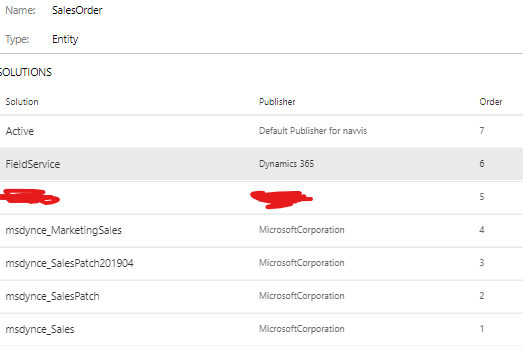
Field Service now lies on Order 7 while our own solution is only on order 6.

How can we change the order of the solution layers, so our solution is on top again?

Thanks!
pastedimage1573032939747v1.png

I have the same question (0)
  • LuHao Profile Picture
    40,892 on at

    Hi partner,

    The Solution Layer Order is actually the order in which the solutions are installed.

    So you only need to import your own solution again.

  • SErf Profile Picture
    659 on at

    We tried this. But it did not work this way.

    Do we have to change the version number or anything?

    Thanks!

  • LuHao Profile Picture
    40,892 on at

    Hi partner,

    You can change the version number or the name of the solution and import it again.

  • SErf Profile Picture
    659 on at

    I tried changing the version number and importing it again. 

    This did not seem to work. If I apply a solution upgrade, I would assume that it will still be on a lower level than Field Service.

    pastedimage1573037956889v1.png

  • David Jennaway Profile Picture
    14,065 on at

    For solutions that you install directly, then the previous answers are correct, in that it depends on the installation sequence.

    However, Microsoft appear to have further control over the sequence of the solutions they provide (such as Field Service), and I don't think there's any way to change this.

    What are you trying to achieve ? If you are trying to modify components that are part of Field Service, you could create a further solution with just those components, and I believe that should end up at a higher level

  • SErf Profile Picture
    659 on at

    Thanks for the answer!

    Fields Service modifies the Option Set "statuscode" (Status Reason) in the "Order" entity.

    We customized this Option Set, but the Field Service Solution overwrites (or tries to merge) these changes.

    I am not sure, that when I create a new solution, only having the Order Entity and the Option Set in it, that this would be applied AFTER the field service solution. But I guess I have to try.

  • SErf Profile Picture
    659 on at

    I've contacted Microsoft Support. Lets see what they say.

  • Arthur Vlachos Profile Picture
    15 on at

    I'm wondering if the following will re-organise your solution order:

    1. create a copy of your existing solution using a different solution name

    2. import this new solution

    3. remove your previous solution

  • SErf Profile Picture
    659 on at

    Hi Arthur,

    this is a good idea that I've also thought about.

    To do this, I probably need to copy the XML files and rename the solution in there?

    Is it only "solution.xml" where I have to change the name?

    I will have to check if this doesn't mess up anything, but then it would be a good fix!

    MS Support hasnt been really helpful until now.

    Thanks

  • Arthur Vlachos Profile Picture
    15 on at

    Thats right the uniquename and localizedname elements... as below

       <UniqueName>EmployerServicesContactHub</UniqueName>

       <LocalizedNames>

         <LocalizedName description="Employer Services Contact Hub" languagecode="1033" />

       </LocalizedNames>

    I too have been caught out by microsoft and their solution management.

    I think its part of being involved in D365, it teaches you a lot about solution management.

Under review

Thank you for your reply! To ensure a great experience for everyone, your content is awaiting approval by our Community Managers. Please check back later.

Helpful resources

Quick Links

Introducing the 2026 Season 1 community Super Users

Congratulations to our 2026 Super Stars!

Meet the Microsoft Dynamics 365 Contact Center Champions

We are thrilled to have these Champions in our Community!

Congratulations to the March Top 10 Community Leaders

These are the community rock stars!

Leaderboard > Customer experience | Sales, Customer Insights, CRM

#1
ManoVerse Profile Picture

ManoVerse 184 Super User 2026 Season 1

#2
11manish Profile Picture

11manish 125

#3
CU11031447-0 Profile Picture

CU11031447-0 100

Last 30 days Overall leaderboard

Product updates

Dynamics 365 release plans
