web
You’re offline. This is a read only version of the page.
close
Skip to main content

Announcements

No record found.

News and Announcements icon
Community site session details

Community site session details

Session Id :
Microsoft Dynamics NAV (Archived)

Security Permissions required for Merging a record?

(0) ShareShare
ReportReport
Posted on by 55

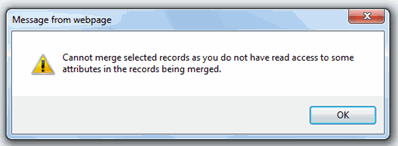
H8306.CRM-permissions-error.gif"Cannot merge selected records as you do not have read access to some attributes in the records being merged"
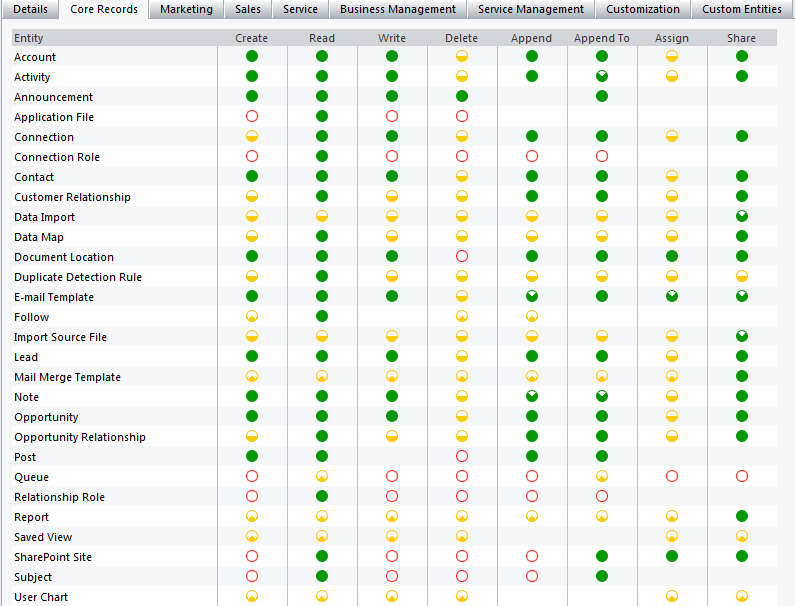
The user is a member of the 'Sales Manager' security role and has the following permissions on Core Records
 

Any suggestions would be greatly appreciated

*This post is locked for comments

I have the same question (0)
  • AmateurBond Profile Picture
    55 on at

    I have the same issue with one of our users.  In my situation, this user who is having the merging issue has the same Security Role as another User who can merge Account record.  They are both under the same Business Unit as well.  I am at a loss. Please help!

    Many thanks

  • AmateurBond Profile Picture
    55 on at

    Hi Tourism Whistler,

    Not sure if you have fouind a solution to your issue. I had the same issue.

    My scenario is that both my Users have the same Security Roles and in the same Business Units. But the funny thing is that only one of them can merge the 2 Duplicated Accounts.

    Upon further investigation and reading the Securtiy Model page in MS Dynamics CRM, there are 3 kinds of security levels (if you want to call it). They are namely:

    1. Role-based security in Microsoft Dynamics CRM focuses on grouping a set of privileges together that describe the responsibilities (or tasks that can be performed) for a user.

    2. Record-based security in Microsoft Dynamics CRM focuses on access rights to specific records.

    3. Field-level security in Microsoft Dynamics CRM restricts access to specific high business impact fields in an entity only to specified users or teams.

    I had to use the "process of elimination"  and work through each level. I had a look at the Security Roles and as stated before, the 2 users had the same security roles. So Role-based security was not the

    problem for my user,

    Very seldom that we use Record-based security. So that eliminates that level of security and finally I came across the field level security where specific field permissions such as Create, Update or Read are added to the filed security profile. So you may want to compare that as the error was quite specific about  the reading of some records attributes.

    Good luck!

    James

Under review

Thank you for your reply! To ensure a great experience for everyone, your content is awaiting approval by our Community Managers. Please check back later.

Helpful resources

Quick Links

Introducing the 2026 Season 1 community Super Users

Congratulations to our 2026 Super Stars!

Meet the Microsoft Dynamics 365 Contact Center Champions

We are thrilled to have these Champions in our Community!

Congratulations to the April Top 10 Community Leaders

These are the community rock stars!

Leaderboard > 🔒一 Microsoft Dynamics NAV (Archived)

Last 30 days Overall leaderboard

Featured topics

Product updates

Dynamics 365 release plans
