web
You’re offline. This is a read only version of the page.
close
Skip to main content

Notifications

Announcements

No record found.

Community site session details

Community site session details

Session Id :
Microsoft Dynamics CRM (Archived)

CRM Outlook integration error - Unable to get property 'contentWindow' of undefined or null reference

(0) ShareShare
ReportReport
Posted on by

My organization is having an issue using CRM with Outlook.  To keep things simple for our staff who are not as tech saavy we are trying to use Shortcuts in Outlook so our staff only see the parts of CRM the require.  Specifically Leads and Accounts.  This is where our problem arises.

When trying to load Leads or Accounts, regardless of the view we get the following error:
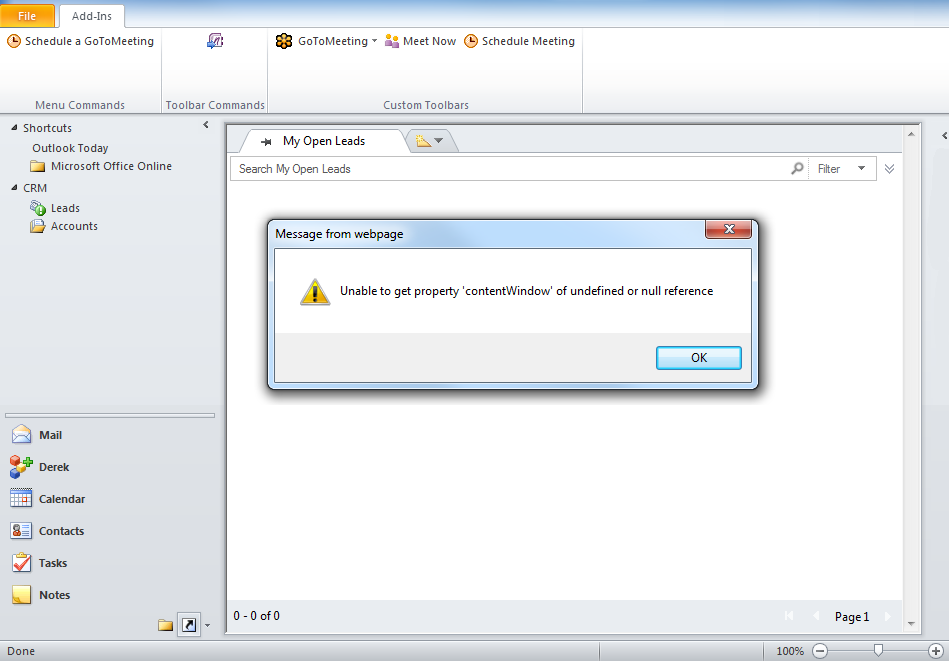
This does not happen with all sections of CRM.  If I load Opportunities or Contacts I do not get this error.
After clicking Ok the data does load if we open a new view, but as you can see in the screenshot the Ribbon at the top is missing all the CRM related icons, which our team needs to work.

Our CRM setup has a lot of customizations, mostly additional fields and workflows, so we assumed at first this was the cause.  We tested this functionality on a fresh CRM install, and had no errors so this confirmed our suspicions.  

In an attempt to diagnose the issue we've tried the following without any luck:

  • disabled any and all workflows
  • removed all custom fields from the view 1 by 1 to see which might be the culprit
  • removed all custom fields from the actual lead/account form just in case the form was being preloaded and causing the error
  • disabled all libraries on the view/form
Does anyone have any ideas what else we could try?  I realize this is difficult to diagnose since it is related to customizations, but I beleive I have disabled everything we've done.  Starting over from a working CRM is not really feasible as we've been making these customizations for the better part of a year and need them for our Sales and Support processes.

Any ideas would be greatly appreciated.

As an extra note, if I view the page on the web rather than through outlook we get no errors.  However if I use the inspector I get the following:

*This post is locked for comments

I have the same question (0)
  • Community Member Profile Picture
    on at

    Hi,

    Is it CRM Online or On Premise?

    If On Premise what is the update rollup installed on your CRM server and the Outlook client ?

    Is this issue happening for all users ?

    What are the things that you have done for your staff who are not a tech savy so that they can use shortcuts of CRM ?

    What if we don't use shortcuts of CRM in Outlook and configure the CRM with Outlook as it is, still the issue occurs?

    Does the system administrator facing the same issue ?

    Help me with the above questions which will rule many things.

    Thanks.

  • Verified answer
    Community Member Profile Picture
    on at

    The issue ended up being related to the EditableGrid 3rd party solution we had installed.  Once removed the error went away.

    Seems the solution modifies the Ribbon in a way Outlook cannot handle, so when using the integration it throws the errors.

    Thanks for the help in any case!

Under review

Thank you for your reply! To ensure a great experience for everyone, your content is awaiting approval by our Community Managers. Please check back later.

Helpful resources

Quick Links

Responsible AI policies

As AI tools become more common, we’re introducing a Responsible AI Use…

Neeraj Kumar – Community Spotlight

We are honored to recognize Neeraj Kumar as our Community Spotlight honoree for…

Leaderboard > 🔒一 Microsoft Dynamics CRM (Archived)

#1
SA-08121319-0 Profile Picture

SA-08121319-0 4

#1
Calum MacFarlane Profile Picture

Calum MacFarlane 4

#3
Alex Fun Wei Jie Profile Picture

Alex Fun Wei Jie 2

Last 30 days Overall leaderboard

Featured topics

Product updates

Dynamics 365 release plans



