web
You’re offline. This is a read only version of the page.
close
Skip to main content

Notifications

Announcements

No record found.

Community site session details

Community site session details

Session Id :
Small and medium business | Business Central, N...
Answered

How to add the condition in DataItemTableFilter in Query?

(0) ShareShare
ReportReport
Posted on by 2,304 Moderator

Hi,

I have created a query in which I have used the LeftOuterJoin.

But I want to add the DataItemTableFilter based on the boolean field value of the table.
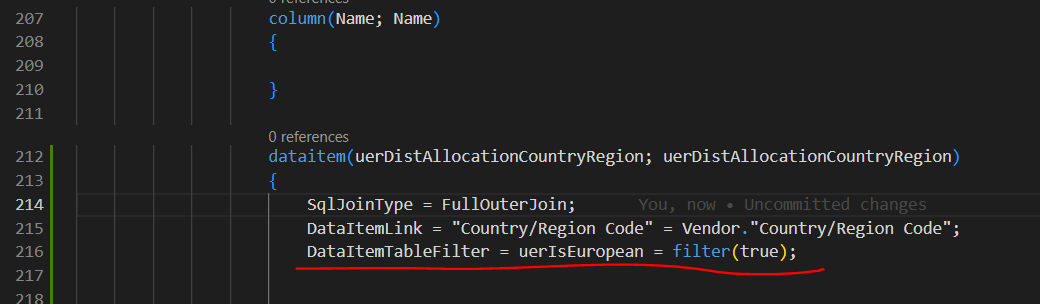
pastedimage1671545091361v3.png

I want this filter to work only if the uerIsEuropeanfield is true else the filter should not work and fetch all the records from both tables..

I don't know how to make this DataItemTableFilter not work based on the condition.

Can you please help me? or can you please suggest me another solution like how to add if else in DataItemTableFilter. or any other solution?

Kindly help.

Regards.

I have the same question (0)
  • Suggested answer
    DAnny3211 Profile Picture
    11,397 on at

    Hi

    can't be dynamic that filter

    either make two queries, or put it as a filter in the dataitem fields but as a filter so that from AL you can filter by whatever you want

    DANiele

  • Govinda Kumar Profile Picture
    2,304 Moderator on at

    Hi Daniele Incalza,

    Thank you very much for replying.

    I have found another logic to do my work, not adding DataItemTableFilter, but I'm more interested in your method.. can you please elaborate more?

    I cannot use a query as a data item in the query

    Regards.

  • Verified answer
    DAnny3211 Profile Picture
    11,397 on at

    hi

    look this

    learn.microsoft.com/.../devenv-query-using-instead-record-variables

    "I cannot use a query as a data item in the query" -> not possible

    check my answer if it helped you, thanks

    DAniele

  • Verified answer
    YUN ZHU Profile Picture
    95,718 Super User 2025 Season 2 on at

    Hi, just adding some info.

    My suggestion is to add a new temporary table, use this temporary table to create reports, and sort according to your needs when inserting values.

    Although the efficiency is not the best, but the simplest.

    Hope this helps.

    Thanks.

    ZHU

  • Govinda Kumar Profile Picture
    2,304 Moderator on at

    Hi ZHU,

    This is to insert data in a temporary table and use that temp table in the process but before this, I want to filter.

    I got your point, thanks for suggesting it.

    Regards.

Under review

Thank you for your reply! To ensure a great experience for everyone, your content is awaiting approval by our Community Managers. Please check back later.

Helpful resources

Quick Links

Responsible AI policies

As AI tools become more common, we’re introducing a Responsible AI Use…

Neeraj Kumar – Community Spotlight

We are honored to recognize Neeraj Kumar as our Community Spotlight honoree for…

Leaderboard > Small and medium business | Business Central, NAV, RMS

#1
OussamaSabbouh Profile Picture

OussamaSabbouh 2,664

#2
YUN ZHU Profile Picture

YUN ZHU 960 Super User 2025 Season 2

#3
Jainam M. Kothari Profile Picture

Jainam M. Kothari 773 Super User 2025 Season 2

Last 30 days Overall leaderboard

Featured topics

Product updates

Dynamics 365 release plans
