web
You’re offline. This is a read only version of the page.
close
Skip to main content

Announcements

No record found.

News and Announcements icon
Community site session details

Community site session details

Session Id :
Microsoft Dynamics AX (Archived)

Error while posting pay statements in payroll

(0) ShareShare
ReportReport
Posted on by 150

Hi everyone,

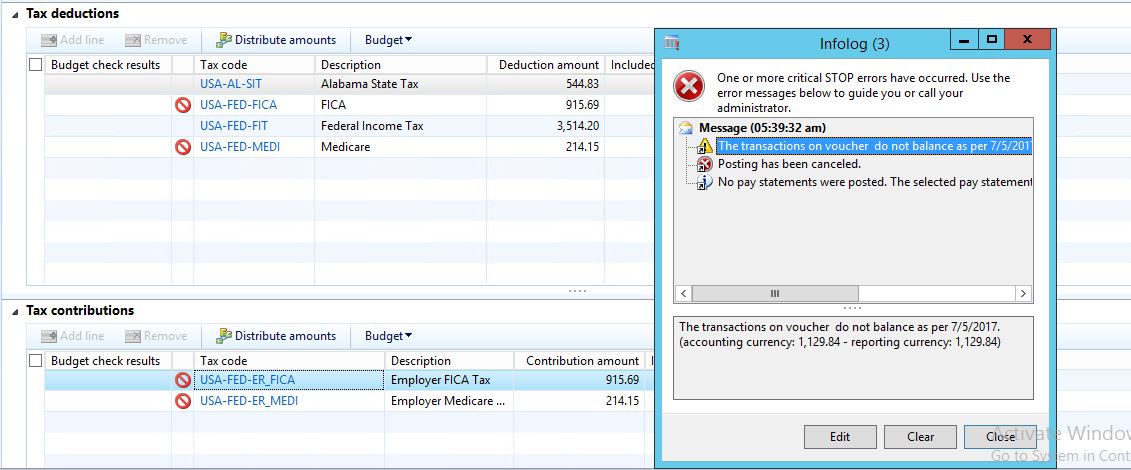
While am posting pay statements in payroll am getting transaction voucher do not balance as per date. Actually this issue because of US Tax distribution and contribution, you can observe in below image. I have tried all setup like posting profiles, rounding and accounts. Still am unable to fix this. Even i have given same and different accounts for TAX distribution and TAX contribution. Is there any other setup that i missed (or) is there anyway to find a solution.
  7510.Capture1.JPG

Thanks

Pranu

*This post is locked for comments

I have the same question (0)
  • Suggested answer
    Nagendra Varma K Profile Picture
    on at

    HI Pranu,

    Two things you need to check here.

    1. Check whether the payroll clearing account is setup in payroll parameters.

    2.Check whether the posting definition for contribution and deduction is setup. Than validate whether from the pay statement , sub-ledger entries on the tab, to check whether the voucher is balanced or not. If it is balance than all the necessary setup is done. you can post.

    Thanks

    Nagendra Varma K

  • Pranu Profile Picture
    150 on at

    Hi Nagendra,

    Thanks for suggestion, ya i have given all setups in payroll parameters

    Let me try with 2nd point which you have mentioned.

    Thank you,

    Pranu

  • Suggested answer
    Nagendra Varma K Profile Picture
    on at

    Hi Pranu,

    Let us know about outcomes, If solution works please validate tread replies.

    Thanks

    Nagendra varma k

  • Pranu Profile Picture
    150 on at

    Actual issue is getting because of TAX contribution, this amount is not balancing showing difference because of this amount. can any one suggest how to avoid this taxes (or) any other alternative solution for this.

    7624.Capture5.JPG  

    Thanks,

    Pranu

  • Suggested answer
    Nagendra Varma K Profile Picture
    on at

    HI Pranu,

    Can you setup all the Tax codes for the specified Tax codes you are using.Have you setup the below tax setup.

    sdf.PNG

    also under payroll benefits setup check the contribution and deduction part and set GL accounts and also posting definition payroll should be setup.

    sdf.PNG

    Thanks

    Nagendra Varma k

  • Rakesh Jaybhaye Profile Picture
    66 on at

    Hi Pranu,

    Please let me know if the mentioned error on pay statement is resolved, because am also facing the same error and tried everything however couldn't resolve it. Thank you!

    Regards,

    Rakesh Jaybhaye

  • Gaurangkumar Jani Profile Picture
    4,558 User Group Leader on at

    Hi Pranay Reddy,

    Did you find the solution? Please share if the issue is resolved. I am facing the same issue and configured all main accounts on TAX Code as well as a parameter, but still facing the same error.

    It seems something related to Posting Definition.

    Thanks, 

Under review

Thank you for your reply! To ensure a great experience for everyone, your content is awaiting approval by our Community Managers. Please check back later.

Helpful resources

Quick Links

Introducing the 2026 Season 1 community Super Users

Congratulations to our 2026 Super Stars!

Meet the Microsoft Dynamics 365 Contact Center Champions

We are thrilled to have these Champions in our Community!

Congratulations to the April Top 10 Community Leaders

These are the community rock stars!

Leaderboard > 🔒一 Microsoft Dynamics AX (Archived)

#1
CP04-islander Profile Picture

CP04-islander 39

#2
Michel ROY Profile Picture

Michel ROY 14

#3
imran ul haq Profile Picture

imran ul haq 8

Last 30 days Overall leaderboard

Featured topics

Product updates

Dynamics 365 release plans
