web
You’re offline. This is a read only version of the page.
close
Skip to main content

Notifications

Announcements

Community site session details

Community site session details

Session Id :
Small and medium business | Business Central, N...
Suggested Answer

Posting Number Series Must Have a Value in Purchase Header

(1) ShareShare
ReportReport
Posted on by

Hello there,

I tried to look through the forums to see if there was something that matched my issue to save time, but I was unable to find anything.

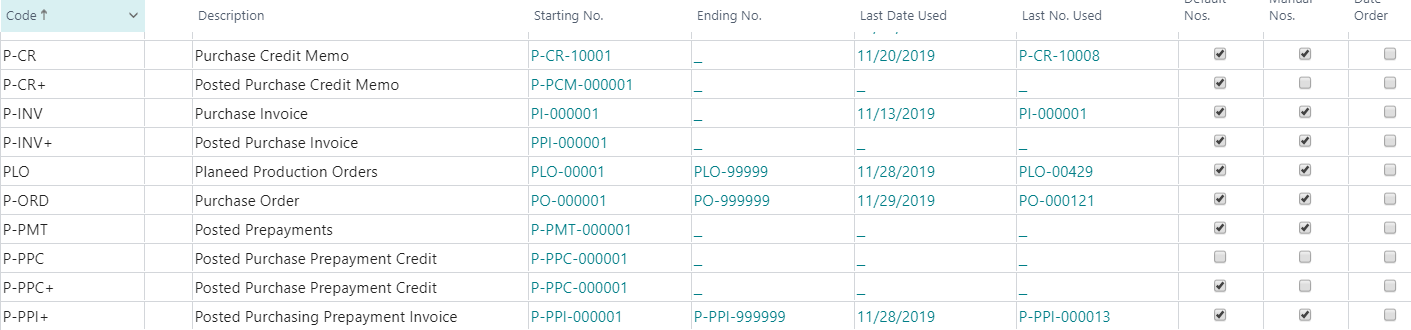
I am trying to receive and post invoice on the PO, and my no series is filled out for everything:
pastedimage1575039764963v1.png

I am using a value from the Vendor's proforma invoice, and am unsure if that is causing the issue as it does not match the no series nomenclature? I have a pre-payment invoice on this PO as well, and then add a "-B" when posting the invoice so that there is a way to differentiate between.

Thank you enormously in advance for the support! :)

Shaun

I have the same question (0)
  • Suggested answer
    Community Member Profile Picture
    on at

    Hello,

    I have solved it myself, but thought I would post in case anyone is having the same issue, and this may save them some time.

    While you may have the no. series filled in appropriately, there may not be a connection between said number series, and the PO in question.

    If you create a config package to export the purchase order header details. as well as the no. series in question, then you might see that there are some without the name of the no. series filled in. In my case, I had created the number series, but the P-INV name was not there for a handful of my PO's (see image for reference).

    I hope this helps someone save some time looking!pastedimage1575299531512v1.png

  • Community Member Profile Picture
    on at

    Did you figure out why the number series were not attached? I am having the same problem except that all my purchase invoices do not have a posting no. series attached.

    Thank you in advance!

  • Community Member Profile Picture
    on at

    Hi Kendra,

    I had solved it myself - please see the above to understand how I found the solution. One thing you might want to check out is the number series (search for it with the magnifying glass in the top right). Ensure that the Purchase Invoice number series has values set.

  • Community Member Profile Picture
    on at

    Hi Shaun.

    I saw your answer above, and I see the same thing except none of my purchase invoices have a Posting No Series attached to them. I have it set up with values, but have no idea why it's not connecting the two of them.

Under review

Thank you for your reply! To ensure a great experience for everyone, your content is awaiting approval by our Community Managers. Please check back later.

Helpful resources

News and Announcements

Season of Giving Solutions is Here!

Quick Links

Responsible AI policies

As AI tools become more common, we’re introducing a Responsible AI Use…

Neeraj Kumar – Community Spotlight

We are honored to recognize Neeraj Kumar as our Community Spotlight honoree for…

Leaderboard > Small and medium business | Business Central, NAV, RMS

#1
OussamaSabbouh Profile Picture

OussamaSabbouh 1,688

#2
Khushbu Rajvi. Profile Picture

Khushbu Rajvi. 784 Super User 2025 Season 2

#3
YUN ZHU Profile Picture

YUN ZHU 595 Super User 2025 Season 2

Last 30 days Overall leaderboard

Featured topics

Product updates

Dynamics 365 release plans
