web
You’re offline. This is a read only version of the page.
close
Skip to main content

Announcements

No record found.

News and Announcements icon
Community site session details

Community site session details

Session Id :
Finance | Project Operations, Human Resources, ...
Answered

Canceling multiple sales lines in AOT

(0) ShareShare
ReportReport
Posted on by 18

Hello

Does anyone know how to (for an example) manually cancel ex 30 selected items out of 100 items ( with Delivery Remainder) on a Sales order in a fast way via a job in AOT (AX2012)?

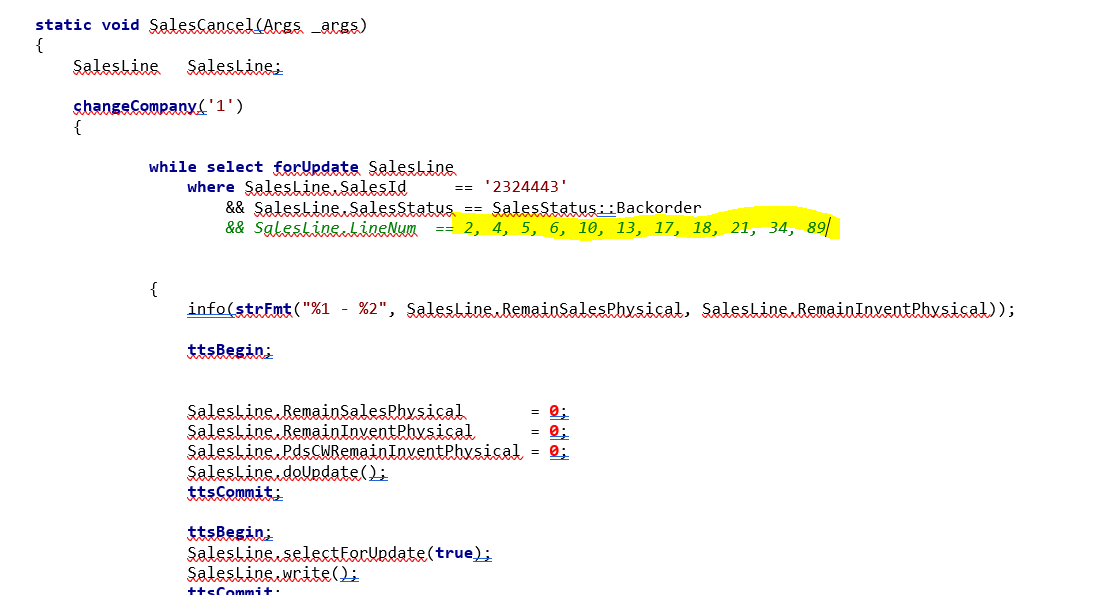
I have this code ( left pic below)  to cancel one "Order -row" at the time. In this ex, row "2" is about to be cancel.

But I need a code to cancel selected lines (rows) in an order ( for ex, see the yellow in the pic below to the right, and this code doesn´t work):

Note, I don´t want to cancel ALL the lines in the order that have Delivery Remainder, I only want to cancel the "order-rows" that I write in the code.

And I don´t want to Delete the lines either.

Does anyone have a good tip on how this could be possible?

pastedimage1637328194491v1.png                      pastedimage1637328270060v2.png

We are starting to work with Backorders, and we need to cancel blocked articles that slip through, in a fast way.

regards / BCC

I have the same question (0)
  • Martin Dráb Profile Picture
    239,381 Most Valuable Professional on at

    Can you please tell us more about your problem than just "this code doesn´t work"?

    By the way, why do you use doUpdate() in the first transaction (instead of update() or write()) and what's the point of the second transaction, where you update no fields but you call write()?

  • BCC Profile Picture
    18 on at

    Hi, I didn´t create this particular (top image) code myself, so I don´t know why “DoUpate ()” and “write ()” were used.

    But our idea was that we want for example to write all the "linenumbers" on a SO to be canceled, of which my example was with several "number-rows" in a line.

    So that, in the below pic, was just an example of how we would like it to work.

    The top ( see pics) code works, if you just want to cancel linenumber "2", but the bottom code doesn´t works.

    The Error message- code “Error executing code: (object) does n´t have a valid code that can be executed in 'SalesCancel “ appears.

    / BCC

  • Martin Dráb Profile Picture
    239,381 Most Valuable Professional on at

    Your code currently doesn't execute at all, because it's not compiled.

    Compile your job and fix compilation errors, if there are any. Then run it again.

  • BCC Profile Picture
    18 on at

    When I write in the code, as I want it with several "line numbers", and then try to compile the code, I get the error message "Err: 9999".

    So I'm a little stuck there.

    So you know, I´m quite new with codes in AX2012 R3 :)..

  • Martin Dráb Profile Picture
    239,381 Most Valuable Professional on at

    You can run your code before you compile it, therefore you can't ignore the error.

    Please look at the compiler output - doesn't it show any error message and the line number?

  • Verified answer
    Martin Dráb Profile Picture
    239,381 Most Valuable Professional on at

    I see the error - you can't use a comma-seprated list of values. Do this instead:

    && ( salesLine.LineNum == 2
      || salesLine.LineNum == 4
      ...
      || salesLine.LineNum == 89)

  • BCC Profile Picture
    18 on at

    Wow, it works :)

    Thank you very much 

Under review

Thank you for your reply! To ensure a great experience for everyone, your content is awaiting approval by our Community Managers. Please check back later.

Helpful resources

Quick Links

Introducing the 2026 Season 1 community Super Users

Congratulations to our 2026 Super Stars!

Meet the Microsoft Dynamics 365 Contact Center Champions

We are thrilled to have these Champions in our Community!

Congratulations to the March Top 10 Community Leaders

These are the community rock stars!

Leaderboard > Finance | Project Operations, Human Resources, AX, GP, SL

#1
Giorgio Bonacorsi Profile Picture

Giorgio Bonacorsi 694

#2
André Arnaud de Calavon Profile Picture

André Arnaud de Cal... 646 Super User 2026 Season 1

#3
CP04-islander Profile Picture

CP04-islander 337

Last 30 days Overall leaderboard

Product updates

Dynamics 365 release plans