Hey there,
I have been trying to install AX for 2 weeks now. Initially, I selected EP and SSRS features but nothing went well, so I gave up everything and made up my mind to install the basic features (in the fig below), so that I can start working immediately and later on add in the remaining.
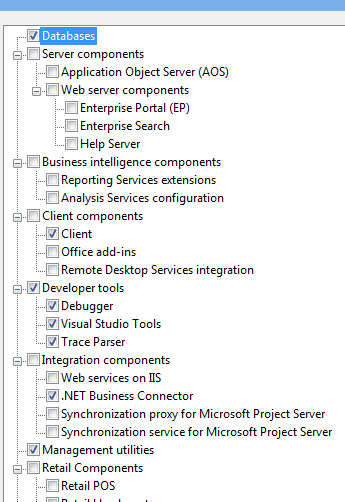
But, to my great misfortune, I always end up with this "Access to the registry key denied" error.
Posting an important part of the log file here:
2014-05-09 03:26:35Z === Starting execution phase ===
2014-05-09 03:26:35Z Performing an MSI AX component check for prerequisite '.NET Business Connector'.
2014-05-09 03:26:35Z Checking for the presence of the Dynamics AX '6' feature 'NetBusinessConnector'.
2014-05-09 03:26:35Z The Dynamics AX '6' feature 'NetBusinessConnector' is not installed.
2014-05-09 03:26:35Z Check failed.
2014-05-09 03:26:35Z Skipping 'Trace Parser' this pass.
2014-05-09 03:26:35Z Executing 'Application Object Server (AOS)' this pass.
2014-05-09 03:26:35Z Executing 'Client' this pass.
2014-05-09 03:26:35Z Executing 'Databases' this pass.
2014-05-09 03:26:35Z Executing 'Debugger' this pass.
2014-05-09 03:26:35Z Executing 'Visual Studio Tools' this pass.
2014-05-09 03:26:35Z Executing 'Management utilities' this pass.
2014-05-09 03:26:35Z Executing '.NET Business Connector' this pass.
2014-05-09 03:26:35Z Debugger
2014-05-09 03:26:35Z Management utilities
2014-05-09 03:26:35Z .NET Business Connector
2014-05-09 03:26:35Z Visual Studio Tools
2014-05-09 03:26:35Z Client
2014-05-09 03:26:35Z Queueing for installation: Databases
2014-05-09 03:26:35Z Queueing for installation: Application Object Server (AOS)
2014-05-09 03:26:35Z Queueing for installation: Components
2014-05-09 03:26:35Z Queueing for installation: Components
2014-05-09 03:26:35Z Component installation task completed successfully.
2014-05-09 03:26:35Z === Setting up Databases MicrosoftDynamicsAX ===
2014-05-09 03:26:36Z Completed setup of Databases MicrosoftDynamicsAX.
2014-05-09 03:26:36Z === Setting up Model database creation MicrosoftDynamicsAX_model ===
2014-05-09 03:26:36Z Completed setup of Model database creation MicrosoftDynamicsAX_model.
2014-05-09 03:26:46Z Installing model 'Foundation' from the backup file
2014-05-09 03:26:46Z Database restore operation started.
2014-05-09 03:29:55Z Invalid object name 'DBO.SYSSETUPLOG'.
2014-05-09 03:29:55Z === Setting up Full Text Catalog ===
2014-05-09 03:29:55Z Completed setup of Full Text Catalog.
2014-05-09 03:29:55Z Altering database MicrosoftDynamicsAX_model to modify size and growth for data and log files
2014-05-09 03:30:22Z Completed execution of Alter Database.
2014-05-09 03:30:22Z Altering database MicrosoftDynamicsAX to modify size and growth for data and log files
2014-05-09 03:30:58Z Completed execution of Alter Database.
2014-05-09 03:30:58Z Completed setup of MicrosoftDynamicsAX_model.
2014-05-09 03:30:58Z Executing AxUtil Schema for database 'WN7X64-BBYNXX1\MicrosoftDynamicsAX_model'.
2014-05-09 03:31:08Z Skipping 'C:\archana\new - 2014\sws new\AX 2012\Models\Standard\Foundation.axmodel' model because it is already installed.
2014-05-09 03:31:08Z Setup cannot find model files applicable for import into database WN7X64-BBYNXX1 on server MicrosoftDynamicsAX_model.
2014-05-09 03:31:08Z === Setting up MicrosoftDynamicsAXBaseline ===
2014-05-09 03:31:08Z Completed setup of MicrosoftDynamicsAXBaseline.
2014-05-09 03:31:28Z Component installation task completed successfully.
2014-05-09 03:31:28Z === Setting up Application Object Server (AOS) ===
2014-05-09 03:31:28Z Adding account 'AMERICAS\Archana_Potharaju' as a login in Microsoft SQL Server.
2014-05-09 03:31:28Z Creating stored procedures for remote sql server. LoginName: 'AMERICAS\Archana_Potharaju'.
2014-05-09 03:31:28Z Creating stored procedure 'CREATETEMPDBPERMISSIONS_WN7X64-BBYNXX1_01'.
2014-05-09 03:31:28Z Creating stored procedure '[dbo].[CREATESERVERSESSIONS]'.
2014-05-09 03:31:28Z Creating stored procedure '[dbo].[CREATEUSERSESSIONS]'.
2014-05-09 03:31:28Z Setup cannot get SYSTABVERSION value from SQLSYSTEMVARIABLES table.
2014-05-09 03:31:28Z Invalid object name 'dbo.SQLSYSTEMVARIABLES'.
2014-05-09 03:31:28Z Creating stored procedure '[dbo].[getNumInternal]'.
2014-05-09 03:31:31Z Creating stored procedure '[dbo].[sp_GetNextRecId]'.
2014-05-09 03:31:31Z isolation level = read committed
2014-05-09 03:31:31Z ALTER DATABASE [MicrosoftDynamicsAX] SET READ_COMMITTED_SNAPSHOT ON
2014-05-09 03:31:33Z Adding account 'AMERICAS\Archana_Potharaju' as a login in Microsoft SQL Server.
2014-05-09 03:31:33Z Adding account 'AMERICAS\Archana_Potharaju' as a login in Microsoft SQL Server.
2014-05-09 03:31:33Z Creating stored procedures for local sql server. LoginName: 'AMERICAS\Archana_Potharaju'.
2014-05-09 03:31:33Z Creating stored procedure 'CREATETEMPDBPERMISSIONS_WN7X64-BBYNXX1_01'.
2014-05-09 03:31:33Z Creating stored procedure '[dbo].[CREATESERVERSESSIONS]'.
2014-05-09 03:31:33Z Creating stored procedure '[dbo].[CREATEUSERSESSIONS]'.
2014-05-09 03:31:33Z Setup cannot get SYSTABVERSION value from SQLSYSTEMVARIABLES table.
2014-05-09 03:31:33Z Invalid object name 'dbo.SQLSYSTEMVARIABLES'.
2014-05-09 03:31:33Z Creating stored procedure '[dbo].[getNumInternal]'.
2014-05-09 03:31:33Z Creating stored procedure '[dbo].[sp_GetNextRecId]'.
2014-05-09 03:31:33Z isolation level = read committed snapshot
2014-05-09 03:31:33Z Granting AOS account access to database MicrosoftDynamicsAX_model on server WN7X64-BBYNXX1
2014-05-09 03:31:34Z Granting AOS account access to database MicrosoftDynamicsAX on server WN7X64-BBYNXX1
2014-05-09 03:31:35Z Granting AOS account access to database MicrosoftDynamicsAXBaseline on server WN7X64-BBYNXX1
2014-05-09 03:31:35Z Common Property Install Path set to 'C:\Program Files\Microsoft Dynamics AX\60'.
2014-05-09 03:31:35Z Installation Path retrieved from registry. Value: 'C:\Program Files\Microsoft Dynamics AX\60'
2014-05-09 03:31:35Z Setting up rights for the AOS service account 'AMERICAS\Archana_Potharaju' to access the application files at: C:\Program Files\Microsoft Dynamics AX\60\Server\MicrosoftDynamicsAX\bin\Application
2014-05-09 03:31:35Z Common Property Install Path set to 'C:\Program Files\Microsoft Dynamics AX\60'.
2014-05-09 03:31:35Z Installation Path retrieved from registry. Value: 'C:\Program Files\Microsoft Dynamics AX\60'
2014-05-09 03:31:35Z Creating AOS registry settings.
2014-05-09 03:31:35Z Access to the registry key 'HKEY_LOCAL_MACHINE\SYSTEM\CurrentControlSet\Services\Dynamics Server\6.0\01\Original (installed configuration)\SetupProperties' is denied.
2014-05-09 03:31:35Z ******************************************************************************************************
2014-05-09 03:31:35Z Unable to write registry value: HKEY_LOCAL_MACHINE\SYSTEM\CurrentControlSet\Services\Dynamics Server\6.0\01\Original (installed configuration)\SetupProperties\AOSINSTANCENAME. Try to run Setup again.
2014-05-09 03:31:35Z ******************************************************************************************************
2014-05-09 03:31:35Z ******************************************************************************************************
2014-05-09 03:31:35Z Component installation task stopped due to an error.
2014-05-09 03:31:35Z ******************************************************************************************************
2014-05-09 03:31:36Z S260FinishedInfo
2014-05-09 03:31:42Z === Setup was canceled or failed. For details see the previous messages in the log.
and my regedit looks something like this:
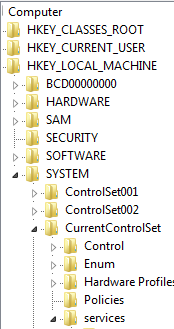
Under services I have the following:
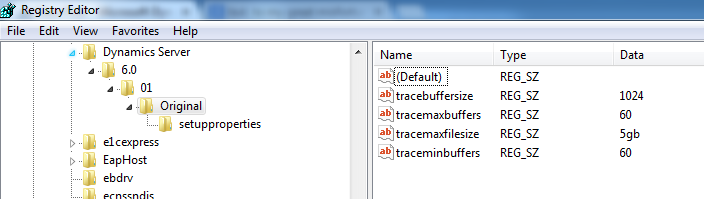
and I have given full permissions to my Domain Account against the keys 'Original' and 'setupproperties'.
Tried many other different options, but nothing worked. Now, I am out of ideas.
Greatly appreciate your help.
Thanks !
Archie.


