web
You’re offline. This is a read only version of the page.
close
Skip to main content

Notifications

Announcements

No record found.

Community site session details

Community site session details

Session Id :
Microsoft Dynamics AX (Archived)

Error: "Character in the bar code mask is invalid".

(0) ShareShare
ReportReport
Posted on by

Hi friends,

When I creating a barcode by mask for item, I see the error: "Character B in the bar code mask is invalid".

I have barcode mask setup:
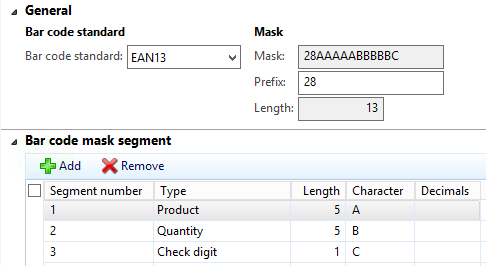
0815._21043D0438043C043E043A04_-_4D043A04400430043D043004_-2014_2D00_10_2D00_22-_3204_-17.10.03.png

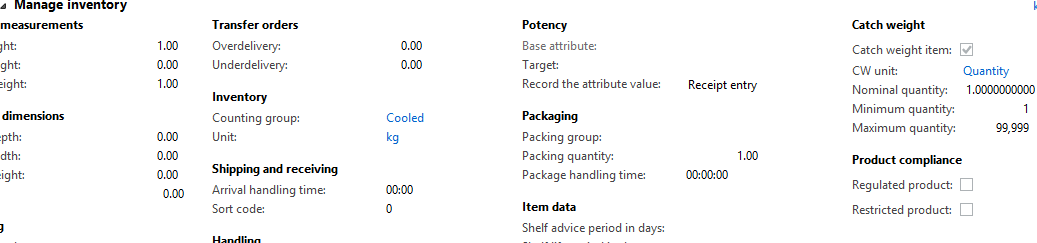
And I have item settings:

5722._21043D0438043C043E043A04_-_4D043A04400430043D043004_-2014_2D00_10_2D00_22-_3204_-17.15.46.png

What's wrong? =)

*This post is locked for comments

I have the same question (0)
  • Suggested answer
    André Arnaud de Calavon Profile Picture
    300,911 Super User 2025 Season 2 on at

    HI,

    Which exact version of AX 2012 are you using? In my AX 2012 R3 environment I don't get this error with this mask setup.

    Also I can't find x++ logic here which raises this error. I can see there is a label available which could be use to raise the error, but it is not referenced.

    So probably it is fixed in R3 or another update/fix.

  • Suggested answer
    keoma Profile Picture
    32,729 on at

    hi,

    try with another type in barcode mask segment instead of quantity: any number, price, data entry, ...

  • Community Member Profile Picture
    on at

    Hi André,

    thanks for the help. I tested it in AX 2012 R2 and checked today in R3. The result is identical - not works =(

  • André Arnaud de Calavon Profile Picture
    300,911 Super User 2025 Season 2 on at

    Hi,

    What type did you use on the bar code mask and at what point exactly do you get this error?

  • Suggested answer
    keoma Profile Picture
    32,729 on at

    hi,

    did you debug? did you find the position, where the error occurs? maybe that would help a lot.

    Is probably an AX feature pack bug. for that check hotfixes from http://lcs.dynamics.com or the MS support. 

  • Community Member Profile Picture
    on at

    Thanks André and Jonathan.

    I solved this problem. Necessary to create any barcode for product in AX.

  • Community Member Profile Picture
    on at

    Create bar code manually for the product (prefix+product id+00000+check digit)

    In POS you can scan bare code with replacing 00000 by right quantity such as 00550 it will work fine

  • Harisgillani Profile Picture
    291 on at

    Hi,

    i got same error at the time of generate bar-code on product form "character W in bar-code mask is invalid" in bar-code mask setup my prefix characters are WP.

Under review

Thank you for your reply! To ensure a great experience for everyone, your content is awaiting approval by our Community Managers. Please check back later.

Helpful resources

Quick Links

Responsible AI policies

As AI tools become more common, we’re introducing a Responsible AI Use…

Neeraj Kumar – Community Spotlight

We are honored to recognize Neeraj Kumar as our Community Spotlight honoree for…

Leaderboard > 🔒一 Microsoft Dynamics AX (Archived)

#1
Martin Dráb Profile Picture

Martin Dráb 4 Most Valuable Professional

#1
Priya_K Profile Picture

Priya_K 4

#3
MyDynamicsNAV Profile Picture

MyDynamicsNAV 2

Last 30 days Overall leaderboard

Featured topics

Product updates

Dynamics 365 release plans