web
You’re offline. This is a read only version of the page.
close
Skip to main content

Announcements

No record found.

News and Announcements icon
Community site session details

Community site session details

Session Id :
Microsoft Dynamics AX (Archived)

How to take discount out for multiple invoices while settlement

(0) ShareShare
ReportReport
Posted on by

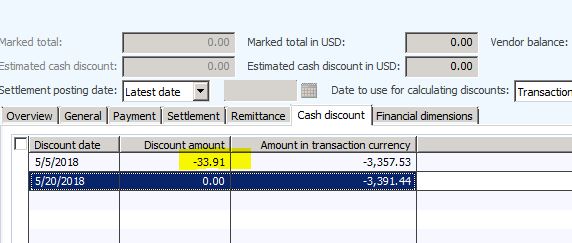
We're using clearing control vendor account in which all our flooring vendor’s liability booked and then we move the liability to actual vendor account and here comes the problem, we have debit and credit in that clearing control account and we have to manually settle these liabilities one by one and take the discount out by going to cash discount tab for each transaction. Is there any possible way that we can take discount off for all transaction in one go.

.72207.Capture.JPG
*This post is locked for comments

I have the same question (0)
  • Suggested answer
    Khaled Alloud Profile Picture
    3,658 on at

    Hello,

    - Have you tried to add Cash discount on the Vendor form? try this on Test to see if the system will add the cash discount to all payments when settlement

    - What is the posting schema resulting from the Cash discount? can you please share it here. Another thing you can try to add the same schema to the Payment journal manually.

    Thank you,

  • Community Member Profile Picture
    on at

    Hi Kaled,

    I do not have rights to add the cash discount on Vendor from.

    Posting schema is that if we do not remove the cash discount while settlement, AX takes discount on Credit Balance (means invoices).

    Screen Shot 1 ( See both Debit and Credit amounts are not equal as AX incorporates discount on all credit balance (means invoices)

    Sett-4.JPG

    Screen Shot 2 (Discount Amount showing)

    Sett-2.JPG

    Screen Shot 3 (When i manually change the discount to Zero in cash discount tab)

    Sett-3.JPG

    Screen Shot 4 (Now you see after making discount to zero now both sides are equal and ready for settlement).

    Sett-4.JPG

    My question is does any one know how to take off the discount amount on both debit and credit balance in one go without doing above steps.

    Thank you

  • Khaled Alloud Profile Picture
    3,658 on at

    Can you please go to Vendor form > Payment fasttab , in the Cash discount fields what do you see?

    As far as i know Cash discount can be set here, and in AP parameters under settlement.

  • Community Member Profile Picture
    on at

    Hello Khaled,

    I don't see any payment form in below given tabs. Thank you

    4276.Capture.JPG

  • Suggested answer
    Ludwig Reinhard Profile Picture
    Microsoft Employee on at

    Hello Ayaz Hassan,

    Can't you simply set the vendor account take discount parameter to never?

    Doing that should not bring up a discount amount that have have to cleanse later on.

    Best regards,

    Ludwig

  • Khaled Alloud Profile Picture
    3,658 on at

    Vendor-Payment-Cast-discount.png

Under review

Thank you for your reply! To ensure a great experience for everyone, your content is awaiting approval by our Community Managers. Please check back later.

Helpful resources

Quick Links

Introducing the 2026 Season 1 community Super Users

Congratulations to our 2026 Super Stars!

Meet the Microsoft Dynamics 365 Contact Center Champions

We are thrilled to have these Champions in our Community!

Congratulations to the March Top 10 Community Leaders

These are the community rock stars!

Leaderboard > 🔒一 Microsoft Dynamics AX (Archived)

#1
CP04-islander Profile Picture

CP04-islander 16

#2
GiacomoRovai Profile Picture

GiacomoRovai 4

#3
Douglas Noel Profile Picture

Douglas Noel 2

Last 30 days Overall leaderboard

Featured topics

Product updates

Dynamics 365 release plans
