web
You’re offline. This is a read only version of the page.
close
Skip to main content

Notifications

Announcements

No record found.

Community site session details

Community site session details

Session Id :
Microsoft Dynamics CRM (Archived)

InvalidPluginExecutionException no longer returning a "nice" user message in CRM 365 9.1.0.2842 when resolving cases (incident entity)

(0) ShareShare
ReportReport
Posted on by 216

A customer has a few validators they wanted to use to check various conditions when resolving incidents. These validations are handled by a plugin, which simply throws an InvalidPluginExecutionException exception with the appropriate message. This USED to simply show this message on the screen for the user.

Unfortunately, something seems to have been changed in the CRM, and now the message is just this:
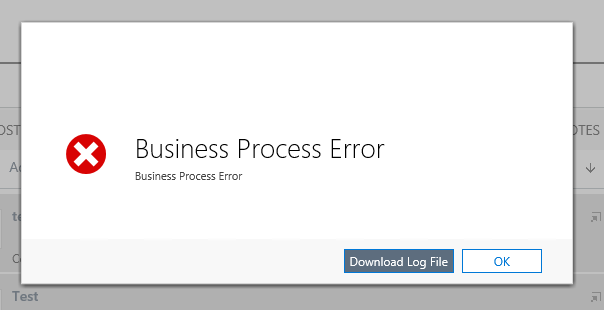
06166.Capture.PNG

Also, the detail log contains ONLY this line and nothing else:

The operation was aborted due to ISV code.

This really feels... wrong, on many levels. The log file not containing any relevant information, the lack of a clear message to the user. Is this some kind of recent MS change? Is there some kind of new way to "throw" nice, business-related errors to the user from a plugin?

*This post is locked for comments

I have the same question (0)
  • Suggested answer
    Radu Chiribelea Profile Picture
    6,667 on at

    I would open a support case with Microsoft and check with them if this isn't a known bug. This happened in past builds as well so it wouldn't be a surprise if this is a regression.

    Regards,

    Radu

  • gdas Profile Picture
    50,091 Moderator on at

    May be  the error is  coming from another plugin or different code  where the error does not handled properly.

    This error is also coming when you have multiple plugin and the message does not overwrited. So disabled all associated plugin with the and only enable the plugin which you are expecting to show the message

    How can you sure that the the message should populate? Do you have any trace log? did you tried to debug?

    Try to debug and also put some trace log in your plugin code.

  • MateuszBender Profile Picture
    216 on at

    [quote user="Goutam Das"]

    May be  the error is  coming from another plugin or different code  where the error does not handled properly.

    This error is also coming when you have multiple plugin and the message does not overwrited. So disabled all associated plugin with the and only enable the plugin which you are expecting to show the message

    How can you sure that the the message should populate? Do you have any trace log? did you tried to debug?

    Try to debug and also put some trace log in your plugin code.[/quote]

    This is DEFINITELY not a problem with my code.

    a) It used to work just fine and there were no updates.
    b) I know exactly which two lines of code that are responsible: a simple if (condition) statement followed by a throw new exception statement; commenting these out makes the plugin continue without issues (but this isn't what the customer wants, obviously).
    c) The same code can be applied not just to incident closure, but also incident updates - it seems to work fine then; it's only when it's applied to incident updates when resolving cases - that's when the errors are suppressed.
    d) Put some trace? Isn't that what the detailed log should be for, in CRM Online? As I outlined in my original post - the log file is almost completely empty, except for a rather useless line...

  • Mikael Suokas Profile Picture
    5 on at

    I realize this is an old question, but I ran into this just today, so this may be helpful to someone out there.

    I just made a plugin validating fields during incident resolution, and had this exact same problem: the message from InvalidPluginExecutionException would not show up to the user, only the class name of the plugin. In my case the InvalidPluginExecutionException would be wrapped in another InvalidPluginExecutionException in my top-level exception handler. When I added an explicit catch in the top level handler to just pass pass InvalidPluginExecutionException through, I would get the clear message in the UI:

               catch (InvalidPluginExecutionException e)

               {

                   throw;

               }

Under review

Thank you for your reply! To ensure a great experience for everyone, your content is awaiting approval by our Community Managers. Please check back later.

Helpful resources

Quick Links

Responsible AI policies

As AI tools become more common, we’re introducing a Responsible AI Use…

Neeraj Kumar – Community Spotlight

We are honored to recognize Neeraj Kumar as our Community Spotlight honoree for…

Leaderboard > 🔒一 Microsoft Dynamics CRM (Archived)

#1
SA-08121319-0 Profile Picture

SA-08121319-0 4

#1
Calum MacFarlane Profile Picture

Calum MacFarlane 4

#3
Alex Fun Wei Jie Profile Picture

Alex Fun Wei Jie 2

Last 30 days Overall leaderboard

Featured topics

Product updates

Dynamics 365 release plans



