web
You’re offline. This is a read only version of the page.
close
Skip to main content

Notifications

Announcements

No record found.

Community site session details

Community site session details

Session Id :
Small and medium business | Business Central, N...
Answered

Show item tracking lines on production order components list

(0) ShareShare
ReportReport
Posted on by 10

Hi,

Before finishing a production order we have to allocate serial no or lot no to different items that we have used in that particular prod order. This is done in the prod. order components list. 
All the items that require so, have a item tracking code on their item card. 

My question is: 
Is there any way to display the components list so the user can see which components that needs serial or lot no?

For example when we use the Physical Inventory Order, the report has this column where it says "Use Item Tracking", and there are check boxes which are checked if the item requires Item Tracking.
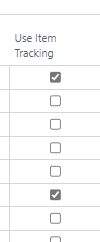
pastedimage1633941459895v1.png

I have the same question (0)
  • Suggested answer
    JAngle Profile Picture
    133 on at

    A page extension would make sense if it’s just a visual aid. If you want filtering capability then a table/page extension.

    Depending on your data you could explore some alternatives. For example, item substitution is an available field. If you aren’t otherwise using it then it could help. Majority of your component items for manufacturing will have “Sales Blocked” on them anyway - to stop confusion for sales personnel.

    Are you using dimensions on items? If not maybe assign one for tracking and then using the dimension set ID as a filter

  • Andreas Isaksen Profile Picture
    10 on at

    Thank you for your answer.

    Yes, it is just for visual aid, I don't need filtering capability. When you talk about page extension, do you refer to the "Add Field to Page" that pops up on your right hand side when pressing Settings->Personalize -> Field? Or do you mean something else?

    We are not using dimensions on items but we would like to not have alternatives and "tricks" because if we start with that we will have multiple functions to maintain.

    We are a company that are in the beginner phase/mediocre of using Business Central so there are still functions that we don't know of. I have not discovered the "Sales Blocked" function that you mention, where can I find this? On the item card I can only find the "Blocked" function.

  • Suggested answer
    JAngle Profile Picture
    133 on at

    Well you came to the right place for help.

    “Sales Blocked” is on the item card.

    I don’t mean personalisation. I mean development. Here is how to achieve the desired result: https://youtu.be/fXDxAM0ZrvU

  • Andreas Isaksen Profile Picture
    10 on at

    Thanks for the input! I will look into it

    I dont know why but I can't find the "Sales Blocked" on the item card. Is this a set up which is achieved through development as well?

    This is the only "Blocked" feature that is displayed on the item cards. Where is it on yours? 

    pastedimage1634047164213v1.png

  • Suggested answer
    JAngle Profile Picture
    133 on at

    Those fields might not be visible on the item card: docs.microsoft.com/.../inventory-how-block-items

    Use “personalise” to add fields are currently not in view. Access personalise in the settings area in the top right - cog ️ icon

  • Andreas Isaksen Profile Picture
    10 on at

    Unfortunately this is the only thing that pops up when I go to personalize and press "field".

    There is no alternative for "Sales Blocked" or "Purchase Blocked" which I can identify.

    pastedimage1634051325167v1.png

  • Suggested answer
    Marco Mels Profile Picture
    on at

    Hello,

    The field Sales Blocked is under Prices & Sales tab and Purchase Blocked is under Replenishment tab.  You may have to click on Show More.

    Thanks.

  • Andreas Isaksen Profile Picture
    10 on at

    Thanks to the both of you!

    Can't believe I didn't see until now..

  • Verified answer
    Marco Mels Profile Picture
    on at

    Hello,

    No problem, we are here to help though all credits go to Josh Anglesea, thanks Josh!

    Thanks.

Under review

Thank you for your reply! To ensure a great experience for everyone, your content is awaiting approval by our Community Managers. Please check back later.

Helpful resources

Quick Links

Responsible AI policies

As AI tools become more common, we’re introducing a Responsible AI Use…

Neeraj Kumar – Community Spotlight

We are honored to recognize Neeraj Kumar as our Community Spotlight honoree for…

Leaderboard > Small and medium business | Business Central, NAV, RMS

#1
OussamaSabbouh Profile Picture

OussamaSabbouh 2,092

#2
YUN ZHU Profile Picture

YUN ZHU 663 Super User 2025 Season 2

#3
Sumit Singh Profile Picture

Sumit Singh 515

Last 30 days Overall leaderboard

Featured topics

Product updates

Dynamics 365 release plans



