Hello Abhilash,
To pass current record's GUID to JSON schema for further use you can use the below sample code on your custom button:
function sendFlowRequest(formContext)
{
var CJGuid = formContext.data.entity.getId();
CJGuid = CJGuid.replace(/[{}]/g,"");
parent.$.ajax({
type: "POST",
url: "**FLOW URL HERE**",
contentType: 'application/json',
data: JSON.stringify({"CJGuid" : CJGuid}),
success: function ()
{
alert("success");
}
});
}
This will return the record ID from the context and it can used later:
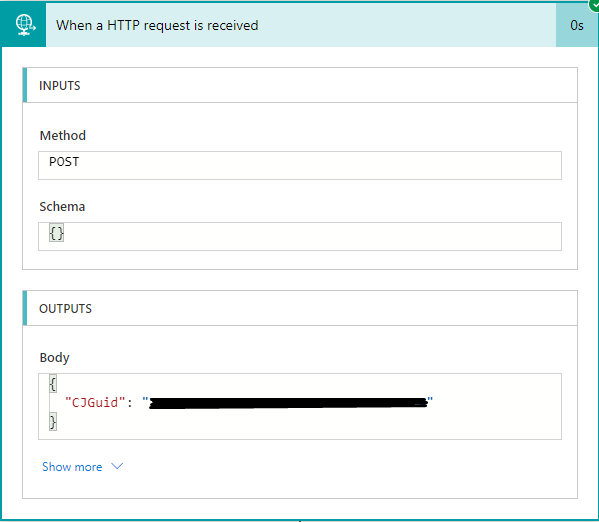
Please refer to Calling Flow from Custom Button in DYnamics.
To generate the Request Body JSON Schema you can initially run the Flow with this empty and later using the Response body you can use "Use sample payload to generate schema".
The response will be like:
{
"CJGuid": "RecordId"
}
Once we pasted this to generate the schema the below will be generated:
{
"type": "object",
"properties": {
"CJGuid": {
"type": "string"
}
}
}
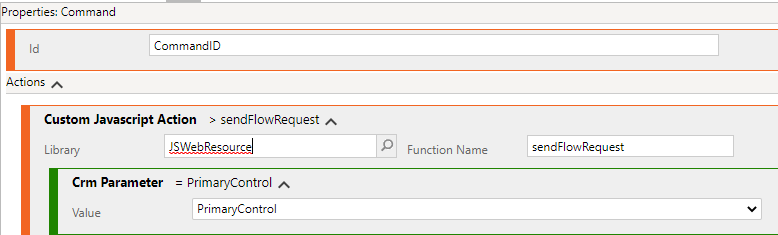
On your custom button you also need to pass a CRM parameter to be able to get the formContext, see the example:
Hope this helps.


