web
You’re offline. This is a read only version of the page.
close
Skip to main content

Notifications

Announcements

No record found.

Community site session details

Community site session details

Session Id :
Microsoft Dynamics CRM (Archived)

Uploading .rdl file gives the following error : Reporting Error The expected parameter has not been supplied for the report.

(0) ShareShare
ReportReport
Posted on by

Hello,

I have to create a report which uses "From Date" and "To Date" as dynamic values from user. For achieving this I have created two parameters of Date/Time type in ssrs report and added the following filter in fetchxml:

<filter type="and">
<condition attribute="date" operator="on-or-after" value="@CRM_FromDate" />
<condition attribute="date" operator="on-or-before" value="@CRM_ToDate" />
</filter>

This works fine on visual studio but the .rdl file uploaded in crm throws an error: The expected parameter has not been supplied for the report.  The error shows up even before prompting for the "From Date" and "To Date"
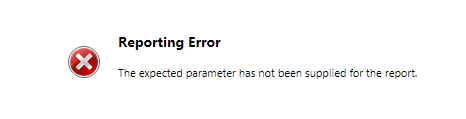
reportingerror.PNG

There is no security role issue, as I've logged in as administrator neither do I have multiple Datasets to focus on their order.

Any help would be appreciated.

*This post is locked for comments

I have the same question (0)
  • David Jennaway Profile Picture
    14,065 on at

    Have you specified default values for each parameter ? If not, try applying default values.

    Something else to consider is that FetchXml expects dates to be provided in YYYY-MM-DD format, and SSRS may not do that by default. The date formatting in SSRS may differ by user, and this will be different in Visual Studio compared to the server. It may be necessary to use an expression to get the date in the correct format

  • Community Member Profile Picture
    on at

    Hi Kruthika,

    Could you please tell me whether you are using pre-filtering or not?

    Thanks,

    Jay

  • Community Member Profile Picture
    on at

    Hi Jay,

    Yes, I am using pre-filtering

  • Rawish Kumar Profile Picture
    13,758 on at

    Hi Kruthika,

    Do you have two data source? or just a single one?

  • Community Member Profile Picture
    on at

    Hi David,

    I tried assigning default value by specifying the following: =Format(Parameters!CRM_ParameterName.Value, "0000-00-00 00:00:00")

    It gives me the following error : The DefaultValue expression for the report parameter contains an error. The expression references a parameter which does not exist in Parameters collection.

    The parameter does exist in the collection and I also crosschecked if it uses the correct case.

  • Community Member Profile Picture
    on at

    Hi Rawish,

    I have a single data source.

  • Community Member Profile Picture
    on at

    Hi Kruthika,

    Can you please share your .rdl file. I am having not sure why you are using pre-filtering?

  • Community Member Profile Picture
    on at

    Hi Jay,

    There is an associated entity, that is the reason why I'm using pre-filtering. The parameter checks the date value from the associated entity's date field.

  • Verified answer
    Community Member Profile Picture
    on at

    Hello everyone,

    After trying out every possible suggested solution, the issue was resolved simply by changing the parameter names from @CRM_FromDate, @CRM_ToDate  to  @FromDate , @ToDate. The prefix "CRM_"  in the parameter name turned out to be the problem.

    I still don't understand the reason why the prefix could result in an issue. 

  • Suggested answer
    Community Member Profile Picture
    on at

    Hi Kruthika,

    If you are using pre-filtering, you have to add CRM_ before the parameter name. The reason behind it is to let SQL server to pass the query of pre filtering parameter so that it can be compared with the associated field. I am still not able to identify why you would be using pre-filtering. The concept of pre-filtering is to associate the report with a record, as here I can see you are just filtering the data. Will appreciate if you upload the .rdl file.

    Thanks

    Jay

Under review

Thank you for your reply! To ensure a great experience for everyone, your content is awaiting approval by our Community Managers. Please check back later.

Helpful resources

Quick Links

Responsible AI policies

As AI tools become more common, we’re introducing a Responsible AI Use…

Neeraj Kumar – Community Spotlight

We are honored to recognize Neeraj Kumar as our Community Spotlight honoree for…

Leaderboard > 🔒一 Microsoft Dynamics CRM (Archived)

#1
SA-08121319-0 Profile Picture

SA-08121319-0 4

#1
Calum MacFarlane Profile Picture

Calum MacFarlane 4

#3
Alex Fun Wei Jie Profile Picture

Alex Fun Wei Jie 2

Last 30 days Overall leaderboard

Featured topics

Product updates

Dynamics 365 release plans



