web
You’re offline. This is a read only version of the page.
close
Skip to main content

Notifications

Announcements

No record found.

Community site session details

Community site session details

Session Id :
Small and medium business | Business Central, N...
Suggested Answer

Create sales order from job AL CODE

(0) ShareShare
ReportReport
Posted on by 8

We are creating a sales order from a job planning line using AL code, the goal is to make the warehouse shipment process from the orders, based on information stored in the jobs, this is our code.

pageextension 50121 SOfromJobPlanning extends "Job Planning Lines"
{
    layout
    {
        // Add changes to page layout here
    }

   actions
    {
        // Add changes to page actions here
        addlast(processing)
        {
            group("Create a Sales Order")
            {
                action("Sales Order")
                {
                    ApplicationArea = All;
                    trigger OnAction()
                    var
                        "Sales Ord": Record "Sales Header"; // Tabla Sales Order
                        "Sales Line": Record "Sales Line"; // Tabla Sales Lines
                        Customer: Record Customer; // Tabla Customer
                        Jobs: Record Job; // Tabla Jobs
                        SOExist: Record "Sales Header";
                        SOpage: Page "Sales Order List";
                        Items: Record Item; // Tabla de Items
                        NextLineNo: Integer;


                    begin
                        Jobs.Get(Rec."Job No.");
                        Customer.Get(Jobs."Bill-to Customer No.");
                        
                        "Sales Ord".Init();
                        "Sales Ord"."Document Type" := "Sales Ord"."Document Type"::Order;
                        "Sales Ord"."No." := '';
                        "Sales Ord"."Sell-to Customer No." := Customer."No.";
                        "Sales Ord"."Sell-to Customer Name" := Customer."Name";
                        "Sales Ord".Insert(TRUE);
                        "Sales Ord".JOB := Rec."Job No.";
                        "Sales Ord"."JOB TASK" := Rec."Job Task No.";
                        "Sales Ord"."Posting Date" := Rec."Planning Date";
                        "Sales Ord".Modify(TRUE);

                       //Sales Lines
                        
                        "Sales Line".Init(); // Inicializa Sales Lines

                       "Sales Line"."Document Type" := "Sales Ord"."Document Type"::Order; //
                        "Sales Line"."Sell-to Customer No." := Customer."No.";
                        "Sales Line"."Document No." := "Sales Ord"."No.";
                        NextLineNo := NextLineNo + 10000;
                        "Sales Line"."Line No." := NextLineNo;
                        "Sales Line".Insert(true);

                       "Sales Line".Type := "Sales Line".Type::Item;
                        "Sales Line"."No." := Rec."No.";
                        "Sales Line".Description := Rec.Description;
                        "Sales Line"."Location Code" := Rec."Location Code";
                        "Sales Line"."Bin Code" := Rec."Bin Code";
                        "Sales Line".Quantity := Rec.Quantity;
                        "Sales Line"."Unit of Measure Code" := 'HARDWARE';
                        "Sales Line"."Unit Price" := Rec."Unit Cost";
                        "Sales Line"."Tax Area Code" := 'AVATAX';
                        "Sales Line"."Tax Group Code" := 'TAXABLE';
                        "Sales Line"."Line Amount" := Rec."Unit Cost";
                        "Sales Line"."Shipment Date" := Rec."Planning Date";
                        "Sales Line".Modify(true);

                   end;
                    
                }
            }
        }
    }

   var
        myInt: Integer;
}


At the moment of executing the code the sales order is created in business central with the data of the job planning line, the sales order is put in release status and when we choose the option to create the warehuse shipment the following error appears.
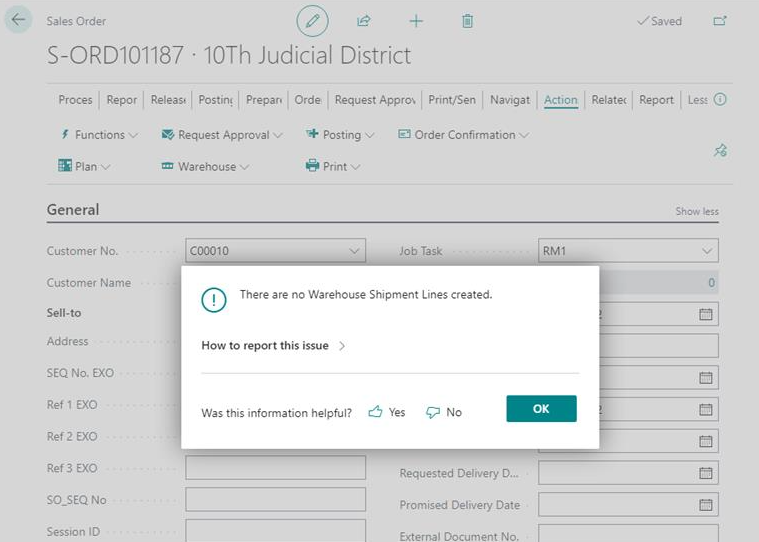
pastedimage1667322871398v1.png

I have the same question (0)
  • Suggested answer
    DAnny3211 Profile Picture
    11,397 on at
  • Suggested answer
    YUN ZHU Profile Picture
    95,681 Super User 2025 Season 2 on at

    Hi, Please check a few settings below.

    Check the Require Shipemnt setting in the Location Card.

    pastedimage1667346359074v1.png

    Check the Warehouse Employees.

    pastedimage1667346400477v2.png

    Check the Location Code in the Sales Lines.

    pastedimage1667346473611v3.png

    Then release the order, and the Warehouse Shipment can be created.

    pastedimage1667346524874v4.png

    Hope this helps.
    Thanks.

    ZHU

Under review

Thank you for your reply! To ensure a great experience for everyone, your content is awaiting approval by our Community Managers. Please check back later.

Helpful resources

Quick Links

Responsible AI policies

As AI tools become more common, we’re introducing a Responsible AI Use…

Neeraj Kumar – Community Spotlight

We are honored to recognize Neeraj Kumar as our Community Spotlight honoree for…

Leaderboard > Small and medium business | Business Central, NAV, RMS

#1
OussamaSabbouh Profile Picture

OussamaSabbouh 2,606

#2
YUN ZHU Profile Picture

YUN ZHU 931 Super User 2025 Season 2

#3
Jainam M. Kothari Profile Picture

Jainam M. Kothari 773 Super User 2025 Season 2

Last 30 days Overall leaderboard

Featured topics

Product updates

Dynamics 365 release plans
