web
You’re offline. This is a read only version of the page.
close
Skip to main content

Announcements

No record found.

News and Announcements icon
Community site session details

Community site session details

Session Id :
Customer experience | Sales, Customer Insights,...
Suggested Answer

Is there anyway to increase the size of default "Duplicate Detection Rule Window"

(0) ShareShare
ReportReport
Posted on by 50

having duplicate detection rule enabled, when there is multiple duplicates found, result set window is coming in very small size and only single record is being seen
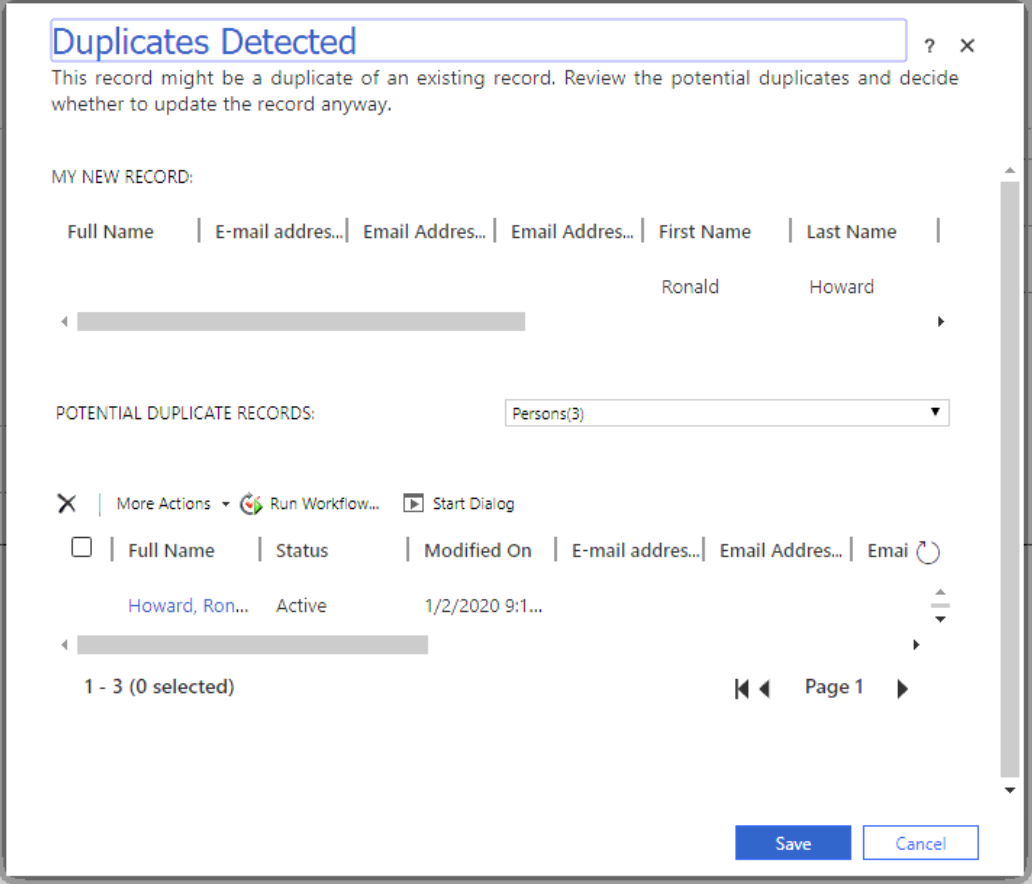
pastedimage1582417002984v1.png

Is there any way we can modify existing page ? when tried with out of the box html modify (unsupported way) it seems Microsoft is building the view dynamically thus not able to modify the style beforehand

I have the same question (0)
  • Suggested answer
    rthompson Profile Picture
    1,532 on at

    This is standard.  You will have to put in a support request to see if MS can add this enhancement.

  • Suggested answer
    Pawar Pravin Profile Picture
    5,237 on at

    Hi Kamalesh82,

    As per my information there is no any possible way to expand view.

  • LuHao Profile Picture
    40,892 on at

    Hi partner,

    Please refer to https://community.dynamics.com/crm/f/microsoft-dynamics-crm-forum/376624/view-in-the-duplicate-detection-popup

    So changing the duplicate detection rule is the only way to modify the columns of the duplicate detection view.

    My recommendation is to hold down the keyboard's Ctrl key while clicking on the record in the duplicate detection view, which opens in a new browser tab instead of jumping to the current page, so you can see the details of the duplicate record.

  • Kamalesh82 Profile Picture
    50 on at

    Thanks for reply. However, it will not solve the issue as our Moto is to view all the duplicate results in the grid. using CTRL is opening a particular matching in a different tab.. It seems we have no option here other than to accept the default look and feel of this

  • Suggested answer
    rthompson Profile Picture
    1,532 on at

    This is standard.  You will have to put in a support request to see if MS can add this enhancement.

Under review

Thank you for your reply! To ensure a great experience for everyone, your content is awaiting approval by our Community Managers. Please check back later.

Helpful resources

Quick Links

Introducing the 2026 Season 1 community Super Users

Congratulations to our 2026 Super Stars!

Meet the Microsoft Dynamics 365 Contact Center Champions

We are thrilled to have these Champions in our Community!

Congratulations to the April Top 10 Community Leaders

These are the community rock stars!

Leaderboard > Customer experience | Sales, Customer Insights, CRM

#1
ManoVerse Profile Picture

ManoVerse 101 Super User 2026 Season 1

#2
11manish Profile Picture

11manish 72

#3
Muhammad Shahzad Shafique Profile Picture

Muhammad Shahzad Sh... 69 Most Valuable Professional

Last 30 days Overall leaderboard

Product updates

Dynamics 365 release plans
