web
You’re offline. This is a read only version of the page.
close
Skip to main content

Announcements

No record found.

News and Announcements icon
Community site session details

Community site session details

Session Id :
Customer experience | Sales, Customer Insights,...
Answered

Linking Activities to Campaigns

(0) ShareShare
ReportReport
Posted on by 285

Hi,

I have a question around campaign activities. I’m aware that when setting up a new campaign you can add campaign activities and distribute to users to follow up the activity and that the user can convert the activity to a campaign response so that it is logged against the campaign, this is exactly what I require.

But how does it work if the user has to make for example further follow up calls. I don’t see how the user is able to navigate to a contact record add a phone call or any appointment and link it back to the original campaign? When trying to convert a standard activity to a campaign the only options I see are to convert to opportunity or a case. I need any random follow up phone calls or meetings that users may have  to link back to the original campaign?

Thanks

Spaz

I have the same question (0)
  • Verified answer
    LuHao Profile Picture
    40,892 on at

    Hi Spaz,

    We will use Connection to link Activity and Campaign.

    Open an activity, such as email. Click Related > Connections.

    pastedimage1588575549862v2.png

    Click Connect.

    pastedimage1588575643677v4.png

    Search Name, click 20 types of records, select Campaigns and select a campaign record.

    pastedimage1588575719027v5.png

    pastedimage1588575808978v6.png

    We can also choose the role and fill in the description to detail the connnection.

    All connections of the activity record will be displayed in Related > Connections of activity form.

    If you want to view all the connections to the Campaign, we can also view it in Related> Connections in the Campaign form.

    pastedimage1588576070483v7.png

    pastedimage1588576093025v8.png

  • Spaz Profile Picture
    285 on at

    Thanks Hao,

    Question, when logging a phone call users click on the Add Phonecall link which appears on any contact or lead form under the Activities section. As you may know once the phone call is logged using this method it is automatically marked as complete. Therefore trying to link the phone call as a connection to a campaign is not possible as it is in read only status, how are you connecting telephone calls to campaigns?

  • Verified answer
    LuHao Profile Picture
    40,892 on at

    Hi Spaz,

    For completed phone calls, we cannot set connection to them.

    So we have to new a campaign lookup field and use a business rule.

    Step 1. new a lookup field of campaign
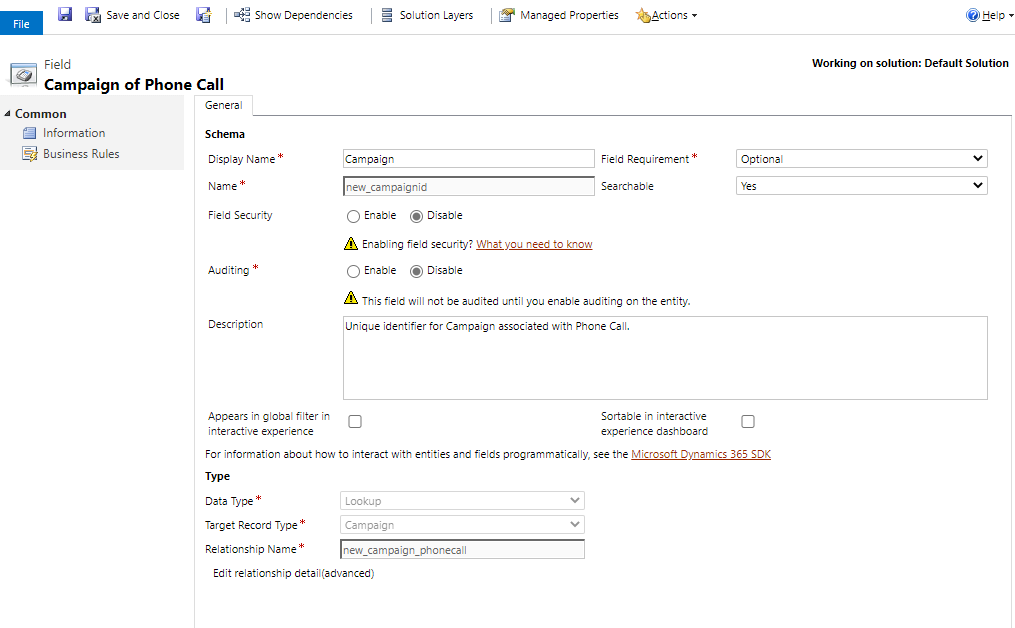
    pastedimage1588645063449v1.png

    Step 2. add this field to the phone call form
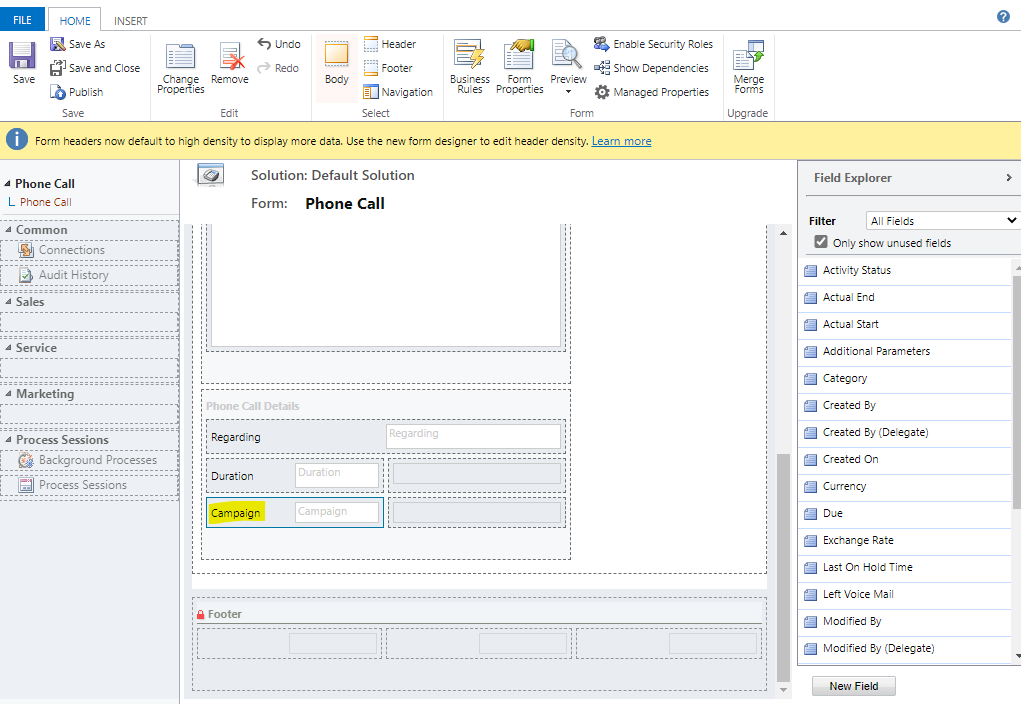
    pastedimage1588645115437v2.png

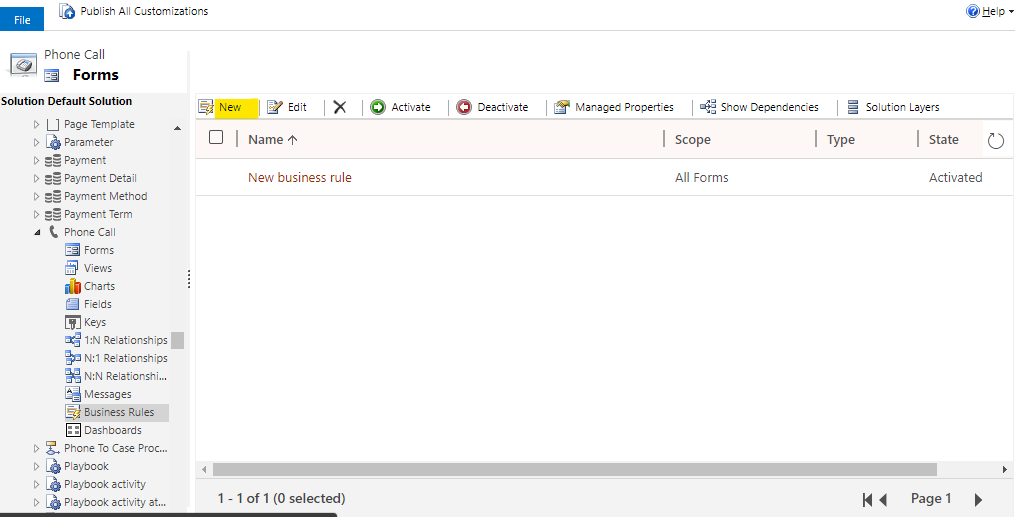
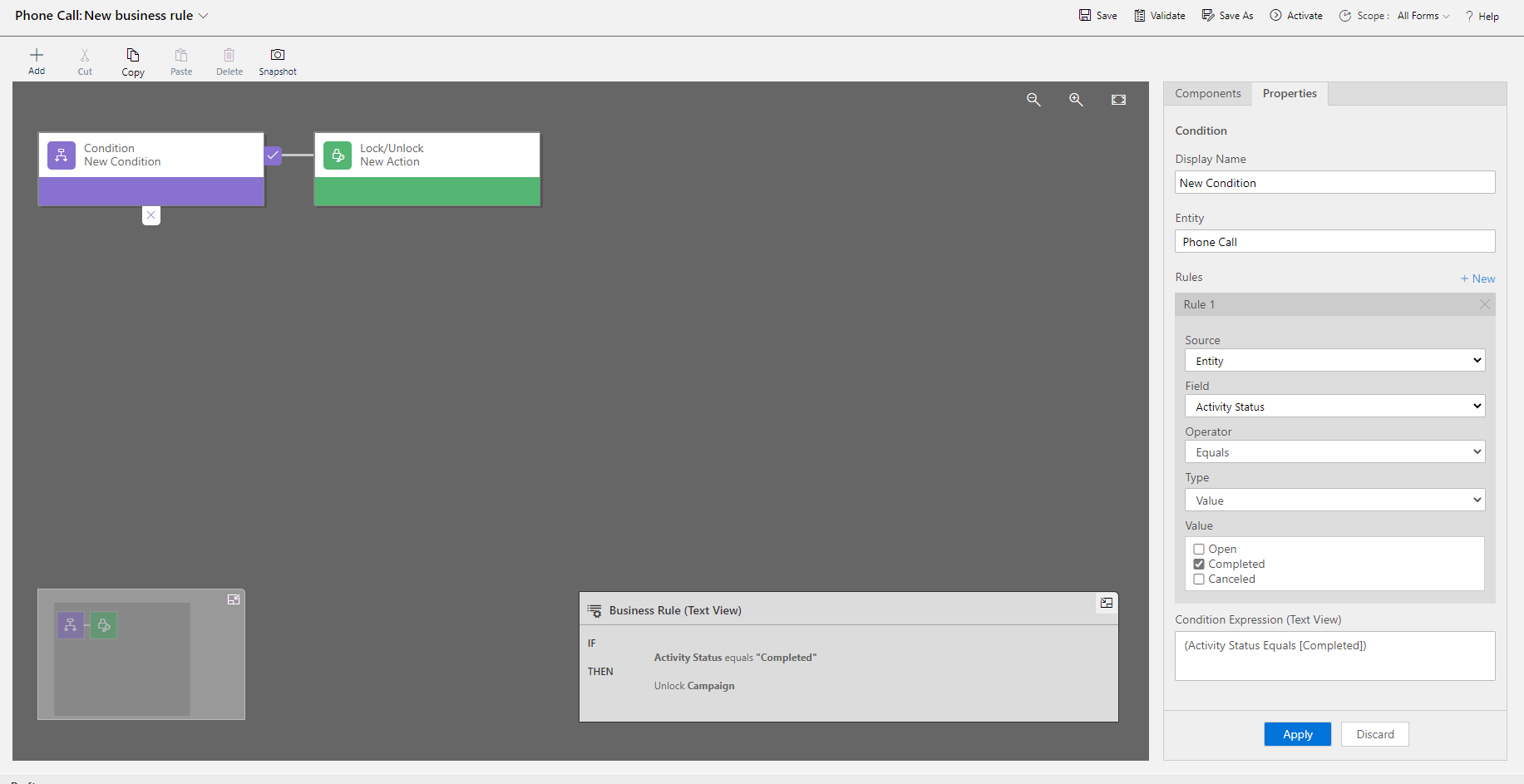
    Step 3. new a business rule

    pastedimage1588645168765v3.png

    pastedimage1588645183860v4.png

    IF

    Activity Status equals "Completed"

    THEN
    Unlock Campaign

    Save and activate it.

    In this way, we can select the campaign for the completed phone call, and when you close the phone call form, it will save automatically.

  • Spaz Profile Picture
    285 on at

    Thanks for your help Hao, that all works.

Under review

Thank you for your reply! To ensure a great experience for everyone, your content is awaiting approval by our Community Managers. Please check back later.

Helpful resources

Quick Links

Introducing the 2026 Season 1 community Super Users

Congratulations to our 2026 Super Stars!

Meet the Microsoft Dynamics 365 Contact Center Champions

We are thrilled to have these Champions in our Community!

Congratulations to the March Top 10 Community Leaders

These are the community rock stars!

Leaderboard > Customer experience | Sales, Customer Insights, CRM

#1
ManoVerse Profile Picture

ManoVerse 196 Super User 2026 Season 1

#2
11manish Profile Picture

11manish 129

#3
CU11031447-0 Profile Picture

CU11031447-0 100

Last 30 days Overall leaderboard

Product updates

Dynamics 365 release plans