web
You’re offline. This is a read only version of the page.
close
Skip to main content

Announcements

No record found.

News and Announcements icon
Community site session details

Community site session details

Session Id :
Customer experience | Sales, Customer Insights,...
Suggested Answer

Write-in product - add a set name when print to quote?

(0) ShareShare
ReportReport
Posted on by 5

Hello

We have a lot of custom items, whereby we utilise the write-in product style with almost every opportunity/quote.

Our issue is, when it's sent to PDF there is a big blank space where the product name would go.

In the example below I've added a write-in product called Reseller Discount
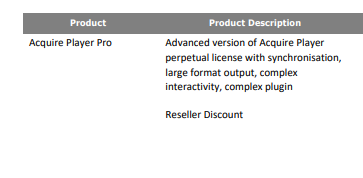
pastedimage1666604937006v1.png

In an ideal world, we want to set the write-in product to have a specific name, such as Custom Product, or Custom Work, but are struggling to see if we can find any settings relating to the write-in product and how its set up.

Our current work around is to print each quote to Word, add the missing detail, and then save as a PDF, but this is a more long winded process, and the sales team aren't happy with the extra work.

Does anyone here have any ideas? Is this even possible?

I have the same question (0)
  • Suggested answer
    Steve Zhao2 Profile Picture
    Microsoft Employee on at

    Hi Abbey Murby,

    It seems that you want to show specific name for write-in products and show original name for existing products on the PDF, correct?

    If so, you could create a new column on Opportunity/Quote line. For existing products, you could populate the original name to this field. For write-in products, you could let user manually type this field's value.

    Then use this field to replace the product name in the word template.

  • Abbey Murby Profile Picture
    5 on at

    Hi Steve

    Thanks for coming back to me.

    I have managed to get into the formatting for that product grid, and added the name column as you suggested (opportunityproductname - Single Line of Text) 

    pastedimage1666694984508v1.png

    Although this shows the product name, it is not editable in the grid.

    When then processing to quote PDF, my template has productidname in column 1 and productdescription in column 2 BUT when the write-in product comes through, it only goes into the description (column 2).

    After further investigation the write-in product is a productdescription field so that kind of makes more sense now.

    pastedimage1666698984936v2.png

    Instead I have added a new field onto Opportunity product and Quote product,  it is a drop down selection box. This would likely work as a free type box too but we don't really want our users to add a product name. We use CUSTOM WORK as a general term so that it is invoiced to the correct nominal and our accounts team do not think they need to create multiple new products with each new order. By using a drop down I can offer pre-set options for the product name.

    I have added my new field into column 1 on my word template, for productname and it brings that over nicely.

    I will now go away and make sure that the opportunity field updates the quote field, but felt like I should share my workaround for this in case others wanted it.

    Thank you for your initial suggestion as that has helped me reach this one.

    Abbey

Under review

Thank you for your reply! To ensure a great experience for everyone, your content is awaiting approval by our Community Managers. Please check back later.

Helpful resources

Quick Links

Introducing the 2026 Season 1 community Super Users

Congratulations to our 2026 Super Stars!

Congratulations to our 2025 Community Spotlights

Thanks to all of our 2025 Community Spotlight stars!

Leaderboard > Customer experience | Sales, Customer Insights, CRM

#1
ManoVerse Profile Picture

ManoVerse 180 Super User 2026 Season 1

#2
11manish Profile Picture

11manish 119

#3
CU11031447-0 Profile Picture

CU11031447-0 100

Last 30 days Overall leaderboard

Product updates

Dynamics 365 release plans
