web
You’re offline. This is a read only version of the page.
close
Skip to main content

Notifications

Announcements

No record found.

Community site session details

Community site session details

Session Id :
Supply chain | Supply Chain Management, Commerce
Answered

How to search data entities by AX field name

(0) ShareShare
ReportReport
Posted on by 2,188

Good Morning Dear Community

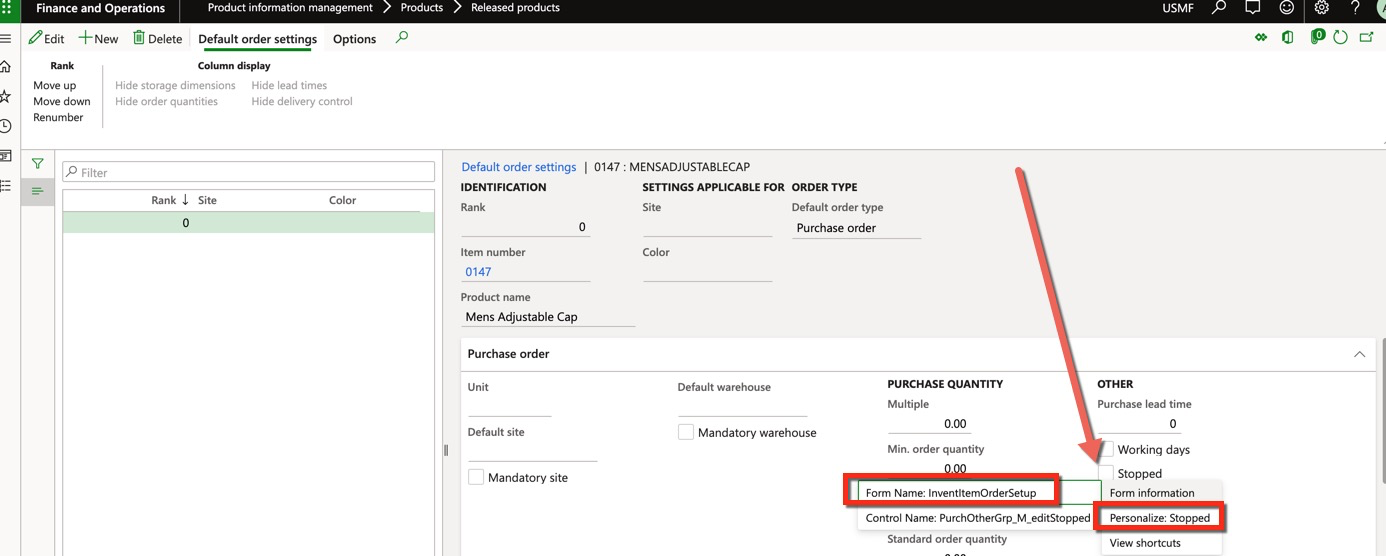
Let's say I want find the data entity that deals with updating the field Stopped on the Purch Section of Default Order Settings from Releases Product.

I  would search the field I am interested in from the form and from AOT I know that it belongs to the table InventItemPurchSetup
pastedimage1593685722585v1.png

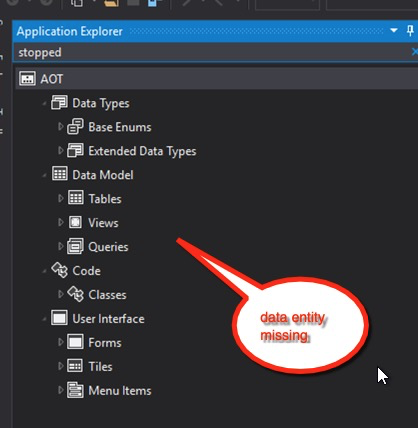
Now, as the AOT containst the data entity list , I was hoping to find all the data entities that use that field but my method does not work.
pastedimage1593685932945v2.png

Is there any way to achieve what I am looking for?

Thank you in advance

I have the same question (0)
  • Suggested answer
    Reyaz@Alfa Profile Picture
    2 on at

    Hi Alessandro,

    Use Find reference on Field in table from AOT in VS.

    Thanks

    Reyaz Ahmed

  • Aparisi82 Profile Picture
    2,188 on at

    Hello Reyaz , thanks for the quick feedback, how do I do that?

  • Verified answer
    Martin Dráb Profile Picture
    237,878 Most Valuable Professional on at

    Your search in AOT tries to find top-level objects (such as tables and forms) containing "Stopped". It's not what you want.

    Also, what is used in the form is not a field - it's actually an edit method: InventItemInventSetup.editStopped().

    If you want to see where it's used, open InventItemInventSetup table in the designer, right-click editStopped method and choose "Find references". You'll find that it's used in the form only.

    Therefore you should explore what the method does and you'll see it utilizes Stopped field from InventItemInventSetup. Right-click the field in the designer, choose "Find references" again and you'll see several entities where this field is used.

  • Aparisi82 Profile Picture
    2,188 on at

    Thank you

    it worked perfectly

    pastedimage1593688658958v1.png

Under review

Thank you for your reply! To ensure a great experience for everyone, your content is awaiting approval by our Community Managers. Please check back later.

Helpful resources

Quick Links

Responsible AI policies

As AI tools become more common, we’re introducing a Responsible AI Use…

Neeraj Kumar – Community Spotlight

We are honored to recognize Neeraj Kumar as our Community Spotlight honoree for…

Leaderboard > Supply chain | Supply Chain Management, Commerce

#1
Laurens vd Tang Profile Picture

Laurens vd Tang 271 Super User 2025 Season 2

#2
Siv Sagar Profile Picture

Siv Sagar 171 Super User 2025 Season 2

#3
André Arnaud de Calavon Profile Picture

André Arnaud de Cal... 130 Super User 2025 Season 2

Last 30 days Overall leaderboard

Featured topics

Product updates

Dynamics 365 release plans



